
FG09 — Windows validation
FG09 · v23
1. Container workflow · 2. Linux validation · 3. Windows validation · 4. Create and verify your container
Reading the evidence
Linux (Ubuntu) screenshots here are run 20260920T144257Z. They are separate from the September 19 raw-log run and September 20 WSL container qualification. The Windows workbook screenshots show the controlled September 19 run. New times, identities and digests will differ in a new run.
Learning objective: Show the command, explain why it was chosen, identify its OS/time effect, inspect the actual result, document the limits, and state a bounded analyst conclusion.
The v23 deck has 44 slides. Linux begins on slide 5 and Windows on slide 22. C01–C16 are a separate application tutorial, not additional deck slides. The instructor retains the deck with answer notes and the 37-page screenshot walkthrough. PacketParsing companion PCAPNGs were not the inputs to the timestamp experiments.
Why we created the Windows procedures
Deck slide 22 · Original step Windows overview 1
Command syntax
Get-Item / Get-FileHash  # state and content
Copy-Item / Robocopy    # copy behavior
Rename-Item / Add-Content / attrib
Remove-Item            # controlled deletion
MFTECmd                # MFT and USN interpretation
Why this syntax: Known operations let students compare Windows API timestamps with NTFS SI/FN timestamps and journal activity.
OS and time effect: Copying may preserve selected values while NTFS creates new records. Rename, metadata change and content change leave different evidence.
Gotcha or ProTip: FileInfo alone does not expose both SI and FN timestamp sets. A matching hash does not certify NTFS metadata preservation.
Connection to the container lesson: Slide 2: operations can change metadata without changing content.
Recorded result or expected outcome: The screenshots follow the controlled procedure: environment 0, operations 1–10, then MFT/USN analysis.
Analyst takeaway: Correlate the known action, content hash, MFT state and journal activity.
How the Windows sources fit together
Deck slide 23 · Original step Windows overview 2
Command syntax
pwsh -File .\Windows_Forensic_Claims_Validation.ps1
# Separate automated harness: tests 01–06
# Workbook run: controlled operations 0–10
# After operation 10: preserve filesystem
# Then parse MFT and USN for comparison
Why this syntax: Use a disposable Windows/NTFS VM. The automated harness creates a dated workspace, transcript and claims matrix. The workbook follows the longer manual procedure.
OS and time effect: Harness 01–06 correspond to controlled operations 2–7. Controlled operations 8–10 add content change, attribute change and deletion.
Gotcha or ProTip: Never renumber the manual screenshots as harness tests. The supplied harness is a separate six-test implementation.
Connection to the container lesson: Slide 2: operations can change metadata without changing content.
Recorded result or expected outcome: The next slides retain the workbook’s operation IDs. Syntax excerpts are taken from that controlled procedure.
Analyst takeaway: Name the procedure and test ID before comparing results.
Windows 00 Environment
Deck slide 24 · Original step Windows 00
Command syntax
New-Item -ItemType Directory C:\ForensicTest -Force
Set-Location C:\ForensicTest
Get-Date -Format o
w32tm /query /status
fsutil behavior query disablelastaccess
Get-Volume C
Why this syntax: Record time service, filesystem and last-access policy before the experiment.
OS and time effect: Policy and synchronization affect timestamp interpretation.
Gotcha or ProTip: The time-service query failed in the captured VM. Do not describe its clock as verified synchronized.
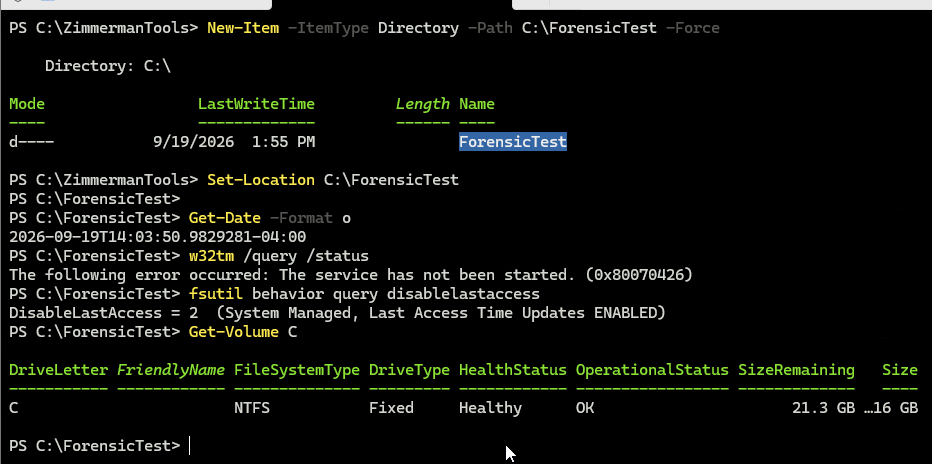
Figure Windows 00. Controlled procedure operation 0; workbook screenshot from September 19
Connection to the container lesson: Slide 2: operations can change metadata without changing content.
Recorded result or expected outcome: NTFS is shown; DisableLastAccess=2, system managed with updates enabled. w32tm reports service not started.
Analyst takeaway: Record clock uncertainty alongside the timestamp values.
Windows 01 Baseline
Deck slide 25 · Original step Windows 01
Command syntax
"FORENSIC TIMESTAMP VALIDATION" | Set-Content .\Original.txt
$F = 'C:\ForensicTest\Original.txt'
[IO.File]::SetCreationTimeUtc($F, '2024-01-02T02:54:05Z')
[IO.File]::SetLastWriteTimeUtc($F, '2024-01-02T03:04:05Z')
[IO.File]::SetLastAccessTimeUtc($F, '2024-01-02T03:14:05Z')
Get-Item $F | Format-List *TimeUtc,Length,Attributes
Get-FileHash $F -Algorithm SHA256
Why this syntax: Create known bytes and deliberately set three API-visible UTC values.
OS and time effect: The APIs set selected timestamps; later MFT analysis distinguishes SI from FN.
Gotcha or ProTip: The display command is shortened here. The original screenshot uses Select-Object. Hashing is already a read.
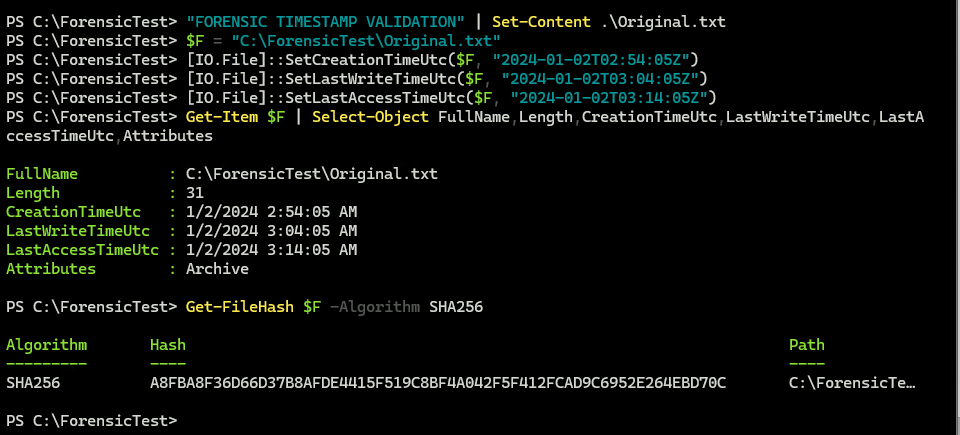
Figure Windows 01. Controlled procedure operation 1; workbook screenshot from September 19
Connection to the container lesson: Slide 2: operations can change metadata without changing content.
Recorded result or expected outcome: Original.txt is 31 bytes. Creation 02:54:05, write 03:04:05 and access 03:14:05 UTC on 2024-01-02.
Analyst takeaway: An intentionally set timestamp must be interpreted with the known operation.
Windows 02 Hash and read
Deck slide 26 · Original step Windows 02
Command syntax
Start-Sleep 5
Get-FileHash $F -Algorithm SHA256
Get-Item $F | Select-Object `
  CreationTimeUtc,LastWriteTimeUtc,LastAccessTimeUtc
Why this syntax: Observe API-visible times after a content read.
OS and time effect: Reads can affect LastAccessTime under the recorded policy.
Gotcha or ProTip: The source had already been read. Do not attribute every elapsed change to this one hash call.
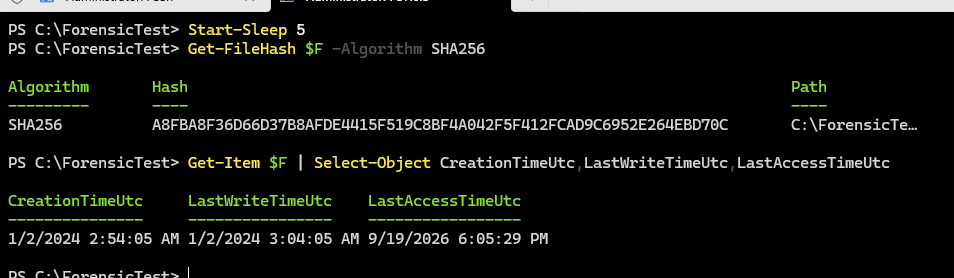
Figure Windows 02. Controlled procedure operation 2; workbook screenshot from September 19
Connection to the container lesson: Slide 2: operations can change metadata without changing content.
Recorded result or expected outcome: Hash matches the baseline. Creation/write remain 2024; displayed access is 2026-09-19 18:05:29 UTC.
Analyst takeaway: A stable content digest can coexist with a later access time.
Windows 03 Normal Copy-Item
Deck slide 27 · Original step Windows 03
Command syntax
Copy-Item $F C:\ForensicTest\CopyItem.txt
Get-Item .\CopyItem.txt | Format-List *TimeUtc
Get-FileHash .\CopyItem.txt -Algorithm SHA256
Why this syntax: Create a new destination and compare its state with Original.txt.
OS and time effect: A newly created destination has its own creation and access history.
Gotcha or ProTip: The 2024 write time does not mean this destination existed in 2024.
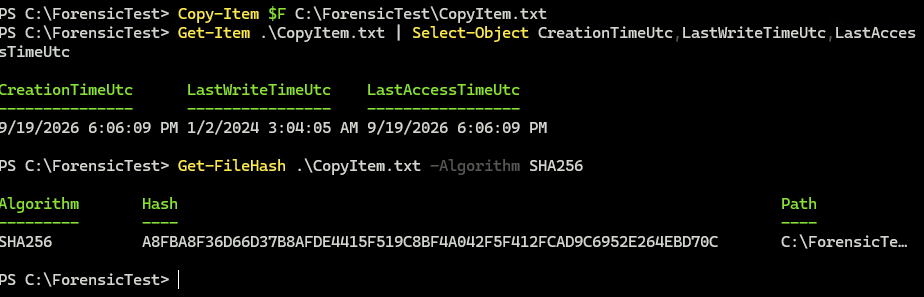
Figure Windows 03. Controlled procedure operation 3; workbook screenshot from September 19
Connection to the container lesson: Slides 2–3: matching bytes do not establish unchanged filesystem identity or every timestamp.
Recorded result or expected outcome: Hash matches. LastWriteTime stays 2024-01-02 03:04:05 UTC; creation/access show 2026-09-19 18:06:09.
Analyst takeaway: Separate inherited timestamps from destination-object history.
Windows 04 Copy-Item -Force
Deck slide 28 · Original step Windows 04
Command syntax
"OLD CONTENT" | Set-Content .\CopyForce.txt
Start-Sleep 5
Copy-Item $F .\CopyForce.txt -Force
Get-Item .\CopyForce.txt | Format-List *TimeUtc,Attributes
Get-FileHash .\CopyForce.txt -Algorithm SHA256
Why this syntax: Overwrite a known existing destination and inspect what changed.
OS and time effect: The captured destination retains its earlier creation time and receives the source write time.
Gotcha or ProTip: -Force allows the operation; it is not a timestamp-preservation switch.
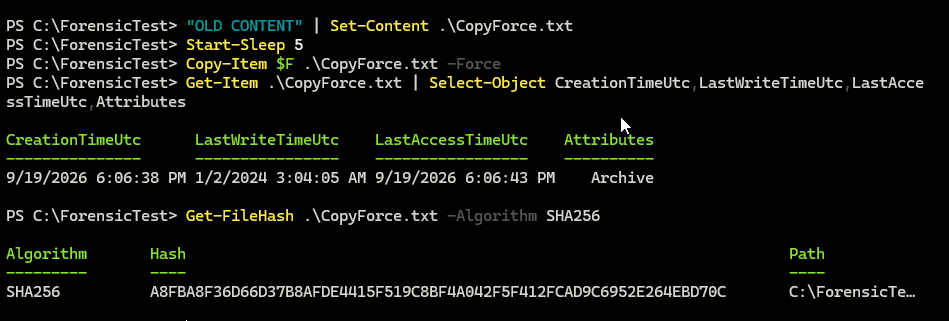
Figure Windows 04. Controlled procedure operation 4; workbook screenshot from September 19
Connection to the container lesson: Slides 2–3: matching bytes do not establish unchanged filesystem identity or every timestamp.
Recorded result or expected outcome: Hash matches. Creation 18:06:38, access 18:06:43 UTC on 2026-09-19; write remains the controlled 2024 value.
Analyst takeaway: Measure overwrite behavior rather than inferring it from the option name.
Windows 05 Robocopy DAT
Deck slide 29 · Original step Windows 05
Command syntax
New-Item -ItemType Directory .\RoboDAT -Force
robocopy C:\ForensicTest C:\ForensicTest\RoboDAT `
  Original.txt /COPY:DAT /R:0 /W:0
Get-Item .\RoboDAT\Original.txt | Format-List *TimeUtc
Get-FileHash .\RoboDAT\Original.txt -Algorithm SHA256
Why this syntax: Request file Data, Attributes and Timestamps, with retries disabled for this measured test.
OS and time effect: Robocopy requests selected API-level properties; NTFS still creates destination records.
Gotcha or ProTip: Read the exit code and summary, then verify hashes. DAT does not include all security metadata.
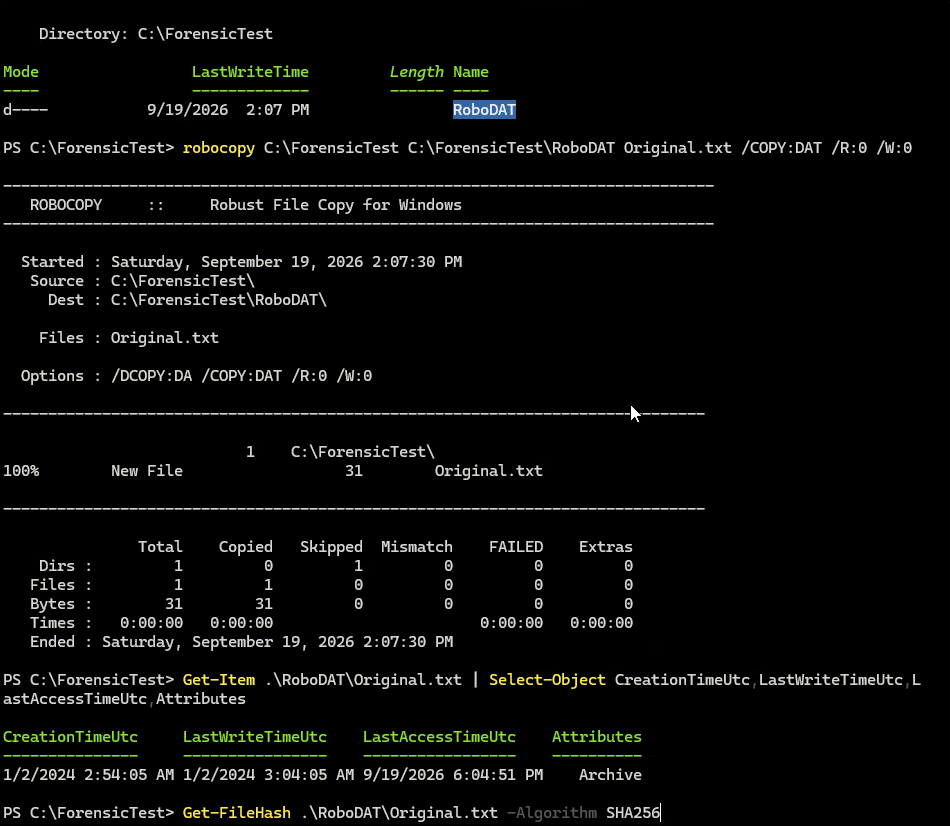
Figure Windows 05. Controlled procedure operation 5; workbook screenshot from September 19
Connection to the container lesson: Slides 2–3: matching bytes do not establish unchanged filesystem identity or every timestamp.
Recorded result or expected outcome: One 31-byte file copied; zero failed. Creation/write show the controlled 2024 values. Hash is shown in the continuation capture.
Analyst takeaway: Requested preservation must be checked at the metadata layer you intend to claim.
Windows 05 Hash verification
Deck slide 30 · Original step Windows 05 result
Command syntax
Get-FileHash .\RoboDAT\Original.txt -Algorithm SHA256Why this syntax: Complete the DAT operation with a file-content comparison.
OS and time effect: Hashing checks bytes and may cause a read-related metadata update.
Gotcha or ProTip: This digest validates the selected file stream; it does not compare every NTFS attribute.

Figure Windows 05 result. Continuation of operation 5, not operation 6
Connection to the container lesson: Slides 2–3: matching bytes do not establish unchanged filesystem identity or every timestamp.
Recorded result or expected outcome: The recorded SHA-256 equals the baseline A8FBA8F3…EBD70C. Retain the full digest in the raw records.
Analyst takeaway: Check content separately from copy success and timestamp display.
Windows 06 Robocopy COPYALL
Deck slide 31 · Original step Windows 06
Command syntax
New-Item -ItemType Directory .\RoboALL -Force
robocopy C:\ForensicTest C:\ForensicTest\RoboALL `
  Original.txt /COPYALL /R:0 /W:0
Get-Acl $F | Format-List
Get-Acl .\RoboALL\Original.txt | Format-List
Get-FileHash .\RoboALL\Original.txt -Algorithm SHA256
Why this syntax: Request DATSOU: data, attributes, times, security, owner and auditing information.
OS and time effect: Security metadata requests depend on rights and filesystem support.
Gotcha or ProTip: A successful copy does not prove every audit entry or all FN values were preserved. Inspect the actual fields.
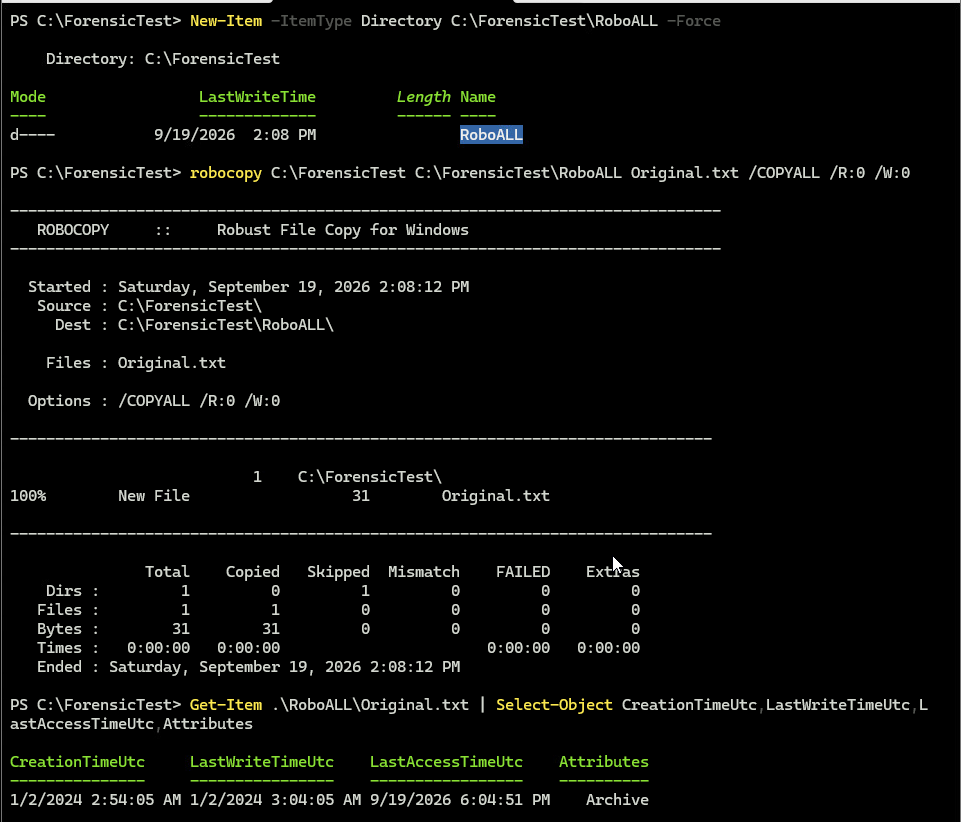
Figure Windows 06. Controlled procedure operation 6; workbook screenshot from September 19
Connection to the container lesson: Slides 2–3: matching bytes do not establish unchanged filesystem identity or every timestamp.
Recorded result or expected outcome: One 31-byte file copied; zero failed. The following ACL capture compares source and destination security.
Analyst takeaway: Compare the requested properties explicitly before widening the preservation claim.
Windows 06 ACL and hash comparison
Deck slide 32 · Original step Windows 06 result
Command syntax
Get-Acl $F | Format-List
Get-Acl .\RoboALL\Original.txt | Format-List
Get-FileHash .\RoboALL\Original.txt -Algorithm SHA256
Why this syntax: Compare the source and COPYALL destination security listings and content.
OS and time effect: The shown owner, group, access entries and SDDL match in this example.
Gotcha or ProTip: The displayed Audit section is blank. Do not claim populated SACL preservation from this result.
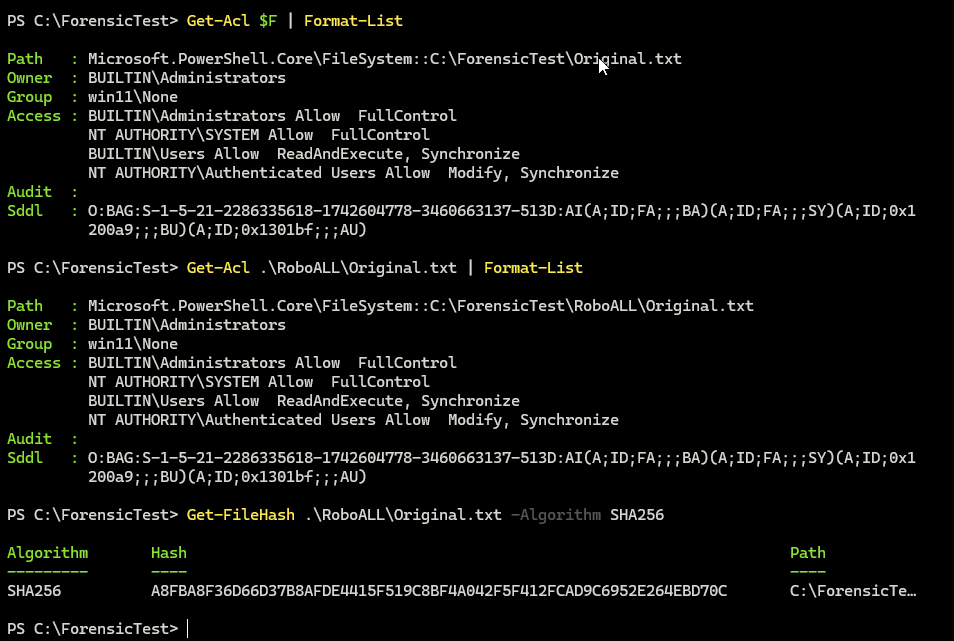
Figure Windows 06 result. Continuation of operation 6, same recorded run
Connection to the container lesson: Slides 2–3: matching bytes do not establish unchanged filesystem identity or every timestamp.
Recorded result or expected outcome: Source/destination owner: BUILTIN\Administrators. Displayed security entries and the content hash match.
Analyst takeaway: State exactly which security fields were compared.
Windows 07 Same-volume rename
Deck slide 33 · Original step Windows 07
Command syntax
Copy-Item $F .\BeforeRename.txt
Get-Item .\BeforeRename.txt | Format-List *TimeUtc
Start-Sleep 5
Rename-Item .\BeforeRename.txt AfterRename.txt
Get-Item .\AfterRename.txt | Format-List *TimeUtc
Get-FileHash .\AfterRename.txt -Algorithm SHA256
Why this syntax: Change a filename on the same volume, then compare content and times.
OS and time effect: The API display remains stable here; the later USN query records the rename operation.
Gotcha or ProTip: API timestamps alone do not establish identity. Correlate entry and sequence numbers with journal context.
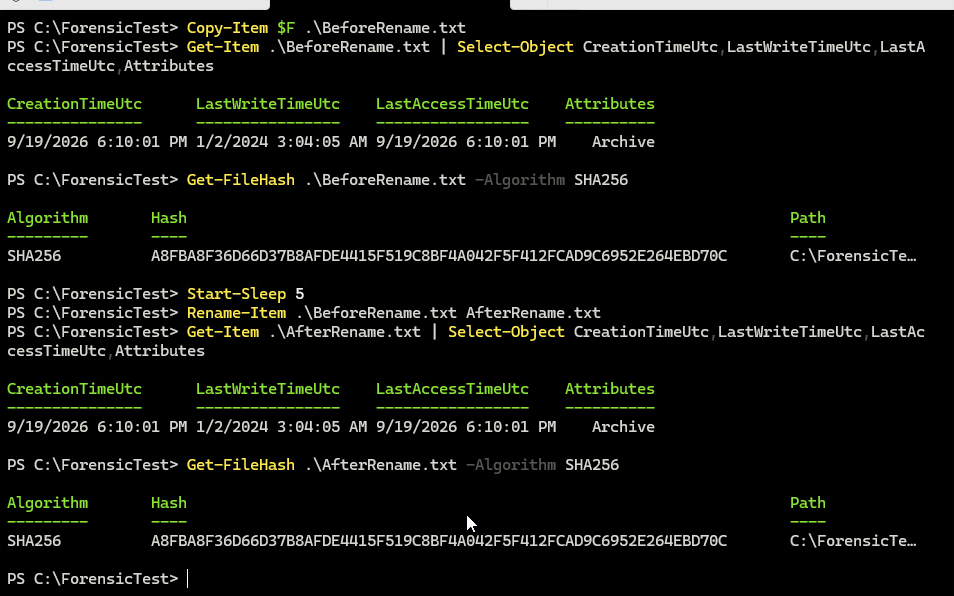
Figure Windows 07. Controlled procedure operation 7; workbook screenshot from September 19
Connection to the container lesson: Slides 2–3: matching bytes do not establish unchanged filesystem identity or every timestamp.
Recorded result or expected outcome: The displayed creation/write/access values and content hash match before and after the rename.
Analyst takeaway: Use journal activity to explain an operation that API timestamps may not reveal.
Windows 08 Content modification
Deck slide 34 · Original step Windows 08
Command syntax
Copy-Item $F .\Modified.txt
Start-Sleep 5
Add-Content .\Modified.txt "CONTENT MODIFIED"
Get-Item .\Modified.txt | Format-List *TimeUtc,Attributes
Get-FileHash .\Modified.txt -Algorithm SHA256
Why this syntax: Append known text so a genuine content change can be compared with metadata-only operations.
OS and time effect: LastWriteTime advances and the content digest changes.
Gotcha or ProTip: Interpret only the specified stream; an ordinary file hash is not a complete disk acquisition.
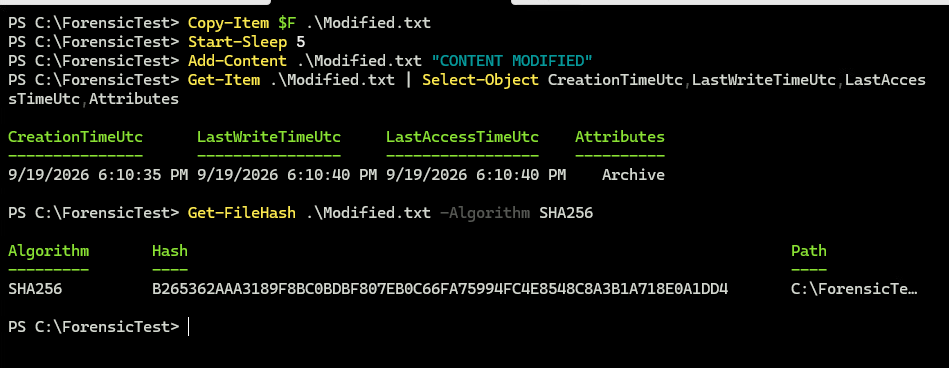
Figure Windows 08. Controlled procedure operation 8; workbook screenshot from September 19
Connection to the container lesson: Slide 2: operations can change metadata without changing content.
Recorded result or expected outcome: Hash begins B265362A, unlike the baseline A8FBA8F3. LastWriteTime is 2026-09-19 18:10:40 UTC.
Analyst takeaway: A changed content digest and write time support the known append operation.
Windows 09 Metadata-only change
Deck slide 35 · Original step Windows 09
Command syntax
Copy-Item $F .\AttributeChange.txt
Start-Sleep 5
attrib +R .\AttributeChange.txt
Get-Item .\AttributeChange.txt | Format-List *TimeUtc,Attributes
Get-FileHash .\AttributeChange.txt -Algorithm SHA256
Why this syntax: Set the read-only attribute without editing the file content.
OS and time effect: The attribute changes; later MFT/USN records provide the metadata-change context.
Gotcha or ProTip: ReadOnly is not forensic write protection. The screenshot alone does not prove which journal reason must appear.
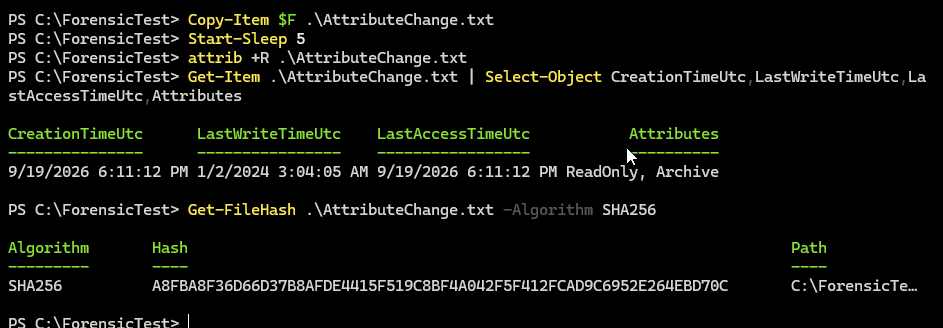
Figure Windows 09. Controlled procedure operation 9; workbook screenshot from September 19
Connection to the container lesson: Slide 2: operations can change metadata without changing content.
Recorded result or expected outcome: Attributes show ReadOnly, Archive. The SHA-256 still matches the baseline.
Analyst takeaway: A metadata change can be real even when the content digest remains equal.
Windows 10 Controlled deletion
Deck slide 36 · Original step Windows 10
Command syntax
Copy-Item $F .\DeleteMe.txt
Start-Sleep 5
Remove-Item .\DeleteMe.txt
Test-Path .\DeleteMe.txt
Why this syntax: Delete only the synthetic test file and examine the remaining records later.
OS and time effect: Path removal changes directory/filesystem state; journal history may persist.
Gotcha or ProTip: Stop experimental operations after this step and preserve the filesystem. False does not prove secure erasure.
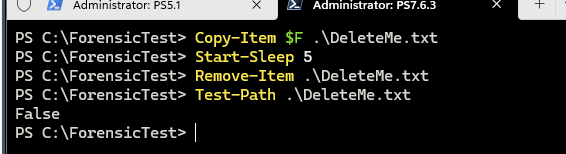
Figure Windows 10. Controlled procedure operation 10; workbook screenshot from September 19
Connection to the container lesson: Slide 2: operations can change metadata without changing content.
Recorded result or expected outcome: Test-Path returns False. The later saved journal includes FileDelete|Close for entry 258305.
Analyst takeaway: Distinguish path absence from absence of historical evidence.
Windows preservation before analysis
Deck slide 37 · Original step Windows acquisition
Command syntax
Original controlled procedure:
Stop after operation 10
Acquire the NTFS volume as E01 or raw image
Retain MFT and $UsnJrnl:$J with context
Hash acquired artifacts and analysis copies
Why this syntax: Preserve the filesystem context required to examine SI/FN timestamps, identities and journal activity.
OS and time effect: Continued use can alter records, allocate new entries or age journal history.
Gotcha or ProTip: The following workbook captures actually used live C: parsing in the disposable VM. That is a documented deviation from the acquisition plan.
Connection to the container lesson: Slides 2–3: Windows API timestamps, NTFS SI/FN attributes and USN journal activity answer different questions.
Recorded result or expected outcome: The visible MFTECmd output says the live file is in use and reroutes access. Do not label that screenshot an offline image parse.
Analyst takeaway: Separate the recommended acquisition plan from what the recorded experiment actually did.
Windows analysis 1 Parse MFT
Deck slide 38 · Original step Windows analysis 1
Command syntax
Set-Location C:\ZimmermanTools\net9
.\MFTECmd.exe -f 'C:\$MFT' `
  --csv C:\ForensicAnalysis\ `
  --csvf MFT.csv --at
Why this syntax: -f selects the input; --csv selects the output folder; --csvf names the CSV; --at includes all FN timestamps.
OS and time effect: MFTECmd exposes both 0x10 SI and 0x30 FN timestamp fields.
Gotcha or ProTip: The capture parses live C:$MFT in a disposable VM. For casework, use the acquired artifact path and preserve its provenance.
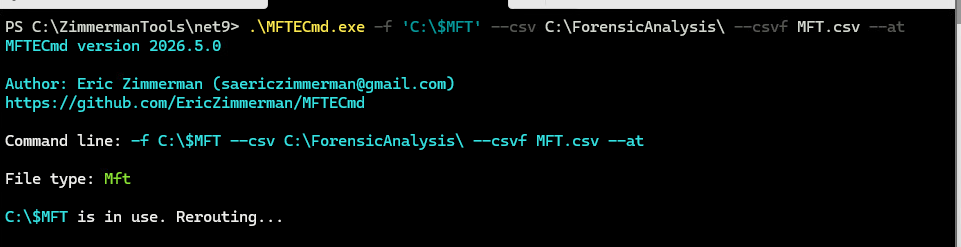
Figure Windows analysis 1. Actual corrected workbook command
Connection to the container lesson: Slides 2–3: Windows API timestamps, NTFS SI/FN attributes and USN journal activity answer different questions.
Recorded result or expected outcome: Actual MFTECmd 2026.5.0 invocation includes --at. It reports C:$MFT in use and reroutes access.
Analyst takeaway: Use the parsed NTFS fields to explain what the copy actually preserved.
Windows analysis 2 Compare SI and FN
Deck slide 39 · Original step Windows analysis 2
Command syntax
$MFT = Import-Csv C:\ForensicAnalysis\MFT.csv
$MFT | Where-Object {
  $_.ParentPath -like '*ForensicTest*'
} | Select-Object FileName,EntryNumber,SequenceNumber,
  Created0x10,Created0x30,LastModified0x10,
  LastModified0x30 | Format-List
Why this syntax: Filter the acquired/parsed rows to the controlled paths and compare fields by attribute type.
OS and time effect: 0x10 and 0x30 are different NTFS attributes, not duplicate API labels.
Gotcha or ProTip: Use full raw rows and sequence numbers. The shown result is an excerpt, not every property or every record.
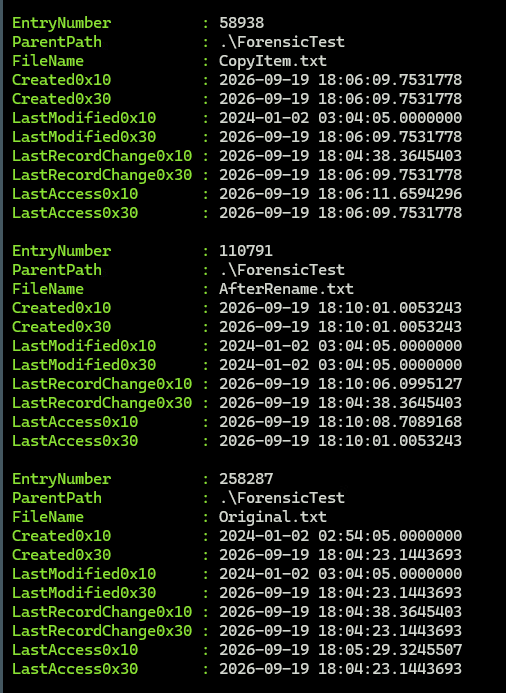
Figure Windows analysis 2. Recorded MFT results; displayed query simplified for the relevant fields
Connection to the container lesson: Slides 2–3: Windows API timestamps, NTFS SI/FN attributes and USN journal activity answer different questions.
Recorded result or expected outcome: Original.txt has a controlled 2024 SI creation value and a 2026 FN creation value. CopyItem.txt has a 2024 SI write value and 2026 FN write value.
Analyst takeaway: A timestamp-preservation claim must name the NTFS attribute being compared.
Windows analysis 3 Parse USN
Deck slide 40 · Original step Windows analysis 3
Command syntax
Set-Location C:\ZimmermanTools\net9
.\MFTECmd.exe `
  -f 'C:\$Extend\$UsnJrnl:$J' `
  -m 'C:\$MFT' `
  --csv C:\ForensicAnalysis\ `
  --csvf USN.csv
Why this syntax: -f selects UsnJrnl:J; -m supplies the MFT; --csv and --csvf select the journal output.
OS and time effect: The journal records reasons and times for filesystem activity; the MFT supplies name/path context.
Gotcha or ProTip: The captured first row is an unrelated file. Filter the controlled scope before interpreting it as experiment evidence.
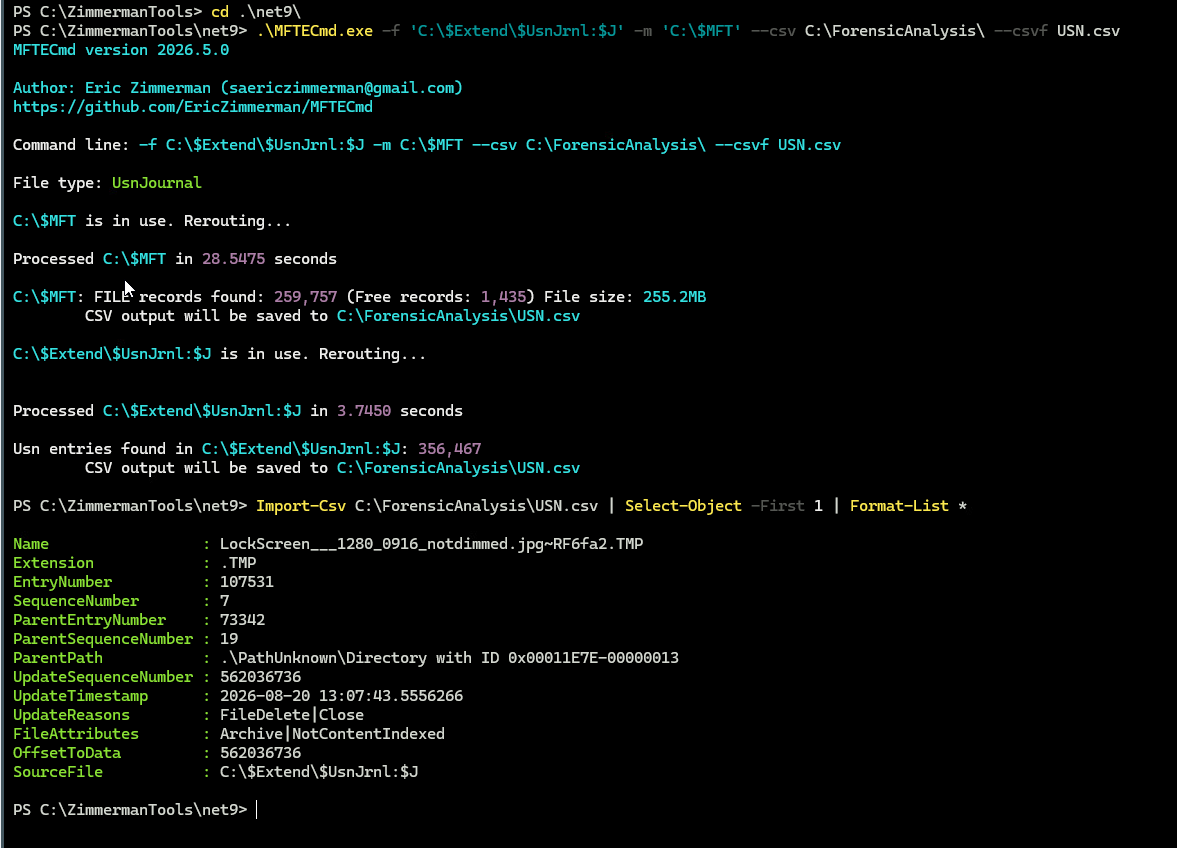
Figure Windows analysis 3. Actual workbook parsing command and CSV schema
Connection to the container lesson: Slides 2–3: Windows API timestamps, NTFS SI/FN attributes and USN journal activity answer different questions.
Recorded result or expected outcome: The tool reports 356,467 journal entries in the live VM. It exposes EntryNumber, SequenceNumber, ParentPath, UpdateTimestamp and UpdateReasons.
Analyst takeaway: Corroborate timestamp interpretations with identified operations and journal records.
Windows analysis 4 Rename correlation
Deck slide 41 · Original step Windows analysis 4
Command syntax
$USN = Import-Csv C:\ForensicAnalysis\USN.csv
$USN | Where-Object {
  $_.Name -in 'BeforeRename.txt','AfterRename.txt'
} | Select-Object UpdateTimestamp,Name,EntryNumber,
  SequenceNumber,ParentPath,UpdateReasons |
  Sort-Object UpdateTimestamp | Format-Table -AutoSize
Why this syntax: The operation renamed a prepared synthetic file. The query selects both names and retains identity and reason fields for comparison.
OS and time effect: USN retains the old/new name reasons and object identifiers for the measured rename.
Gotcha or ProTip: Use sequence numbers from the full export, path and observation window. EntryNumber alone can be reused and is insufficient across arbitrary intervals.
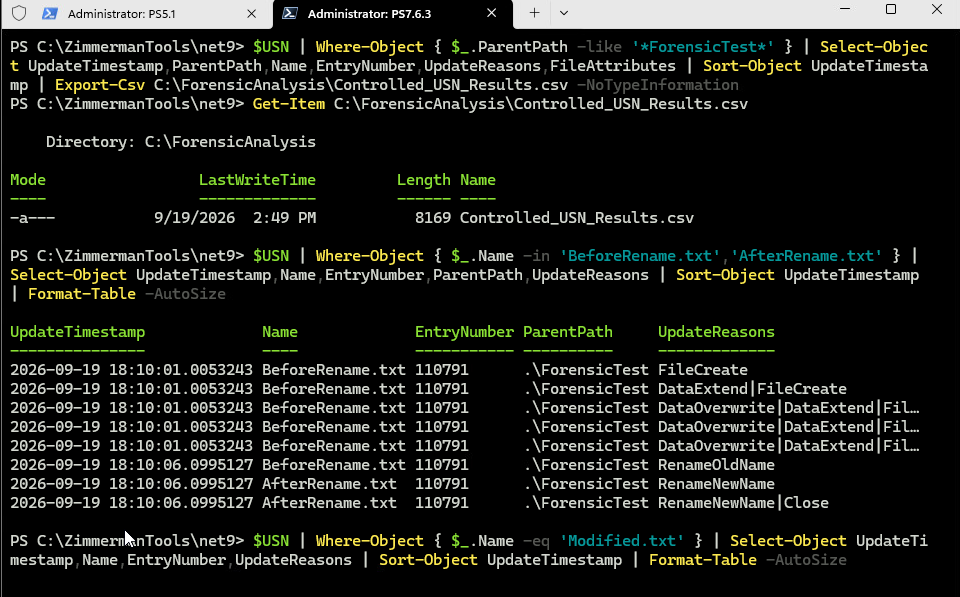
Figure Windows analysis 4. Original rename capture; query includes added sequence field
Connection to the container lesson: Slides 2–3: Windows API timestamps, NTFS SI/FN attributes and USN journal activity answer different questions.
Recorded result or expected outcome: RenameOldName / RenameNewName Controlled entry 110791 Paired events at 18:10:06.0995127
Analyst takeaway: Known operations plus matching identity context explain a rename more reliably than isolated times.
Windows analysis 5 Content-change history
Deck slide 42 · Original step Windows analysis 5
Command syntax
$USN | Where-Object { $_.Name -eq 'Modified.txt' } |
  Select-Object UpdateTimestamp,Name,EntryNumber,
    SequenceNumber,UpdateReasons |
  Sort-Object UpdateTimestamp | Format-Table -AutoSize
Why this syntax: Correlate the known append in operation 08 with journal entries.
OS and time effect: The saved journal contains DataExtend and DataExtend|Close at the measured append time.
Gotcha or ProTip: A reason code reports an operation category, not the human’s intent. Keep the preceding creation/copy entries too.
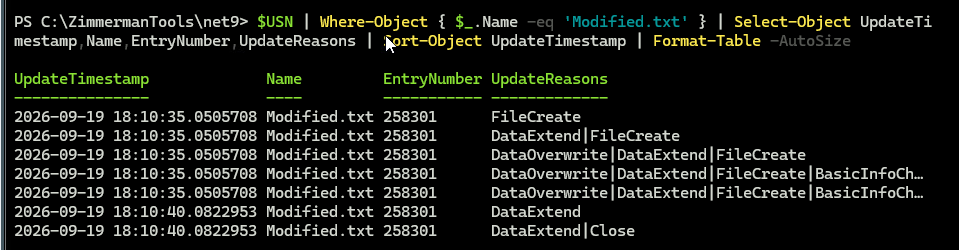
Figure Windows analysis 5. USN focused query for controlled operation 8
Connection to the container lesson: Slides 2–3: Windows API timestamps, NTFS SI/FN attributes and USN journal activity answer different questions.
Recorded result or expected outcome: Modified.txt, entry 258301: DataExtend at 2026-09-19 18:10:40.0822953. Earlier rows belong to creation of the copy.
Analyst takeaway: Use the operation time and surrounding entries to distinguish copy creation from the later edit.
Windows analysis 6 Attribute-change history
Deck slide 43 · Original step Windows analysis 6
Command syntax
$USN | Where-Object { $_.Name -eq 'AttributeChange.txt' } |
  Select-Object UpdateTimestamp,Name,EntryNumber,
    SequenceNumber,UpdateReasons |
  Sort-Object UpdateTimestamp | Format-Table -AutoSize
Why this syntax: The read-only attribute changes. Compare the known command, MFT last-write time, content hash and journal reason.
OS and time effect: USN records BasicInfoChange in the interval of the known attrib operation.
Gotcha or ProTip: BasicInfoChange by itself does not identify the exact field or intent. The controlled command supplies that missing context.
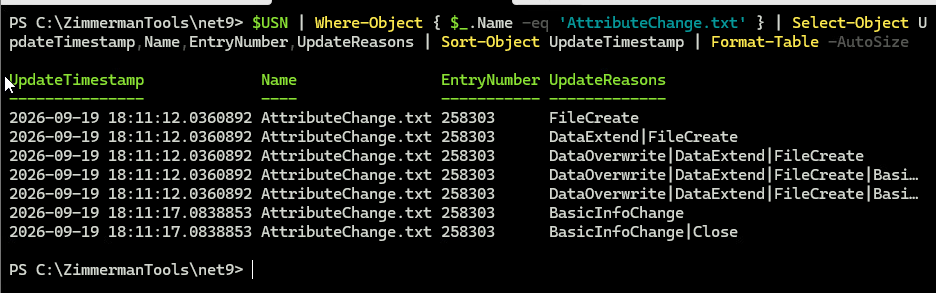
Figure Windows analysis 6. Original attribute-change journal capture
Connection to the container lesson: Slides 2–3: Windows API timestamps, NTFS SI/FN attributes and USN journal activity answer different questions.
Recorded result or expected outcome: Entry 258303: BasicInfoChange 2026-09-19 18:11:17.0838853 $SI last-write remains the 2024 control value.
Analyst takeaway: An unchanged last-write time does not establish that a file was untouched.
Windows analysis 7 Deleted-file history
Deck slide 44 · Original step Windows analysis 7
Command syntax
$USN | Where-Object { $_.Name -eq 'DeleteMe.txt' } |
  Select-Object UpdateTimestamp,Name,EntryNumber,
    SequenceNumber,ParentPath,UpdateReasons |
  Sort-Object UpdateTimestamp | Format-List
Why this syntax: Inspect the saved journal for activity involving the intentionally deleted file.
OS and time effect: A journal entry may remain even though Test-Path is False.
Gotcha or ProTip: No matching screenshot was supplied for this query. The result here comes from the saved CSV, not an invented terminal image.
Connection to the container lesson: Slides 2–3: Windows API timestamps, NTFS SI/FN attributes and USN journal activity answer different questions.
Recorded result or expected outcome: Saved CSV: DeleteMe.txt, entry 258305, includes FileDelete|Close. This establishes a recorded event, not recovered file content.
Analyst takeaway: Preserve and explain historical records independently of current path existence.
1. Container workflow · 2. Linux validation · 3. Windows validation · 4. Create and verify your container