
FG09 — Linux validation
FG09 · v23
1. Container workflow · 2. Linux validation · 3. Windows validation · 4. Create and verify your container
Reading the evidence
Linux (Ubuntu) screenshots here are run 20260920T144257Z. They are separate from the September 19 raw-log run and September 20 WSL container qualification. The Windows workbook screenshots show the controlled September 19 run. New times, identities and digests will differ in a new run.
Learning objective: Show the command, explain why it was chosen, identify its OS/time effect, inspect the actual result, document the limits, and state a bounded analyst conclusion.
The v23 deck has 44 slides. Linux begins on slide 5 and Windows on slide 22. C01–C16 are a separate application tutorial, not additional deck slides. The instructor retains the deck with answer notes and the 37-page screenshot walkthrough. PacketParsing companion PCAPNGs were not the inputs to the timestamp experiments.
Why we created the Linux script
Deck slide 5 · Original step Linux overview 1
Command syntax
stat       # inode and four time fields
sha256sum  # content identity
cp / mv    # copy and rename
chmod / touch / setfacl / setfattr
tar        # package and extract
Why this syntax: The validator measures how familiar Linux operations affect content, file identity and metadata on a recorded filesystem.
OS and time effect: Controlled 2024 timestamps distinguish inherited values from times generated by the 2026 operation.
Gotcha or ProTip: Read effects depend on mount policy. The saved screenshots are one ext4/relatime run, not every Linux system.
Connection to the container lesson: Slide 2: operations can change metadata without changing content.
Recorded result or expected outcome: Tests 01–10 establish behavior. Test 11 packages the source. Test 12 checks extraction. Test 13 is optional SCP.
Analyst takeaway: Use controlled observations to choose and qualify a preservation method.
How to use and read the Linux script
Deck slide 6 · Original step Linux overview 2
Command syntax
bash ./Linux_Forensic_Time_Validator.sh
# ENTER = execute next test
# s = skip; q = quit
# work/ = synthetic files
# logs/ = state, hashes and transcript
# results/ = claims and final summary
Why this syntax: Run the complete supplied script in a disposable Ubuntu lab. It creates a dated workspace and records the sequence.
OS and time effect: state() prints Path, Inode, Size, Mode, UID/GID, Access, Modify, Change and Birth. Hash reads can themselves affect atime.
Gotcha or ProTip: Do not skip baseline 01: later tests require F and BASE. A printed OBSERVED claim still needs the underlying logs.
Connection to the container lesson: Slide 2: operations can change metadata without changing content.
Recorded result or expected outcome: The following slides use the script’s original test IDs. Visible snippets are core commands; the full harness handles pauses and logs.
Analyst takeaway: Preserve the run folder and raw records alongside the screenshots.
Linux pre-flight and environment
Deck slide 7 · Original step Linux pre-flight
Command syntax
cat /etc/os-release
uname -a
findmnt -T "$W" \
  -o TARGET,SOURCE,FSTYPE,OPTIONS
# W is the harness work directory
Why this syntax: Identify the environment before testing timestamp behavior. findmnt links the workspace to its actual filesystem and mount policy.
OS and time effect: relatime permits conditional access-time updates; it does not promise a new atime for each read.
Gotcha or ProTip: The capture also includes test 01 below pre-flight. Its displayed local offset changes between winter and summer.
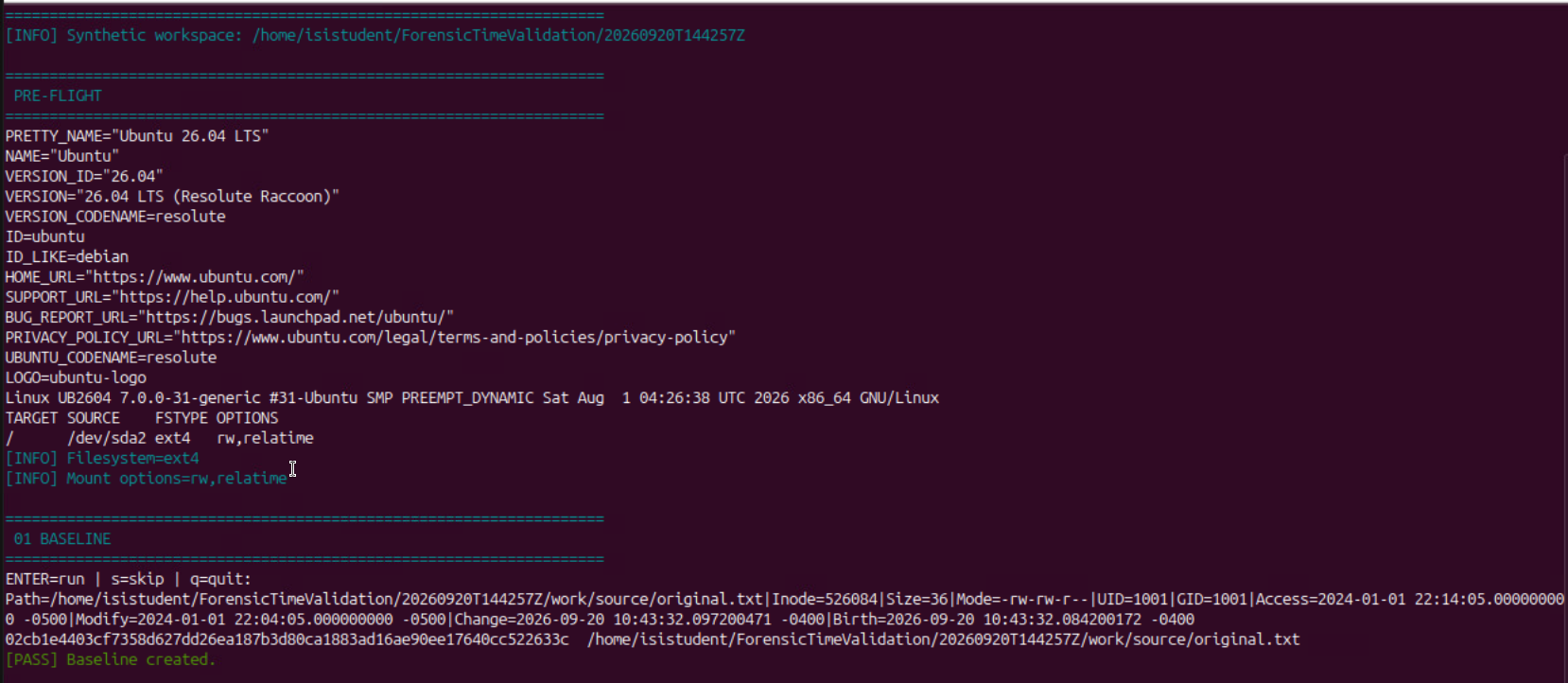
Figure Linux pre-flight. PRE-FLIGHT and 01 share the same original capture
Connection to the container lesson: Slide 2: operations can change metadata without changing content.
Recorded result or expected outcome: Recorded: Ubuntu 26.04 LTS; kernel 7.0.0-31-generic; ext4 mounted rw,relatime.
Analyst takeaway: Tie timestamp findings to the recorded OS, filesystem and time policy.
Linux 01 Baseline
Deck slide 8 · Original step Linux 01
Command syntax
F="$W/source/original.txt"
printf "FORENSIC LINUX TIMESTAMP VALIDATION\n" > "$F"
touch -m -d "2024-01-02 03:04:05 UTC" "$F"
touch -a -d "2024-01-02 03:14:05 UTC" "$F"
state "$F"
sha256sum "$F"
BASE="$(hash "$F")"
Why this syntax: Create known content and deliberately set mtime and atime. state() records the controlled file before the baseline hash reads.
OS and time effect: touch sets selected timestamps. ctime and birth time still describe the new filesystem object.
Gotcha or ProTip: The baseline hashes the source twice. Test 02 is therefore a later read, not the first read of untouched data.
Figure Linux 01. 01 BASELINE, lower part of the pre-flight capture
Connection to the container lesson: Slide 2: operations can change metadata without changing content.
Recorded result or expected outcome: 01 BASELINE: 36 bytes; inode 526084; mtime 2024-01-01 22:04:05 -0500; atime 22:14:05 -0500. Hash begins 02cb1e44.
Analyst takeaway: A baseline records both deliberate settings and the effects of the measurement process.
Linux 02 SHA256SUM read effect
Deck slide 9 · Original step Linux 02
Command syntax
state "$F"
A1="$(stat -c %x "$F")"
sleep 5
sha256sum "$F"
state "$F"
A2="$(stat -c %x "$F")"
Why this syntax: Read the same source bytes and compare access time before and after this measured interval.
OS and time effect: SHA-256 reads content. The filesystem decides whether and when that read updates atime.
Gotcha or ProTip: A1 and A2 match here after prior baseline reads. That cannot establish that hashing never changes atime.

Figure Linux 02. Original test 02, screenshot run 20260920T144257Z
Connection to the container lesson: Slide 2: operations can change metadata without changing content.
Recorded result or expected outcome: 02 SHA256SUM READ EFFECT: content unchanged; displayed atime unchanged at 2026-09-20 10:43:32.112200815 -0400.
Analyst takeaway: Interpret a read in its sequence and mount policy, not from one unchanged value.
Linux 03 Default cp
Deck slide 10 · Original step Linux 03
Command syntax
D="$W/copy_default/original.txt"
sleep 5
cp "$F" "$D"
state "$F"
state "$D"
sha256sum "$F" "$D"
Why this syntax: F is the original harness fixture; W is its work directory. state() is the script’s stat wrapper. The harness created each destination directory first.
OS and time effect: A new destination gets a new inode and newly assigned times in this run.
Gotcha or ProTip: The copy can match byte-for-byte while timestamps describe a new object.

Figure Linux 03. Original test 03, screenshot run 20260920T144257Z
Connection to the container lesson: Slides 2–3: matching bytes do not establish unchanged filesystem identity or every timestamp.
Recorded result or expected outcome: 03 DEFAULT cp: source inode 526084; destination 552125. Hashes match. Destination mtime is a new 2026 value.
Analyst takeaway: Check content and the specific metadata fields required for your collection.
Linux 04 cp -p
Deck slide 11 · Original step Linux 04
Command syntax
D="$W/copy_p/original.txt"
sleep 5
cp -p "$F" "$D"
state "$F"
state "$D"
sha256sum "$F" "$D"
Why this syntax: F is the original harness fixture; W is its work directory. state() is the script’s stat wrapper. The harness created each destination directory first.
OS and time effect: -p requests mode, ownership and timestamp preservation, subject to permissions.
Gotcha or ProTip: -p preserves selected properties, not the original inode or its history.

Figure Linux 04. Original test 04, screenshot run 20260920T144257Z
Connection to the container lesson: Slides 2–3: matching bytes do not establish unchanged filesystem identity or every timestamp.
Recorded result or expected outcome: 04 cp -p: destination inode 547480. mtime remains the controlled 2024 value; destination ctime/birth are new 2026 values.
Analyst takeaway: Check content and the specific metadata fields required for your collection.
Linux 05 cp -a
Deck slide 12 · Original step Linux 05
Command syntax
D="$W/copy_a/original.txt"
sleep 5
cp -a "$F" "$D"
state "$F"
state "$D"
sha256sum "$F" "$D"
Why this syntax: F is the original harness fixture; W is its work directory. state() is the script’s stat wrapper. The harness created each destination directory first.
OS and time effect: Archive copying preserves selected properties while creating a new destination object.
Gotcha or ProTip: Archive-style copying is logical preservation, not a filesystem clone.

Figure Linux 05. Original test 05, screenshot run 20260920T144257Z
Connection to the container lesson: Slides 2–3: matching bytes do not establish unchanged filesystem identity or every timestamp.
Recorded result or expected outcome: 05 cp -a: destination inode 552509. Content and mtime match; inode, ctime and birth identify a new object.
Analyst takeaway: Check content and the specific metadata fields required for your collection.
Linux 06 rsync -a
Deck slide 13 · Original step Linux 06
Command syntax
D="$W/rsync_a/original.txt"
sleep 5
rsync -a "$F" "$D"
state "$F"
state "$D"
sha256sum "$F" "$D"
Why this syntax: F is the original harness fixture; W is its work directory. state() is the script’s stat wrapper. The harness created each destination directory first.
OS and time effect: Archive mode requests selected properties; it does not include ACLs, xattrs or hard links by itself.
Gotcha or ProTip: Archive mode alone does not request every metadata class. Do not infer full ACL/xattr restoration.

Figure Linux 06. Original test 06, screenshot run 20260920T144257Z
Connection to the container lesson: Slides 2–3: matching bytes do not establish unchanged filesystem identity or every timestamp.
Recorded result or expected outcome: 06 rsync -a: destination inode 553147. Content and mtime match; destination access, change and birth times are 2026 values.
Analyst takeaway: Check content and the specific metadata fields required for your collection.
Linux 07 Same-filesystem mv
Deck slide 14 · Original step Linux 07
Command syntax
B="$W/rename/before.txt"
A="$W/rename/after.txt"
cp -p "$F" "$B"
state "$B"
sleep 5
mv "$B" "$A"
state "$A"
Why this syntax: The test prepares a file, records its state, renames it on the same filesystem, then records state again.
OS and time effect: The rename updates filesystem metadata while retaining the observed inode.
Gotcha or ProTip: The screenshot also shows an atime difference in the broader sequence. Do not attribute every changed field to the rename alone.

Figure Linux 07. Original test 07, screenshot run 20260920T144257Z
Connection to the container lesson: Slides 2–3: matching bytes do not establish unchanged filesystem identity or every timestamp.
Recorded result or expected outcome: Inode remains 553260 mtime and birth time remain equal ctime changes
Analyst takeaway: A rename can retain file identity while changing metadata.
Linux 08 chmod metadata change
Deck slide 15 · Original step Linux 08
Command syntax
D="$W/metadata_change.txt"
cp -p "$F" "$D"
state "$D"
sha256sum "$D"
sleep 5
chmod 600 "$D"
state "$D"
sha256sum "$D"
Why this syntax: 600 gives the owner read/write access and removes group/other access. Compare content digest, Modify and Change fields.
OS and time effect: chmod 600 changes permission bits and ctime without changing the content or mtime here.
Gotcha or ProTip: This teaching excerpt shows the same measured fields. The full harness stores before/after values and tests them; its hashing order includes extra reads.

Figure Linux 08. Original test 08, screenshot run 20260920T144257Z
Connection to the container lesson: Slide 2: operations can change metadata without changing content.
Recorded result or expected outcome: Hash unchanged mtime unchanged ctime changed
Analyst takeaway: Content integrity and metadata activity require separate findings.
Linux 09 touch backdating
Deck slide 16 · Original step Linux 09
Command syntax
D="$W/touch_test.txt"
cp -p "$F" "$D"
state "$D"
sleep 5
touch -d '2020-01-01 12:00:00 UTC' "$D"
state "$D"
Why this syntax: The synthetic exercise deliberately assigns earlier access and modification times. Compare them to ctime and birth time.
OS and time effect: touch assigns atime and mtime; ctime reflects the later metadata change.
Gotcha or ProTip: A divergence is an investigative clue, not proof of malicious intent. Do not assign timestamps to original evidence to make results match.

Figure Linux 09. Original test 09, screenshot run 20260920T144257Z
Connection to the container lesson: Slide 2: operations can change metadata without changing content.
Recorded result or expected outcome: Access/Modify: 2020-01-01 07:00:00 -0500 Change: 2026 test time Birth remains unchanged.
Analyst takeaway: Timestamp values require operational context before they support a chronology.
Linux 10 ACL and xattr change
Deck slide 17 · Original step Linux 10
Command syntax
D="$W/source/metadata.txt"
cp -p "$F" "$D"
state "$D"
setfacl -m "u:$(id -un):rw" "$D"
setfattr -n user.forensic_test -v LAB409 "$D"
state "$D"
getfacl -p "$D"
getfattr -d -m- "$D"
sha256sum "$D"
Why this syntax: setfacl adds a named-user ACL entry. setfattr sets a user-namespace attribute. getfacl/getfattr expose what changed.
OS and time effect: A named ACL and a user extended attribute change metadata while content remains equal.
Gotcha or ProTip: The content digest excludes these metadata listings. A successful metadata-change test does not qualify metadata restoration after transfer.
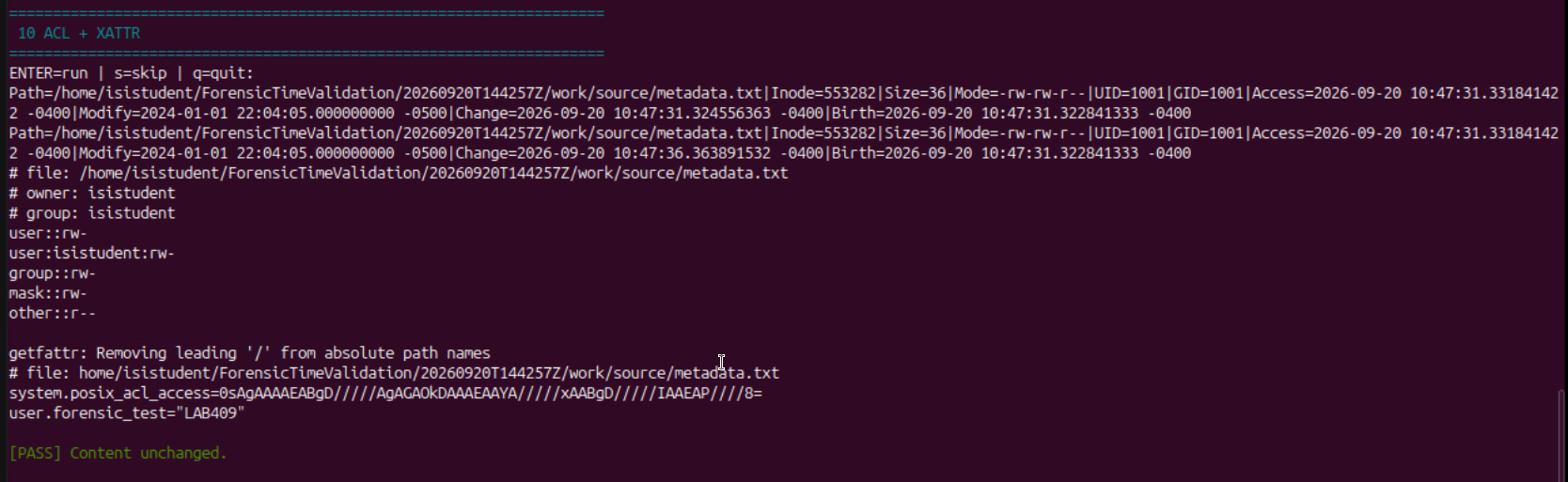
Figure Linux 10. Original test 10, screenshot run 20260920T144257Z
Connection to the container lesson: Slide 2: operations can change metadata without changing content.
Recorded result or expected outcome: user:isistudent:rw- user.forensic_test="LAB409" Content unchanged; ctime changed
Analyst takeaway: Capture and compare ACLs/xattrs explicitly when they matter to the evidence question.
Linux 11 TAR container
Deck slide 18 · Original step Linux 11
Command syntax
cd "$W"
ARGS=(--numeric-owner --atime-preserve=system)
tar --help | grep -q -- --acls && \
  ARGS+=(--acls)
tar --help | grep -q -- --xattrs && \
  ARGS+=(--xattrs)
tar "${ARGS[@]}" -czf evidence_package.tar.gz \
  source ../logs/11_evidence_hashes.txt
sha256sum "$W/evidence_package.tar.gz"
Why this syntax: Exact core operations from the original script. W was that run’s work directory; its preceding step created the hash list in L.
OS and time effect: TAR serializes content and supported metadata. Its source reads may affect atime unless the requested protection works.
Gotcha or ProTip: The original used ../logs and absolute paths in the hash list. The main exercise fixes portability with explicit relative members and hashes.

Figure Linux 11. Original test 11, screenshot run 20260920T144257Z
Connection to the container lesson: Slides 3–4: a container preserves selected contents and records; each transfer and extraction needs separate checks.
Recorded result or expected outcome: 11 TAR CONTAINER: source atime stayed equal. The archive digest begins b21e85bb. TAR warned about stripping leading ../ from member names.
Analyst takeaway: Retain warnings and explain command changes instead of hiding them.
Linux 12 TAR extraction
Deck slide 19 · Original step Linux 12
Command syntax
cd "$W"
X=()
tar --help | grep -q -- --acls && X+=(--acls)
tar --help | grep -q -- --xattrs && X+=(--xattrs)
tar "${X[@]}" -xzf evidence_package.tar.gz \
  -C tar_extract
E="$W/tar_extract/source/original.txt"
state "$F"; state "$E"
sha256sum "$F" "$E"
Why this syntax: Extract the recorded archive and compare source and destination state and hashes. The options request supported metadata restoration.
OS and time effect: Extraction creates new destination objects. Matching content and mtime can coexist with new inode, ctime and birth.
Gotcha or ProTip: The original harness reuses X for TAR options and a color reset, producing stray --acls text. This is a display bug, not another test.

Figure Linux 12. Original test 12; this excerpt uses the original X variable
Connection to the container lesson: Slides 3–4: a container preserves selected contents and records; each transfer and extraction needs separate checks.
Recorded result or expected outcome: 12 TAR EXTRACTION: inode 526084 becomes 553304. Hashes and mtime match. Destination ctime/birth: 2026-09-20 10:48:10.125970313 -0400.
Analyst takeaway: Preserve the archive and explain the new object created by extraction.
Linux 13 Optional SCP
Deck slide 20 · Original step Linux 13
Command syntax
scp "$F" "$REMOTE:/tmp/scp_default.txt"
scp -p "$F" "$REMOTE:/tmp/scp_p.txt"
ssh "$REMOTE" \
  "stat /tmp/scp_default.txt; \
   stat /tmp/scp_p.txt; \
   sha256sum /tmp/scp_default.txt /tmp/scp_p.txt"
Why this syntax: Compare raw-file transfer with and without -p after supplying a real, verified SSH endpoint.
OS and time effect: -p requests modification/access times and mode bits. The destination remains a separate filesystem object.
Gotcha or ProTip: This original optional step sends raw files. The later practical exercise transfers an intact TAR container instead.
Connection to the container lesson: Slides 3–4: a container preserves selected contents and records; each transfer and extraction needs separate checks.
Recorded result or expected outcome: No supplied screenshot or raw endpoint result proves this optional step ran. Keep it explicitly unvalidated.
Analyst takeaway: A planned transfer command is not evidence of a completed, verified transfer.
Linux final summary and retained results
Deck slide 21 · Original step Linux summary
Command syntax
cat "$O/Linux_Forensic_Time_Final_Summary.txt"
cat "$O/claims.tsv"
sha256sum \
  "$ROOT/Linux_Forensic_Time_Validation_Results_${RUN}.tar.gz"
Why this syntax: The script collects final states, claims and a results archive so another analyst can inspect the measured operations.
OS and time effect: Final state may reflect intervening hash reads. Use each test’s before/after record to isolate its measured interval.
Gotcha or ProTip: The results bundle is different from work/evidence_package.tar.gz. Do not substitute one archive digest for the other.
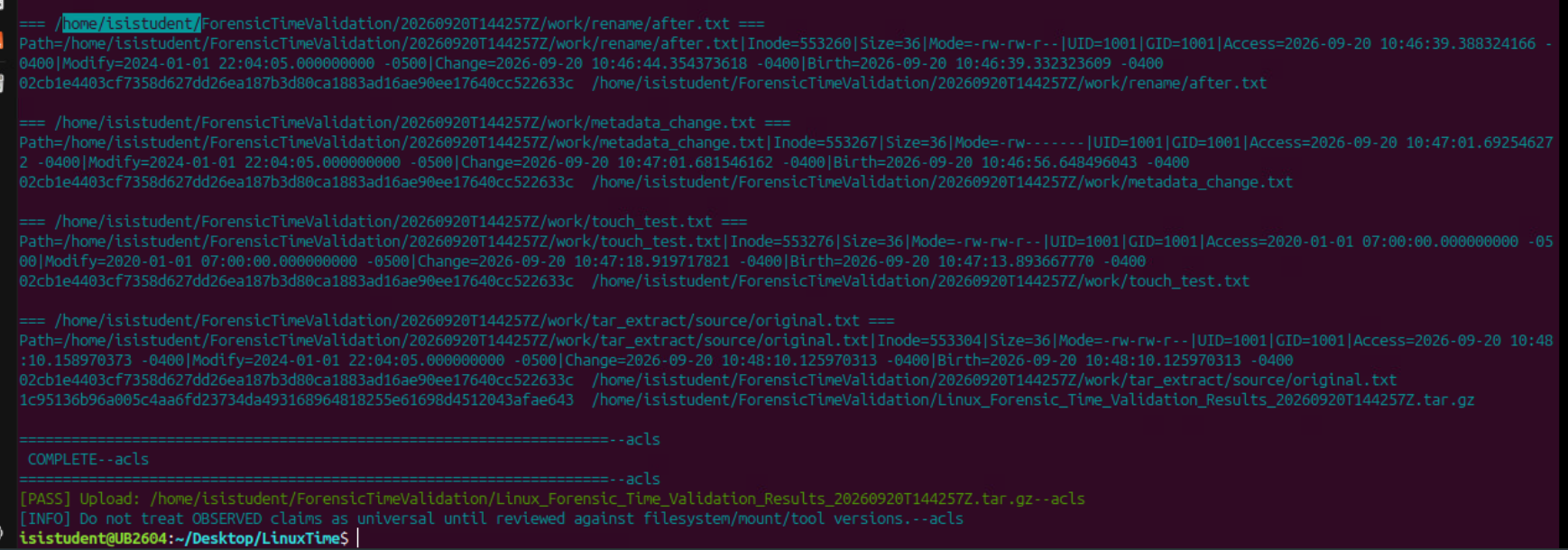
Figure Linux summary. FINAL SUMMARY and COMPLETE, after optional test 13
Connection to the container lesson: Slide 2: operations can change metadata without changing content.
Recorded result or expected outcome: Run 20260920T144257Z completed; the final summary shows the source, comparison copies and extracted object.
Analyst takeaway: Retain operation-level logs as well as the final summary.
1. Container workflow · 2. Linux validation · 3. Windows validation · 4. Create and verify your container