

Chapter Overview
Course Progression
This chapter prepares for and reinforces Progressive Labs PL-05 through PL-08, using endpoint, network, and threat-intelligence evidence for hypothesis-led hunting and correlation. The Chapter Exercises provide focused hunting practice; the Progressive Labs are cumulative investigations. See Course Progression and Progressive Lab Alignment in the front matter.
Field Guide: Osquery Windows Process-to-Network Correlation — connect Windows processes to network activity.
Security Operations Centers traditionally operate in a reactive manner. An alert is generated. An analyst investigates. The incident is confirmed or dismissed. The investigation concludes. Threat hunting follows a different philosophy. Instead of waiting for alerts, analysts actively search for evidence that attackers may already exist within the environment.
Threat hunting assumes that:
Some attacks generate no alerts.
Some detections fail.
Some adversaries remain undetected.
Analysts must proactively search for suspicious behaviors.
Threat hunting therefore complements Detection Engineering. Detection Engineers improve alerts. Threat Hunters search beyond them.
Learning Objectives
After completing this chapter, you should be able to:
Explain proactive threat hunting.
Differentiate monitoring from hunting.
Develop hunting hypotheses.
Collect investigative evidence.
Search Wazuh effectively.
Correlate endpoint and network telemetry.
Use MITRE ATT&CK® to guide hunts.
Document threat hunting activities.
6.1 Threat Hunting Fundamentals
Introduction
Suppose your SOC receives no alerts for an entire week.
Is your organization secure?
Not necessarily.
Perhaps:
The attackers stopped. Or perhaps, your detections failed. Threat hunting begins by questioning assumptions.
Professional hunters ask:
“If an attacker were here, how would we find them?”
What Is Threat Hunting?
Threat hunting is a structured, proactive search for evidence of malicious activity that has not yet been identified by automated detections (Knerler et al., 2022). A hunting hypothesis is a specific, testable explanation of possible adversary behavior that identifies what evidence could support, weaken, or leave the explanation unresolved. Heuer's analytic method supplies the discipline behind that definition: analysts should compare plausible explanations against available evidence, seek inconsistent evidence, and avoid accepting the favored explanation merely because confirming evidence exists (Heuer, 1999). The operational cybersecurity form used in this chapter—behavior, scope, data source, and measurable time relationship—is an Alerts to Answers teaching pattern, not a quotation or formal model from Heuer.
Threat hunting differs from:
Incident Response → Reactive → Alert Driven
Threat Hunting → Proactive → Hypothesis Driven
The hunter begins with a theory rather than an alert.
Figure 6-1
Monitoring vs Threat Hunting
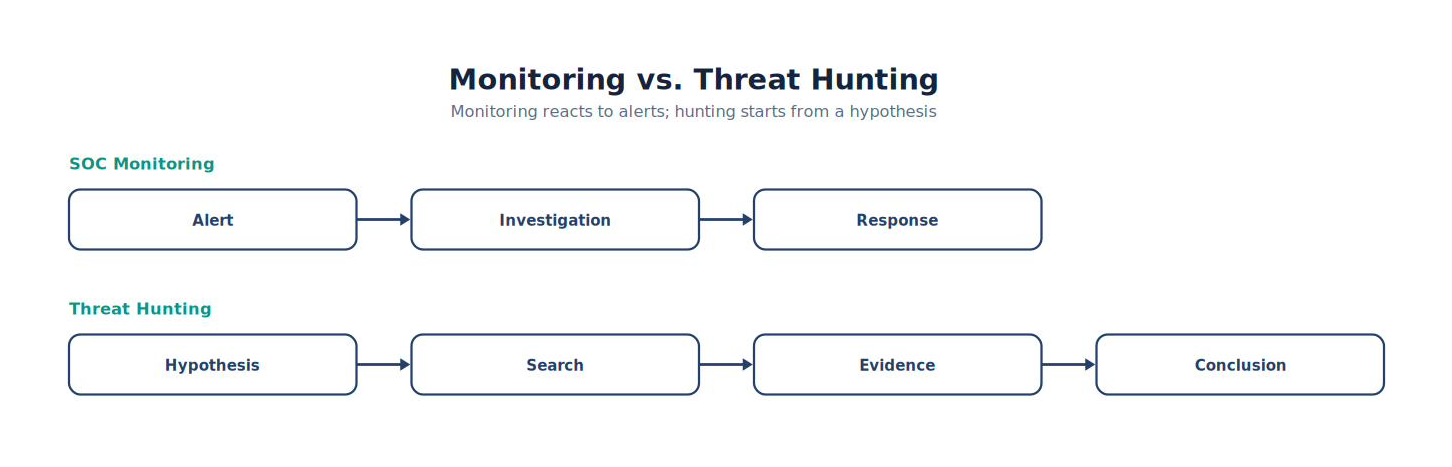
Note. The comparison highlights the operational differences represented by monitoring vs Threat Hunting and shows why the distinction matters during analysis.
Why Threat Hunting Matters
Modern attackers attempt to avoid detection.
They may:
Use legitimate administrative tools.
Encrypt communications.
Blend into normal traffic.
Operate slowly.
Remove evidence.
Traditional alerts may never trigger. Threat hunting searches for behavioral clues instead.
Analyst Tradecraft Tip
Threat hunting is not randomly searching logs. Every hunt should begin with a hypothesis. Good hunters ask focused questions. They do not simply browse dashboards.
Hunting Versus Investigating
Students often confuse these concepts.
| Investigation | Threat Hunt |
|---|---|
| Begins with alert | Begins with hypothesis |
| Reactive | Proactive |
| Confirms an event | Searches for unknown activity |
| Usually short | Often iterative |
| Scope defined by alert | Scope defined by hypothesis |
Both are essential. They simply begin differently.
The Threat Hunting Cycle
Professional hunters follow a repeatable process.
Figure 6-2
Threat Hunting Lifecycle
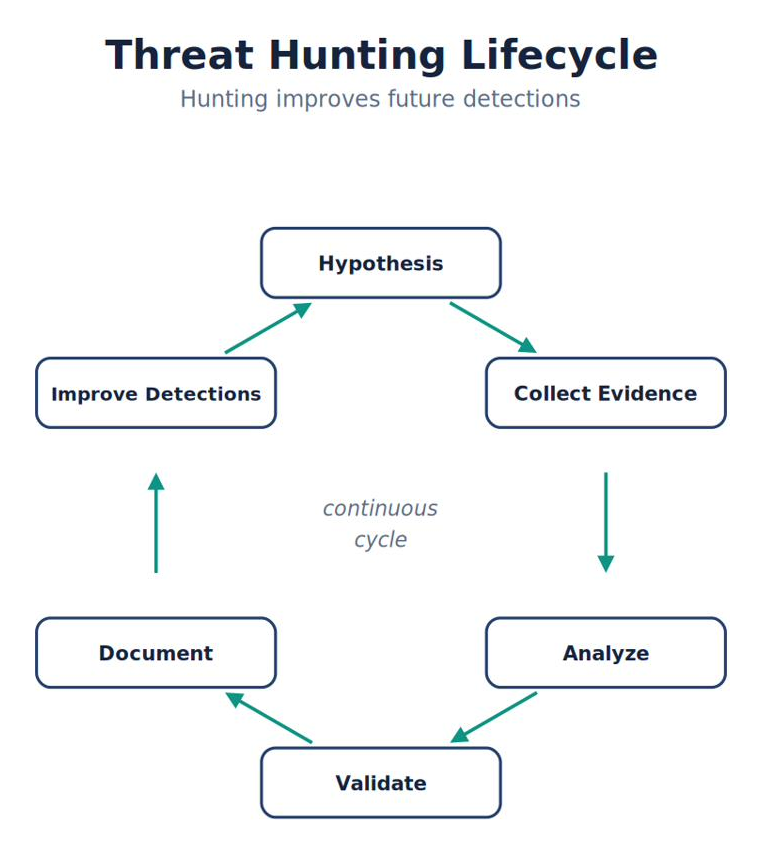
Note. The workflow presents the ordered stages of threat Hunting Lifecycle and highlights the validation and feedback steps that make the process repeatable.
Notice the last step. Threat hunting improves future detections.
Sources of Hunting Ideas
Hunters rarely invent hypotheses randomly.
Ideas often originate from:
Threat intelligence
ATT&CK techniques
Recent vulnerabilities
Incident response lessons
Industry reports
Internal observations
Detection gaps
Purple team exercises
Good hunts are evidence-driven.
Example Hunting Hypothesis
Hypothesis:
Attackers may be abusing PowerShell to download remote payloads without triggering existing detections.
Questions:
Which systems executed PowerShell?
Which users launched it?
Did DNS immediately follow?
Was outbound HTTP observed?
Did Defender detect malware?
Did Suricata observe downloads?
Notice that every question is measurable.
Characteristics of a Good Hunting Hypothesis
Heuer does not prescribe a cybersecurity threat-hunt template. He does establish the more important analytic discipline: consider plausible alternatives, test them against evidence, and give particular weight to evidence that is inconsistent with an explanation (Heuer, 1999). For this laboratory, translate that discipline into five practical checks:
| Check | Meaning in a hunt | Example |
|---|---|---|
| Testable | Available evidence can change the analyst's judgment. | Sysmon and Suricata can corroborate or weaken the claim. |
| Specific | Behavior, scope, and subject are bounded. | PowerShell on win11, not “something suspicious.” |
| Measurable | The expected fields and time relationship are stated. | Process creation followed by HTTP within two minutes. |
| Evidence-linked | The hypothesis names telemetry capable of observing the behavior. | Sysmon Event IDs 1 and 22 plus Suricata HTTP records. |
| Risk-relevant | Testing the claim supports a documented mission or asset priority. | The endpoint processes sensitive financial data. |
“Maybe something bad happened” is not a usable hunting hypothesis because no observation could meaningfully disconfirm it. A stronger version is: “PowerShell executions on win11 followed by outbound HTTP connections within two minutes may indicate unauthorized script-driven downloads.” It states the behavior, host, temporal relationship, and observable evidence. Before searching, record at least one reasonable alternative—for example, an administrator performed an approved download—so the hunt tests explanations rather than collecting only confirming clues (Heuer, 1999).
Using Wazuh for Threat Hunting
Unlike investigations, hunts usually begin in Discover rather than the Alerts view.
Hunters search for:
Process names
Parent processes
Users
Command lines
Network destinations
File hashes
DNS queries
ATT&CK techniques
Discover becomes the primary hunting interface.
Hunting Questions
Good hunters constantly ask questions.
Examples:
Which hosts executed PowerShell today?
Which systems contacted previously unseen domains?
Which users generated the most authentication failures?
Which endpoints executed unsigned binaries?
Which processes launched immediately after Office applications?
Which systems communicated with rare external IP addresses?
Every question becomes a hunt.
Figure 6-3
Hunt Development
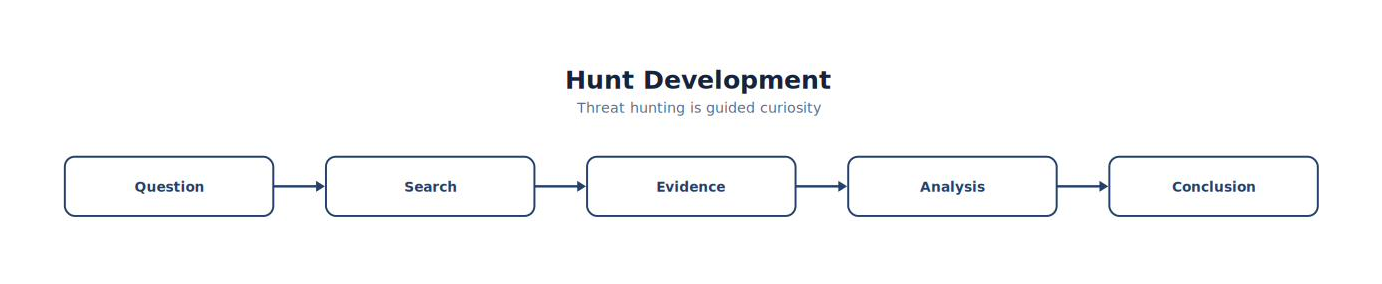
Note. The figure summarizes hunt Development and highlights the relationships among its principal elements, evidence sources, and analytical outcomes.
Threat hunting is guided curiosity.
Evidence-Based Hunting
Hunters should avoid intuition alone. Instead, combine multiple evidence sources.
Example:
| Source | Evidence |
|---|---|
| Sysmon | PowerShell |
| Sysmon | DNS |
| Suricata | HTTP |
| Defender | Malware |
| Wazuh | Correlation |
Independent evidence increases confidence.
ATT&CK-Driven Hunting
Many organizations organize hunts around ATT&CK.
Example:
Execution → PowerShell → Search:
All PowerShell executions.
Discovery → Network Scanning → Search:
Nmap activity.
Credential Access → LSASS Access → Search:
Sysmon Event ID 10 (if configured). ATT&CK provides a structured hunting framework.
Hunting Documentation
Every hunt should include:
Hypothesis
Scope
Data sources
Search strategy
Results
Evidence
Conclusion
Recommended actions
Documentation is just as important as the hunt itself.
Common Student Mistake
Students often believe:
Threat Hunting means finding malware. Sometimes, a successful hunt finds nothing. That is still valuable. A documented hunt demonstrating that a hypothesis was investigated and unsupported provides confidence in the environment and may reveal opportunities to improve telemetry or detections.
Chapter Exercise 6.1 — Your First Threat Hunt
Objective
Conduct a hypothesis-driven hunt using telemetry collected in the SOC laboratory.
Hypothesis
PowerShell may have been used to download remote content without generating a high-confidence detection.
Tasks
Use a Last 24 hours time range for the first pass. If the laboratory activity occurred earlier, widen the range and record the exact start time, end time, and displayed time zone. Preserve every query in the worksheet.
1. Establish the PowerShell event set
Navigate to → Wazuh Dashboard → Explore → Discover
WAZUH DASHBOARD · DQL FILTER
agent.name: "win11" AND data.win.system.eventID: 1 AND data.win.eventdata.image: *\\powershell.exeThis query limits the evidence to the win11 agent, Sysmon Event ID 1 process-creation records, and an image path ending in powershell.exe. Record @timestamp, data.win.eventdata.user, data.win.eventdata.parentImage, data.win.eventdata.commandLine, and data.win.eventdata.processGuid from each result.
2. Test the download behavior
WAZUH DASHBOARD · DQL FILTER
agent.name: "win11" AND data.win.system.eventID: 1 AND data.win.eventdata.image: *\\powershell.exe AND (data.win.eventdata.commandLine: *Invoke-WebRequest* OR data.win.eventdata.commandLine: *DownloadString* OR data.win.eventdata.commandLine: *curl*)AND requires all major conditions, while the parenthesized OR group accepts any listed download indicator. A match is a lead, not proof of malicious intent. Copy the full command line and process GUID; do not record only the word that matched.
3. Identify the parent process
Inspect data.win.eventdata.parentImage in the matching process event. If the value is unclear, pivot on the recorded process GUID or repeat the search with the observed parent path.
WAZUH DASHBOARD · DQL FILTER
agent.name: "win11" AND data.win.system.eventID: 1 AND data.win.eventdata.processGuid: "{PASTE-PROCESS-GUID}"Replace the placeholder with the exact GUID from the event. A parent such as explorer.exe may reflect interactive use; an Office application, script host, or unexpected service is more suspicious and requires corroboration.
4. Correlate DNS and network activity
Search Sysmon DNS Query events for the same host and a narrow interval around the PowerShell timestamp.
WAZUH DASHBOARD · DQL FILTER
agent.name: "win11" AND data.win.system.eventID: 22 AND data.win.eventdata.image: *\\powershell.exeRecord data.win.eventdata.queryName, data.win.eventdata.processGuid, and @timestamp. Then search Suricata telemetry for the observed domain; field population can vary with the Wazuh decoder and Suricata version.
WAZUH DASHBOARD · DQL FILTER
rule.groups: suricata AND (data.http.hostname: "PASTE-DOMAIN" OR data.dns.rrname: "PASTE-DOMAIN")Replace the placeholder with the exact domain. Compare source and destination addresses, destination port, URL, event type, and timestamp with the endpoint evidence.
5. Check Microsoft Defender evidence
WAZUH DASHBOARD · DQL FILTER
agent.name: "win11" AND data.win.system.providerName: "Microsoft-Windows-Windows Defender" AND data.win.system.eventID: (1116 OR 1117)Event ID 1116 records a malware detection and 1117 records an action taken. Record the threat name, affected path, action, and timestamp when those fields are populated. No matching Defender event means only that this dataset contains no matching event in the selected interval.
6. Build and evaluate the mini-timeline
Order the evidence by @timestamp. Keep only events that share a defensible link: host, user, process GUID, domain, IP address, file path, or close temporal proximity.
| Time | Source/artifact | Representative observation | Why it matters |
|---|---|---|---|
| 10:03:12 | Sysmon Event ID 1 | WINWORD.EXE launched powershell.exe |
Establishes the process chain |
| 10:03:14 | Sysmon Event ID 22 | PowerShell queried example.com |
Connects the process to a domain |
| 10:03:15 | Suricata EVE | HTTP request from WIN11 to the same domain | Corroborates network activity |
| 10:03:18 | Defender Event ID 1116 | Test file detected | Adds endpoint security context |
These rows illustrate the finished structure; use the timestamps and values from your own laboratory.
Classify the hypothesis using the evidence, not the number of search hits:
| Conclusion | Decision criterion |
|---|---|
| Supported | PowerShell execution and remote-content behavior are linked by a shared process, command line, domain, address, file, or defensible timeline. |
| Not supported | Required telemetry is present and reliable, but the reviewed interval contains evidence inconsistent with the hypothesized download behavior. |
| Inconclusive | Relevant telemetry is absent, fields are not populated, retention excludes the interval, clocks cannot be reconciled, or the observed events cannot be linked confidently. |
Attach the preserved queries, relevant expanded records, mini-timeline, conclusion, and one detection or telemetry improvement to the worksheet.
Threat Hunting Worksheet
| Step | Evidence or decision recorded | Completed |
|---|---|---|
| Hypothesis and scope defined | Time range, time zone, host, expected telemetry | □ |
| PowerShell search performed | Query and result count | □ |
| Parent and command line reviewed | Parent image, command line, process GUID | □ |
| DNS and network activity correlated | Domain, addresses, timestamps | □ |
| Defender evidence reviewed | Detection/action event or bounded negative result | □ |
| Timeline created | Linked events in chronological order | □ |
| ATT&CK mapped | Technique and evidence supporting the mapping | □ |
| Conclusion written | Supported, not supported, or inconclusive with rationale | □ |
| Improvement suggested | Specific detection, collection, or retention change | □ |
Think Like a Threat Hunter
Imagine you complete a hunt and find no evidence of malicious PowerShell activity.
Was the hunt a failure?
No.
Ask yourself:
Did I test the hypothesis?
Did I examine all relevant telemetry?
Did I document the methodology?
Did I identify gaps in visibility?
Did I discover opportunities to improve detections?
Threat hunting is not measured by the number of attackers found. It is measured by the quality of the questions asked, the rigor of the methodology, and the improvements it drives in the organization’s detection capabilities.
Key Concepts
By the end of this section, you should understand that:
Threat hunting is proactive rather than reactive.
Hunts begin with hypotheses instead of alerts.
ATT&CK provides an effective framework for organizing hunts.
Multiple telemetry sources strengthen hunting conclusions.
A hunt that does not uncover malicious activity can still improve security by validating assumptions, exposing telemetry gaps, and informing future detection engineering.
Looking Ahead
The next section, 6.2 Developing Hunting Hypotheses, teaches students how experienced threat hunters transform threat intelligence, ATT&CK techniques, vulnerability disclosures, incident response findings, and environmental knowledge into structured, testable hunting hypotheses. Students will learn to distinguish broad questions from measurable hypotheses, prioritize hunts based on organizational risk, and build repeatable hunting plans that can be shared across SOC teams. This methodology becomes the foundation for every hunt performed throughout the remainder of the textbook.
6.2 Developing Effective Threat Hunting Hypotheses
Learning Objectives
After completing this section, you should be able to:
Explain what constitutes a threat hunting hypothesis.
Differentiate between a question and a hypothesis.
Develop measurable hunting hypotheses.
Prioritize hunts using organizational risk.
Use MITRE ATT&CK to guide hypothesis development.
Create repeatable hunting plans.
Document hunting rationale.
Introduction
Imagine entering your SOC on Monday morning.
Instead of beginning with alerts, your team asks:
“What attacker behavior concerns us the most this week?”
Perhaps:
A new ransomware campaign is targeting universities.
Microsoft released an emergency security advisory.
Your organization recently enabled PowerShell remoting.
A vendor disclosed a critical VPN vulnerability.
Threat intelligence reports increased credential theft.
Each of these observations can become the foundation of a structured threat hunt.
What Is a Hunting Hypothesis?
A hunting hypothesis is a testable statement describing behavior that may exist within an environment.
It is not:
“Maybe something happened.”
Instead:
“Attackers may be abusing PowerShell to download remote payloads following Microsoft Office document execution.”
Notice that the hypothesis identifies:
Behavior
Expected evidence
Telemetry sources
Investigation direction
Figure 6-4
Building a Hypothesis
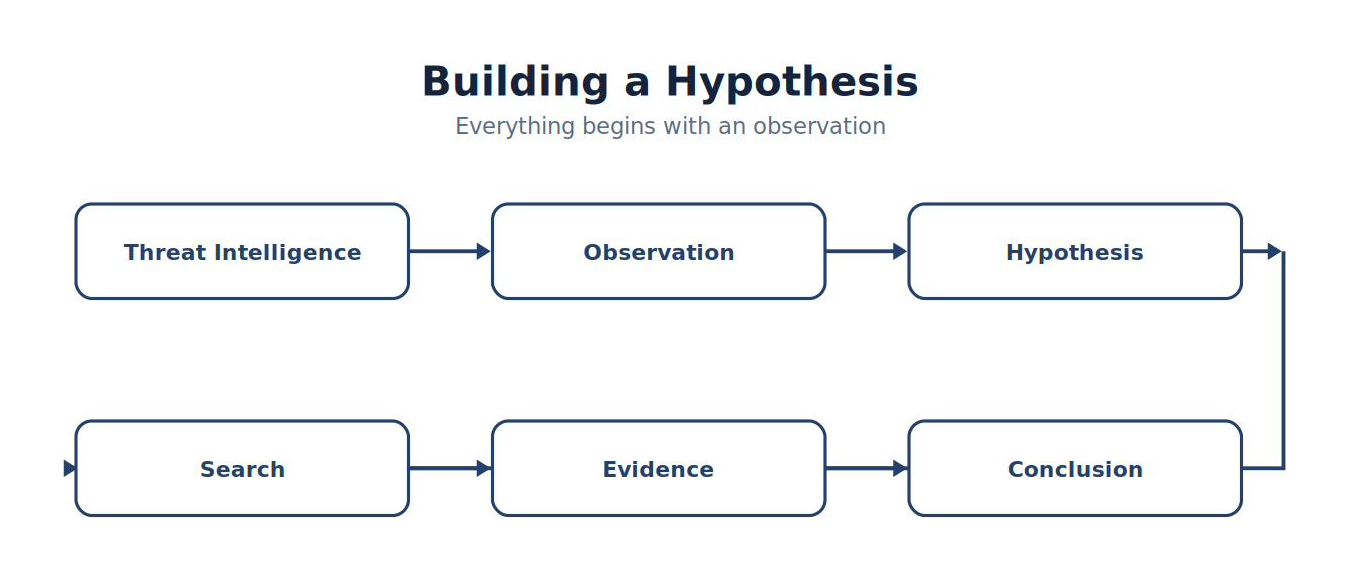
Note. The figure summarizes building a Hypothesis and highlights the relationships among its principal elements, evidence sources, and analytical outcomes.
Everything begins with an observation.
Questions Versus Hypotheses
Students often begin with broad questions.
Example:
Are attackers in our network?
Impossible to answer directly. Instead, develop measurable hypotheses.
Example:
Systems executing Microsoft Office immediately followed by PowerShell and outbound HTTP traffic may represent malicious script execution. The second statement can be tested.
Characteristics of Strong Hypotheses
Professional hunting hypotheses should be:
| Characteristic | Explanation |
|---|---|
| Specific | Defines the behavior being investigated |
| Measurable | Can be tested using telemetry |
| Relevant | Addresses organizational risk |
| Repeatable | Another analyst can perform the same hunt |
| Evidence-Based | Supported by intelligence or observations |
Avoid vague or overly broad hypotheses.
Analyst Tradecraft Tip
A useful way to evaluate a hypothesis is to ask:
If I gave this hypothesis to another analyst, could they perform the hunt without additional explanation?
If not, the hypothesis needs refinement.
Sources of Hunting Hypotheses
Threat hunters derive hypotheses from current information, observed gaps, and knowledge of their environment. Common sources include:
Threat Intelligence
Cyber threat information helps organizations recognize, assess, monitor, and respond to threats. Useful inputs include recent malware campaigns, adversary reporting, industry advisories, and shared indicators or defensive actions (Johnson et al., 2016). An indicator is a lead to evaluate in context—not proof that compromise occurred.
Incident Response
Previous incidents frequently reveal detection gaps. Ask:
Could similar activity still exist?
Did attackers establish persistence?
Were other systems affected?
ATT&CK Techniques
Each ATT&CK technique can become a hunt.
Example:
T1059.001 → Search:
PowerShell usage
T1046 → Search:
Network scanning
T1053 → Search:
Scheduled Tasks
ATT&CK naturally organizes hunting ideas.
Vulnerability Disclosures
Suppose a critical vulnerability affects your VPN gateway.
Possible hypothesis:
Attackers may have exploited the VPN and subsequently attempted PowerShell execution on internal systems. This hypothesis is timely and measurable.
Internal Observations
Operational knowledge often produces excellent hunts.
Example:
Administrators rarely use PowerShell on accounting workstations.
Hypothesis:
PowerShell execution on finance department endpoints may indicate unauthorized activity. Knowledge of the environment is a force multiplier.
Risk-Based Prioritization
Not every hypothesis deserves equal attention. NIST CSF 2.0 directs organizations to prioritize cybersecurity activity according to organizational risk objectives, the threat environment, and business or mission requirements (National Institute of Standards and Technology, 2024). CISA also identifies confirmed exploitation as a meaningful prioritization input through its Known Exploited Vulnerabilities Catalog (Cybersecurity and Infrastructure Security Agency, n.d.). Neither source assigns a universal priority to every host type; context determines the ranking.
Apply those principles to the laboratory by rating each proposed hunt against observable factors:
| Risk factor | Question to answer | Illustrative effect on priority |
|---|---|---|
| Confirmed or active exploitation | Is authoritative reporting showing this behavior or vulnerability in use? | Raise when relevant to the environment. |
| Mission or business impact | Would compromise interrupt a critical service or expose sensitive data? | Raise for high-consequence assets. |
| Exposure | Is the affected service internet-facing or otherwise reachable by the threat? | Raise when exposure and capability align. |
| Threat applicability | Does the adversary behavior match the technology, identity, or sector in scope? | Raise when the hypothesis is plausible here. |
| Evidence freshness and coverage | Can retained, reliable telemetry test the hypothesis now? | Run promptly when evidence may expire; document blind spots. |
| Competing demand | Is another hunt addressing greater likelihood or impact? | Defer only with a recorded rationale. |
For example, a hunt for exploitation of an internet-facing service supporting a critical mission would normally outrank the same hunt on an isolated training host. “Normally” matters: a laboratory host used to validate an urgent production detection may temporarily become the higher-value hunting target. Record the rationale instead of treating High or Lower as a permanent asset label.
Figure 6-5
Hunt Prioritization
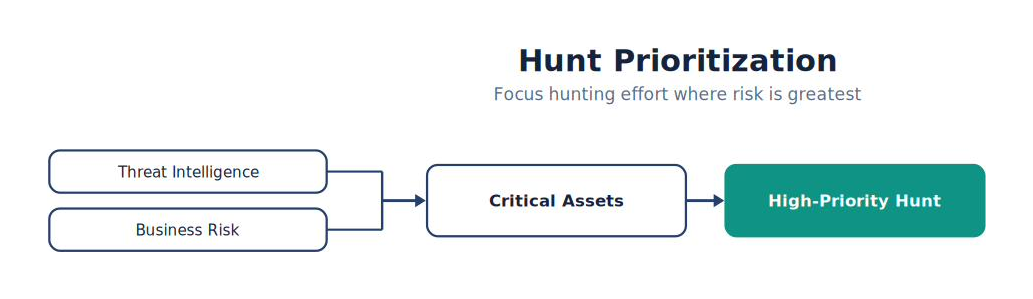
Note. The figure shows how hunt Prioritization narrows broad observations into prioritized evidence and increasingly confident analytical judgments.
Converting Intelligence Into Hypotheses
Threat Intelligence:
Recent attacks use Office documents to launch PowerShell.
Hypothesis:
Office applications launching PowerShell may indicate malicious document execution.
Evidence to collect:
Sysmon Event ID 1
Parent process
Command line
DNS queries
HTTP traffic
Defender alerts
Every piece of evidence directly supports or refutes the hypothesis.
Defining Success
Every hunt should establish success criteria before searching.
Example:
Success means:
- Hypothesis supported
or
- Hypothesis not supported
or
- Additional evidence required
Avoid changing the hypothesis after reviewing the data.
Building a Hunting Plan
Professional hunters document their methodology before beginning.
Example:
| Step | Action |
|---|---|
| 1 | Define hypothesis |
| 2 | Identify telemetry |
| 3 | Build searches |
| 4 | Collect evidence |
| 5 | Correlate events |
| 6 | Draw conclusions |
| 7 | Recommend detection improvements |
This process ensures repeatability.
Example Hunt
Hypothesis:
Unauthorized PowerShell downloads may be occurring.
Telemetry:
Sysmon
Suricata
Defender
Wazuh
Searches:
Figure 6-6
From PowerShell to Defender
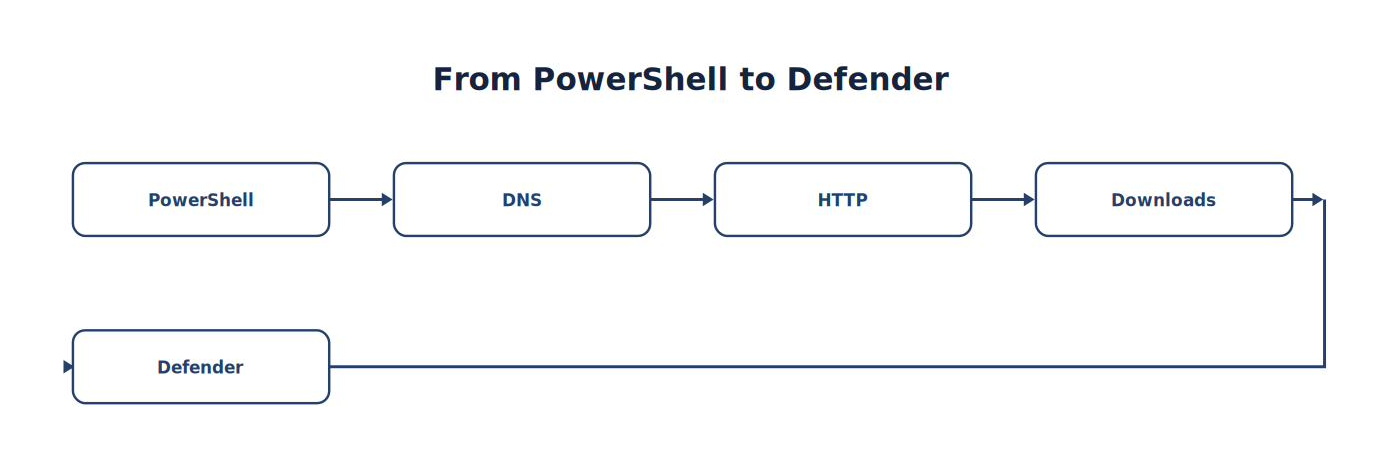
Note. The sequence traces how PowerShell progresses to Defender, emphasizing the intermediate evidence and processing steps.
Possible conclusions:
Supported
Unsupported
Inconclusive
Figure 6-7
Hypothesis Validation
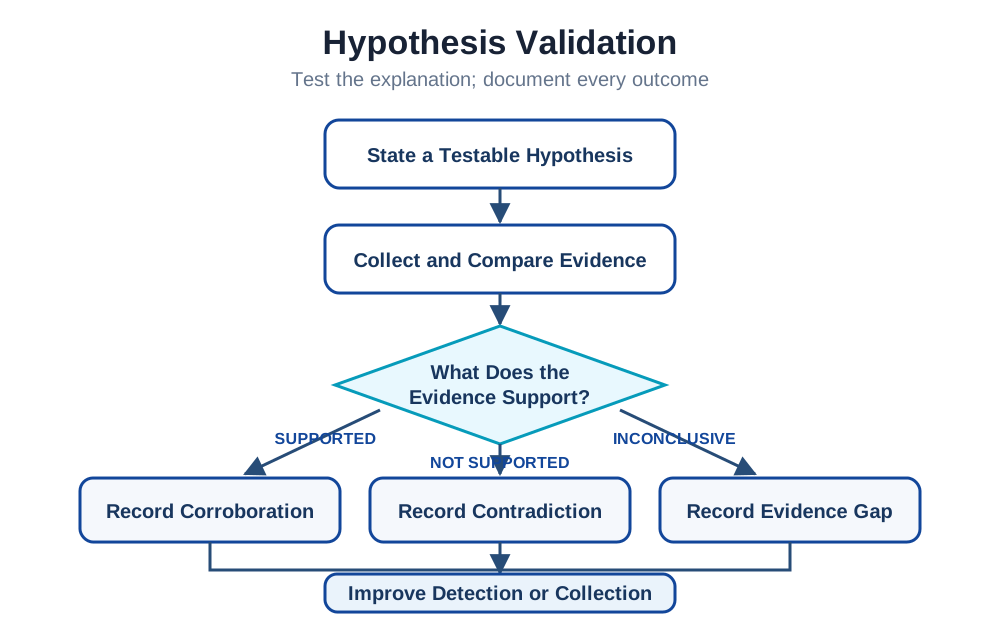
Note. The figure summarizes hypothesis Validation and highlights the relationships among its principal elements, evidence sources, and analytical outcomes.
Even unsupported hypotheses provide valuable information.
Common Student Mistake
Students often write hypotheses like:
Something suspicious may exist. This statement cannot be disproven. Instead, write hypotheses that can clearly be supported or rejected using available evidence. Scientific thinking improves threat hunting.
Chapter Exercise 6.2 — Developing Hunting Hypotheses
Objective
Develop three threat hunting hypotheses using the SOC laboratory.
Requirements
One hypothesis must originate from:
ATT&CK
Threat Intelligence
Organizational Knowledge
For each hypothesis:
Identify:
Threat
Expected behavior
Telemetry
ATT&CK mapping
Search strategy
Success criteria
Threat Hunting Planning Worksheet
| Item | Description |
|---|---|
| Hypothesis | __________________ |
| Business Risk | __________________ |
| ATT&CK Technique | __________________ |
| Telemetry Sources | __________________ |
| Search Queries | __________________ |
| Expected Evidence | __________________ |
| Success Criteria | __________________ |
Students should complete one worksheet for every hunt.
Threat Hunting Journal
Throughout the remainder of Part V, students maintain a hunting journal.
Each entry should include:
Date
Hunter
Hypothesis
Data sources
Searches performed
Evidence collected
ATT&CK techniques
Findings
Detection improvements
Lessons learned
By the end of the course, this journal becomes a professional artifact demonstrating analytical reasoning and investigative methodology.
Think Like a Threat Hunter
Imagine two analysts begin a hunt.
Analyst A
Opens Discover and starts clicking through random logs.
Analyst B
Reviews current threat intelligence, identifies a relevant ATT&CK technique, develops a measurable hypothesis, defines required telemetry, documents expected evidence, and only then begins searching. Both analysts spend two hours hunting. Only one followed a repeatable methodology. Professional threat hunting is hypothesis-driven, evidence-based, and measurable.
Key Concepts
By the end of this section, you should understand that:
Every threat hunt should begin with a clear, testable hypothesis.
Strong hypotheses are specific, measurable, and evidence-based.
Threat intelligence, ATT&CK, incident response findings, vulnerability disclosures, and organizational knowledge are valuable sources of hunting ideas.
Risk-based prioritization helps focus limited hunting resources on the most important threats.
A documented hunting plan improves repeatability, collaboration, and the quality of investigative outcomes.
Looking Ahead
The next section, 6.3 Advanced Searching with Wazuh Discover, teaches students how to transform hunting hypotheses into efficient searches. They will learn to build increasingly sophisticated queries using field filters, Boolean operators, ranges, wildcards, aggregations, and timelines to identify suspicious behaviors across millions of events. Rather than simply locating alerts, students will use Discover as a true investigative platform, developing searches that can be saved, shared, refined, and reused across future hunts. This chapter lays the technical foundation for enterprise-scale threat hunting using Wazuh.
6.3 Advanced Threat Hunting with Wazuh Discover
Learning Objectives
After completing this section, you should be able to:
Use Discover as a professional hunting platform.
Build structured hunting queries.
Search millions of events efficiently.
Filter endpoint and network telemetry.
Develop reusable hunting queries.
Correlate multiple data sources.
Document investigative searches.
Introduction
Imagine your manager asks:
“Has anyone executed PowerShell from Microsoft Word during the last thirty days?” There is no alert. No incident. No investigation. Only a question. Threat hunters answer questions using data. Discover is the primary interface used to answer those questions.
Thinking Like a Hunter
Most students begin searching like this:
Search:
powershell
Thousands of results appear.
Useful?
Not really. Professional hunters continue refining.
Figure 6-8
From PowerShell to Timeline
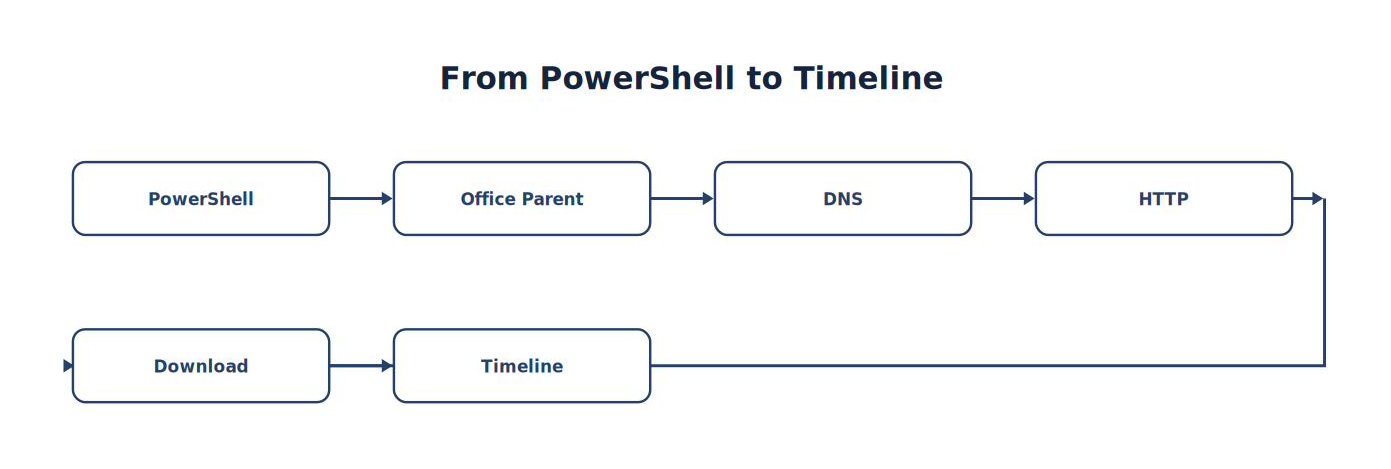
Note. The sequence traces how PowerShell progresses to Timeline, emphasizing the intermediate evidence and processing steps.
The search becomes progressively more focused.
Figure 6-9
Hunt Refinement
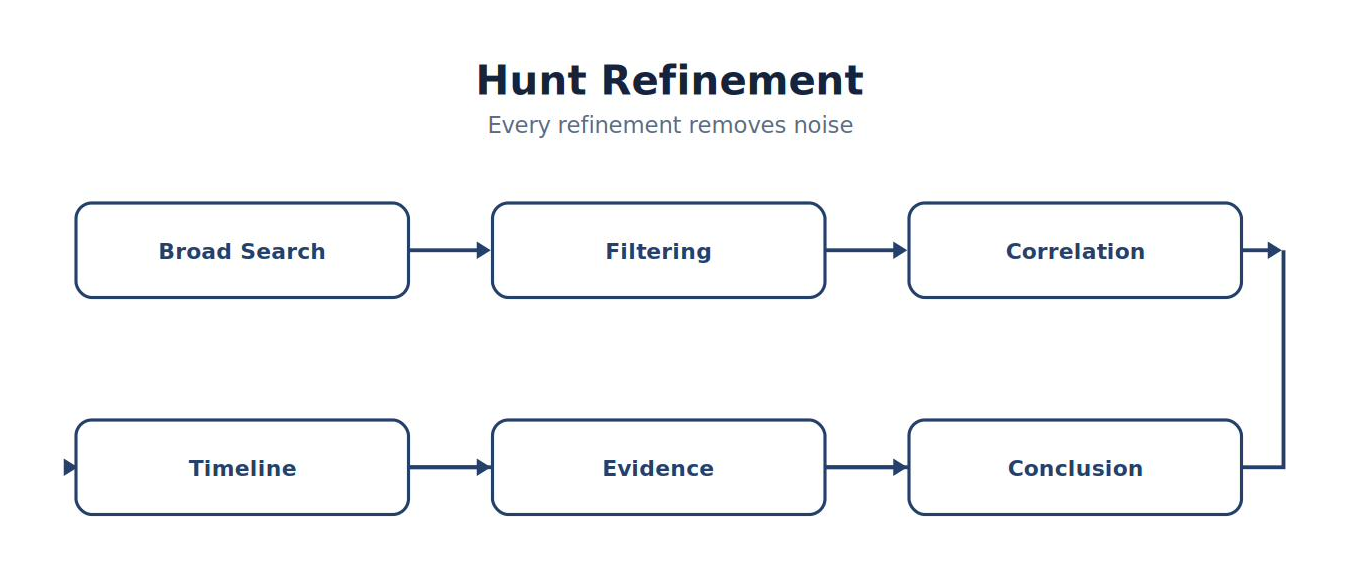
Note. The figure summarizes hunt Refinement and highlights the relationships among its principal elements, evidence sources, and analytical outcomes.
Every refinement removes noise.
Begin with the Hypothesis
Suppose the hypothesis states: “Microsoft Office applications on win11 may be launching PowerShell.” Do not search for the conclusion malware; search for the observable parent-child process relationship.
Navigate to → Wazuh Dashboard → Explore → Discover
Set the time selector to Last 24 hours, then enter:
WAZUH DASHBOARD · DQL FILTER
agent.name: "win11" AND data.win.system.eventID: 1 AND data.win.eventdata.image: *\\powershell.exe AND (data.win.eventdata.parentImage: *\\winword.exe OR data.win.eventdata.parentImage: *\\excel.exe OR data.win.eventdata.parentImage: *\\outlook.exe)The query requires Sysmon Event ID 1 process creation and PowerShell as the child, while the parenthesized OR group accepts Word, Excel, or Outlook as the parent. In each match, add @timestamp, agent.name, data.win.eventdata.user, data.win.eventdata.parentImage, data.win.eventdata.image, data.win.eventdata.commandLine, and data.win.eventdata.processGuid as columns. Those fields show who ran what, from which parent, when, and under which process identity.
Searching by Process
Begin broadly with a known executable, review populated fields, and then add context.
| Question | Wazuh DQL example | Fields to inspect and next pivot |
|---|---|---|
| Which systems launched PowerShell? | data.win.system.eventID: 1 AND data.win.eventdata.image: *\\powershell.exe |
Group by agent.name; pivot on user, parent image, command line, or process GUID. |
| Which users launched Command Prompt? | data.win.system.eventID: 1 AND data.win.eventdata.image: *\\cmd.exe |
Compare data.win.eventdata.user with the command line and logon context. |
Which Linux hosts executed curl? |
agent.name: "u2604" AND process.name: "curl" |
If process.name is absent, expand a known Linux event and use its populated executable or command field. |
| Which endpoints ran from a temporary directory? | data.win.system.eventID: 1 AND data.win.eventdata.image: *\\Temp\\* |
Inspect signature, hash, parent image, and command line before deciding whether execution is unusual. |
Field names depend on the source and decoder. Expand one known event before finalizing a reusable query; an empty result can mean a field mismatch rather than absence of the behavior.
Searching by Parent Process
Parent-child relationships frequently reveal attacker behavior because each executable may be legitimate by itself while the pairing is unusual.
WAZUH DASHBOARD · DQL FILTER
data.win.system.eventID: 1 AND data.win.eventdata.parentImage: *\\winword.exe AND data.win.eventdata.image: *\\powershell.exeSort ascending by @timestamp. Record the user, host, parent command line, child command line, parent process GUID, and process GUID. Then pivot on the PowerShell processGuid in Sysmon Event IDs 3 and 22 to test whether network or DNS activity followed.
Analyst Tradecraft Tip
Never stop at the first event. Every event should lead to another question. Professional hunters follow evidence until the activity is fully understood.
Time-Based Hunting
Time is one of the most valuable hunting dimensions. In Discover, set Last 24 hours, run the PowerShell process query below, and display the results as a date histogram using @timestamp.
WAZUH DASHBOARD · DQL FILTER
data.win.system.eventID: 1 AND data.win.eventdata.image: *\\powershell.exeCompare the histogram with Last 7 days using the same query. Look for bursts, first-seen activity, or execution outside the organization's documented working hours. Record the displayed time zone: “02:00” in the browser is not meaningful until the analyst knows whether it is local time or UTC. A spike is a lead; validate it against scheduled administration, class exercises, or automation.
User-Based Hunting
Users create investigative context. Start with an observed username, then reuse the exact value across process, authentication, and Defender telemetry.
| Question | Wazuh DQL example | How to use the result |
|---|---|---|
| Which users executed PowerShell? | data.win.system.eventID: 1 AND data.win.eventdata.image: *\\powershell.exe |
Add data.win.eventdata.user as a column and compare users. |
What else did Student01 execute? |
agent.name: "win11" AND data.win.system.eventID: 1 AND data.win.eventdata.user: *Student01 |
Sort by time; inspect image, parent image, and command line. |
| Did the same account authenticate? | data.win.system.eventID: 4624 AND data.win.eventdata.targetUserName: "Student01" |
Compare workstation, source address, logon type, and timestamp. |
| Did Defender record a related detection? | data.win.system.providerName: "Microsoft-Windows-Windows Defender" AND data.win.eventdata.detectionUser: *Student01* |
If detectionUser is absent, pivot by host, time, path, or process instead. |
User fields vary across providers: user, targetUserName, and subjectUserName are not interchangeable. Inspect the source event before choosing the identity field.
Host-Based Hunting
Use agent.name to bound Wazuh telemetry to an enrolled endpoint; use the event's computer or hostname field when the operating-system identity is required.
WAZUH DASHBOARD · DQL FILTER
agent.name: "win11" AND rule.level >= 7Add rule.id, rule.description, data.win.system.eventID, and @timestamp, then sort by rule or create a terms visualization on rule.id to see what drives the count. To investigate a new destination, filter the same host to Sysmon Event ID 3 and inspect destinationIp, destinationPort, image, and processGuid. A high alert count is workload, not automatically high risk; assess severity, behavior, and asset context.
Network Hunting
Network telemetry answers questions that endpoint logs cannot. Suricata writes protocol and alert records to /var/log/suricata/eve.json; Wazuh ingests those records when the laboratory integration is enabled (Open Information Security Foundation, n.d.).
UB2604 · TERMINAL
sudo jq -c 'select(.event_type == "http") | {time:.timestamp,src:.src_ip,dst:.dest_ip,host:.http.hostname,url:.http.url,status:.http.status}' /var/log/suricata/eve.json | tail -n 20jq -c emits one compact JSON result per line; select retains HTTP events; the object expression keeps only hunting fields; tail -n 20 bounds the display. In Wazuh, start with rule.groups: suricata AND data.event_type: "http", inspect a known result, and then add the exact populated hostname, URL, source, or destination field. Look for executable extensions, unusual destinations, unexpected ports, and endpoint/network timestamps that agree.
DNS Hunting
DNS can connect a process to a destination before an HTTP or TLS session is visible. Hunt the endpoint view first:
WAZUH DASHBOARD · DQL FILTER
agent.name: "win11" AND data.win.system.eventID: 22Add data.win.eventdata.image, data.win.eventdata.processGuid, data.win.eventdata.queryName, data.win.eventdata.queryResults, and @timestamp. Filter an observed domain with data.win.eventdata.queryName: "example.com", then pivot to the same process GUID or a narrow time window. For the sensor-side view:
UB2604 · TERMINAL
sudo jq -r 'select(.event_type == "dns") | [.timestamp,.src_ip,.dns.type,.dns.rrname,.dns.rcode] | @tsv' /var/log/suricata/eve.json | tail -n 25The filter retains DNS records and formats selected fields as tab-separated output. Repeated failures, long or high-entropy names, first-seen domains, and unusual volume are leads that require a baseline and corroboration; DNS alone does not establish compromise.
Figure 6-10
DNS Hunt — Endpoint Event Chain (Wazuh Discover)
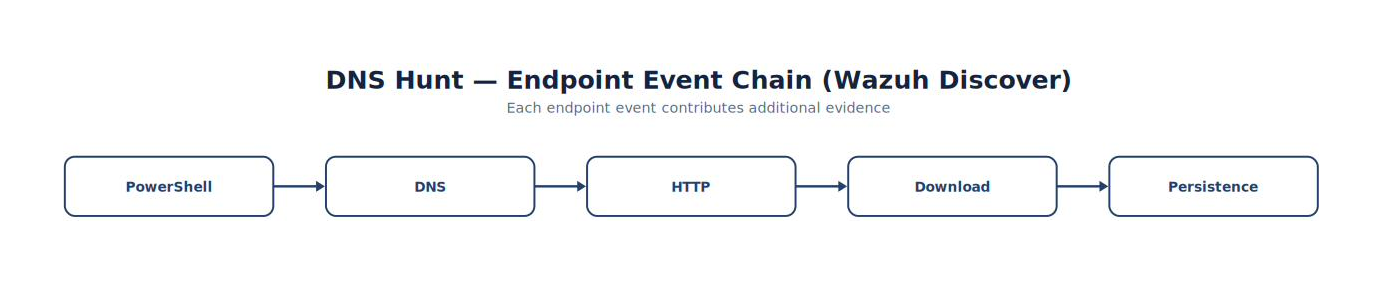
Note. The figure summarizes dNS Hunt — Endpoint Event Chain (Wazuh Discover) and highlights the relationships among its principal elements, evidence sources, and analytical outcomes.
Each event contributes additional evidence.
Timeline Hunting
Rather than viewing isolated events, build timelines.
Example:
| Time | Event |
|---|---|
| 10:01 | Word |
| 10:02 | PowerShell |
| 10:03 | DNS |
| 10:04 | HTTP |
| 10:05 | File Download |
| 10:06 | Defender |
Timelines reveal attack progression.
Building Progressive Searches
Professional hunters rarely build one complex query immediately. Instead, start broadly.
Example:
Step 1
PowerShell → Step 2
PowerShell
AND
Office → Step 3
PowerShell
AND
Office
AND
HTTP → Step 4
Timeline → Evidence → Conclusion
Progressive refinement reduces errors.
Saving Searches
Enterprise SOCs rarely recreate searches. Instead, they save successful hunting queries.
Benefits include:
Repeatability
Collaboration
Standardization
Faster investigations
Consistent methodology
Students should maintain a library of validated hunting searches throughout the course.
Search Documentation
Every search should include:
| Field | Description |
|---|---|
| Purpose | Why the search exists |
| Hypothesis | Behavior investigated |
| Telemetry | Data sources |
| ATT&CK | Related techniques |
| Filters | Search criteria |
| Findings | Results |
| Follow-up | Additional investigation |
Searches become engineering artifacts.
Pivoting
Threat hunters constantly pivot.
Example:
Start:
Figure 6-11
From PowerShell to Timeline
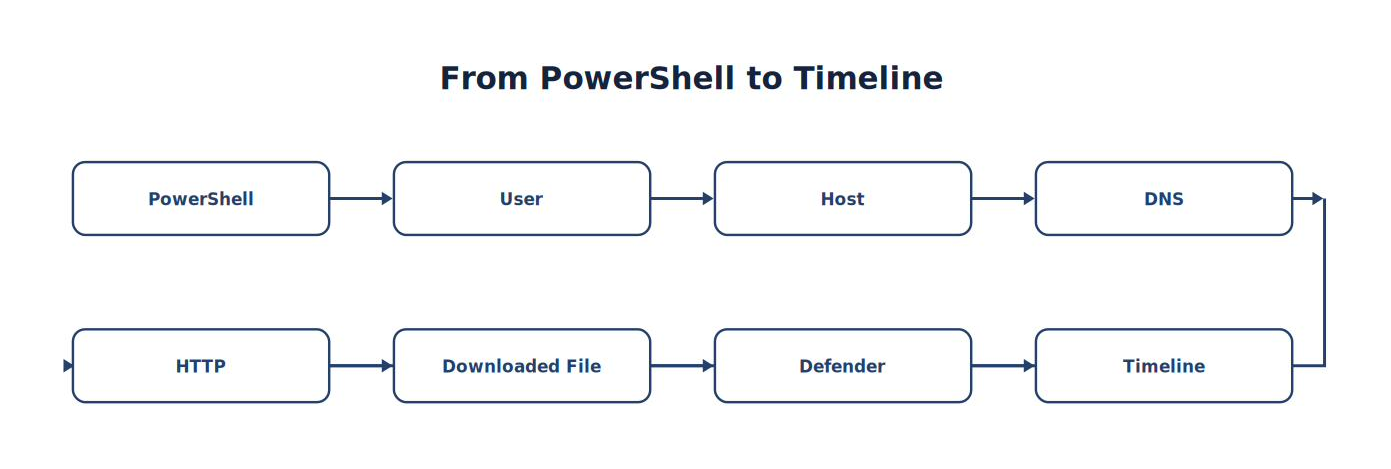
Note. The sequence traces how PowerShell progresses to Timeline, emphasizing the intermediate evidence and processing steps.
Each observation leads naturally to another.
Figure 6-12
Investigative Pivoting

Note. The figure summarizes investigative Pivoting and highlights the relationships among its principal elements, evidence sources, and analytical outcomes.
There is rarely a single “correct” investigation path.
Common Student Mistake
Students often stop after finding the first suspicious event.
Professional hunters ask:
What happened before?
What happened afterward?
Which user performed the activity?
Which systems communicated?
Did another sensor observe the same behavior?
The first event usually begins the investigation—not ends it.
Chapter Exercise 6.3 — Advanced Threat Hunting
Objective
Conduct a structured hunt using progressively refined searches.
Initial Hypothesis
Office applications may be launching PowerShell to retrieve remote content.
Investigation Steps
Locate Office executions.
Pivot to child processes.
Identify PowerShell.
Locate associated DNS.
Review Suricata HTTP events.
Review Defender telemetry.
Construct a timeline.
Determine:
Supported?
Unsupported?
Inconclusive?
Hunting Documentation Worksheet
| Step | Evidence |
|---|---|
| Hypothesis | __________________ |
| Initial Search | __________________ |
| Pivot 1 | __________________ |
| Pivot 2 | __________________ |
| Timeline | □ |
| ATT&CK Mapping | __________________ |
| Conclusion | __________________ |
| Detection Recommendation | __________________ |
Students should submit the completed worksheet with screenshots of their search process and supporting evidence.
Threat Hunter Tips
Develop these habits:
✓ Begin with a hypothesis. ✓ Search for behavior. ✓ Pivot frequently. ✓ Build timelines. ✓ Correlate multiple sensors. ✓ Save useful searches. ✓ Document methodology. ✓ Recommend detection improvements. Threat hunting and Detection Engineering should continuously reinforce each other.
Think Like a Threat Hunter
Imagine two analysts receive the same assignment:
“Determine whether Office applications are being used to launch PowerShell.”
Analyst A
Searches for “PowerShell,” reviews the first ten events, and stops.
Analyst B
Defines a hypothesis, searches for Office processes, pivots to child processes, correlates Sysmon, Suricata, Windows Defender, and Wazuh telemetry, constructs a timeline, documents the methodology, saves the search for future use, and recommends a new correlation rule based on the findings. Both analysts searched the same data. Only one performed threat hunting.
Key Concepts
By the end of this section, you should understand that:
Discover is an investigative platform, not just an alert viewer.
Effective hunting begins with questions and hypotheses.
Progressive query refinement improves efficiency and reduces noise.
Pivoting between users, hosts, processes, network activity, and timelines is a core hunting skill.
Saved searches, documentation, and repeatable methodologies improve consistency across SOC teams.
Every hunt should conclude with evidence-based findings and recommendations for improving future detections.
Looking Ahead
The next section, 6.4 Endpoint Threat Hunting with Sysmon, moves from general search techniques to deep endpoint analysis. Students will learn how to hunt using Sysmon process trees, parent-child relationships, command-line arguments, network connections, file creation events, registry activity, and DNS queries. Rather than relying solely on alerts, they will reconstruct attacker behavior directly from endpoint telemetry, using Sysmon as a forensic-quality data source for proactive threat hunting. This chapter forms the bridge between traditional SOC analysis and advanced endpoint detection and response (EDR) methodologies used in enterprise environments.
6.4 Endpoint Threat Hunting with Sysmon
Learning Objectives
After completing this section, you should be able to:
Explain why Sysmon is one of the most valuable hunting tools available (Russinovich & Garnier, n.d.).
Hunt using Sysmon process trees.
Analyze parent-child process relationships.
Investigate command-line arguments.
Hunt using DNS telemetry.
Correlate Sysmon events with Wazuh.
Reconstruct attacker timelines.
Introduction
Windows records thousands of security events every day. Most are useful. Some are extremely valuable. Sysmon was designed to provide investigators with much richer telemetry than standard Windows logging.
Instead of simply recording:
PowerShell executed
Sysmon records:
Parent process
Child process
User
Process GUID
Command line
Working directory
Hashes
Integrity level
Session
Network activity
DNS queries
This additional context transforms ordinary logs into investigative evidence.
Why Sysmon Matters
Imagine two investigators.
Investigator A receives:
PowerShell executed.
Investigator B receives:
Figure 6-13
From WINWORD.EXE to Windows Defender Detection
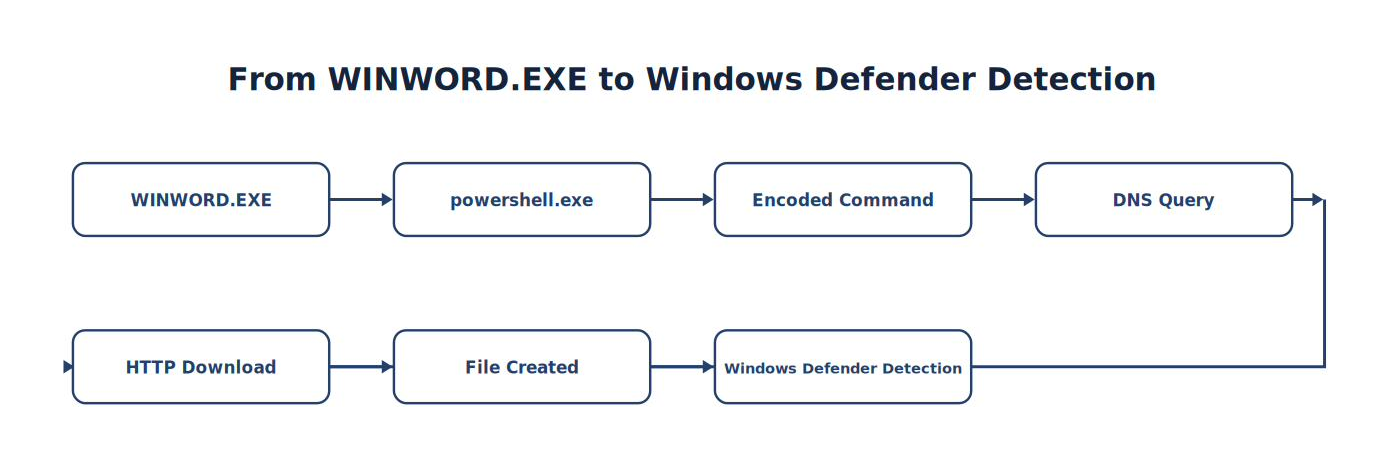
Note. The sequence traces how WINWORD.EXE progresses to Windows Defender Detection, emphasizing the intermediate evidence and processing steps.
Which investigation is easier?
Clearly the second. Context explains behavior.
Figure 6-14
Sysmon Visibility
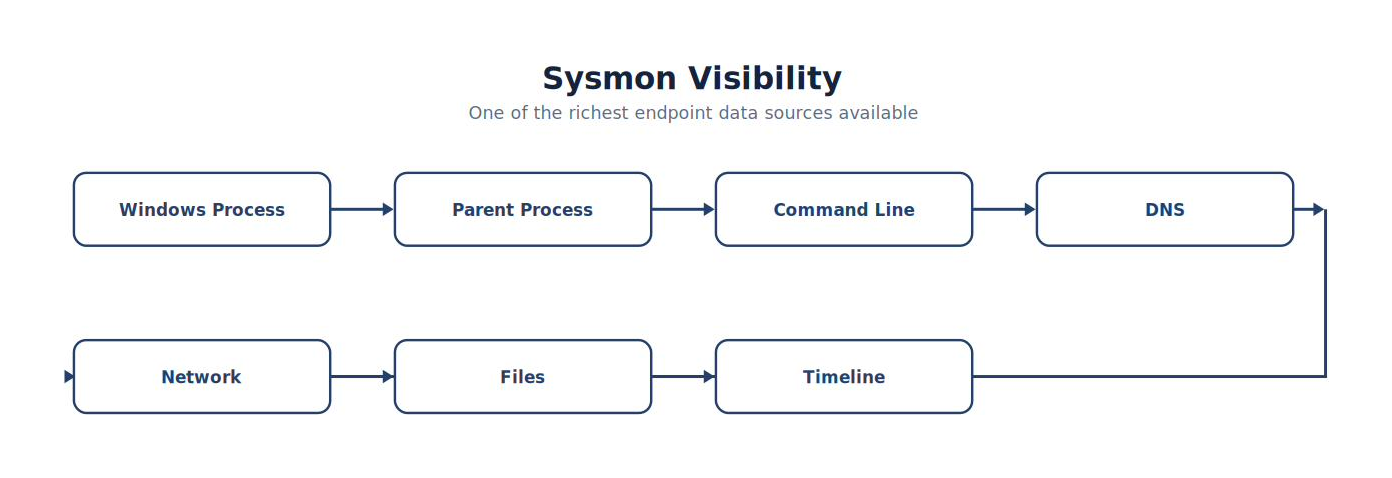
Note. The figure summarizes sysmon Visibility and highlights the relationships among its principal elements, evidence sources, and analytical outcomes.
Sysmon provides one of the richest endpoint data sources available to defenders (Russinovich & Garnier, n.d.).
The Most Important Sysmon Events
Throughout this textbook we focus on several high-value events.
| Event ID | Description | Hunting Value |
|---|---|---|
| 1 | Process Creation | Very High |
| 3 | Network Connection | Very High |
| 8 | CreateRemoteThread | High |
| 11 | File Creation | High |
| 22 | DNS Query | Very High |
These events provide enough telemetry to reconstruct many attacker behaviors.
Analyst Tradecraft Tip
Students often ask:
“Should I collect every Sysmon event?” Not necessarily. Collecting more data does not automatically improve security. Collect the telemetry that supports your investigations while considering storage, performance, and operational requirements. Effective logging is intentional.
Hunting Process Trees
Attackers rarely execute a single program. Instead they launch sequences.
Example:
Figure 6-15
From Explorer to payload.exe
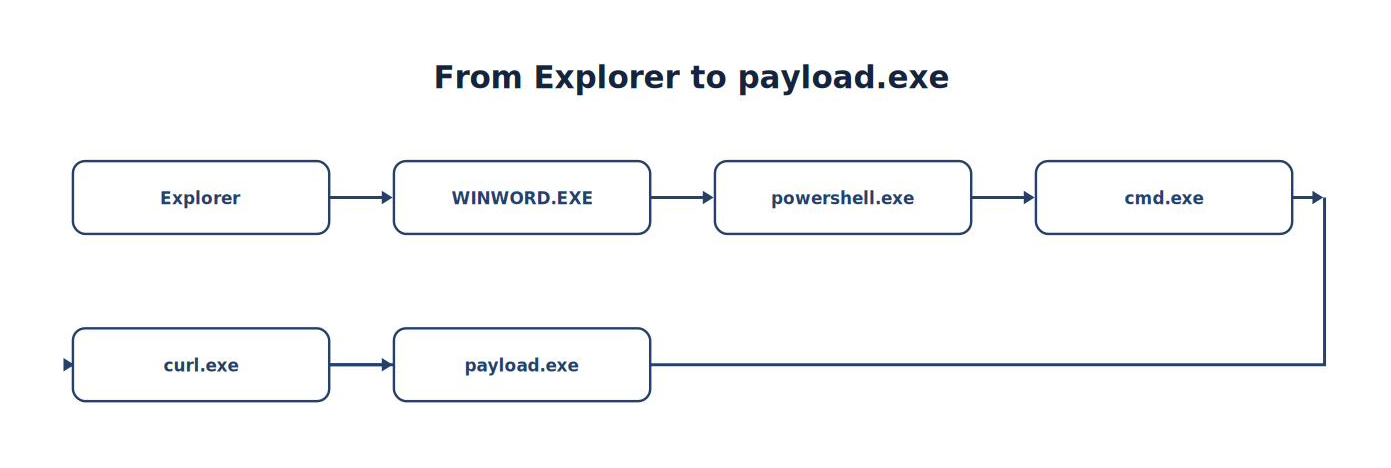
Note. The sequence traces how Explorer progresses to payload.exe, emphasizing the intermediate evidence and processing steps.
A process tree tells a story. Professional hunters learn to read that story.
Parent-Child Relationships
One of the strongest behavioral indicators is an unusual parent-child relationship.
Normal:
Explorer → Notepad
More unusual:
WINWORD.EXE → powershell.exe
Even more suspicious:
powershell.exe → rundll32.exe
The parent process often explains why a program executed.
Hunting Command Lines
Command-line arguments frequently contain the most valuable evidence.
Consider these examples:
Normal:
powershell.exe
More suspicious:
WIN11 · PowerShell
powershell.exe -EncodedCommandPotentially suspicious:
WIN11 · PowerShell
powershell.exe -ExecutionPolicy BypassHighly suspicious:
WIN11 · PowerShell
powershell.exe -WindowStyle Hidden -EncodedCommandThe process name stayed the same. The command line changed dramatically.
Figure 6-16
Command-Line Analysis
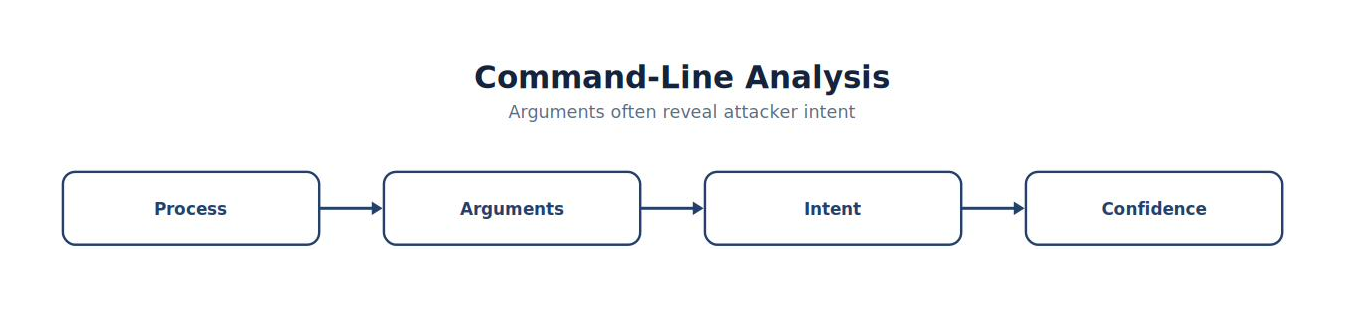
Note. The figure summarizes command-Line Analysis and highlights the relationships among its principal elements, evidence sources, and analytical outcomes.
Arguments often reveal attacker intent.
Hunting DNS Activity
DNS queries often occur before network communication.
Example sequence:
Figure 6-17
From PowerShell to Download
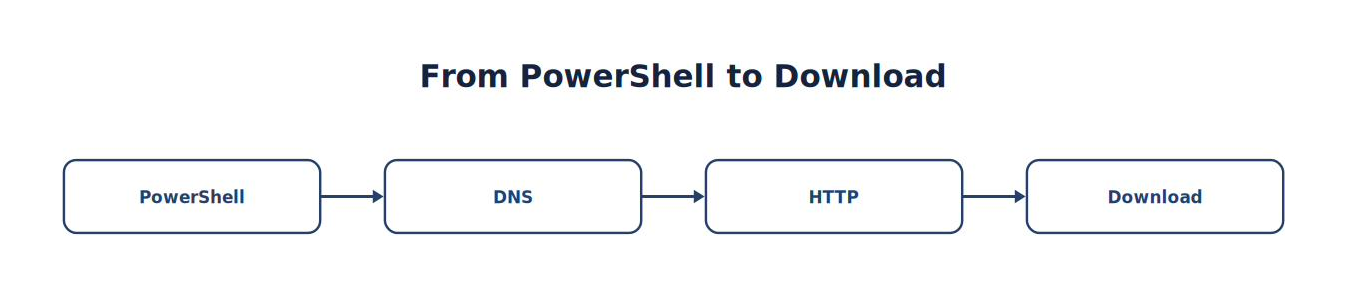
Note. The sequence traces how PowerShell progresses to Download, emphasizing the intermediate evidence and processing steps.
Questions:
Which domain?
Has it been observed before?
Which process requested it?
Which user initiated the request?
Sysmon Event ID 22 provides these answers.
Hunting Network Connections
Sysmon Event ID 3 records outbound network activity.
Example questions:
Which process initiated the connection?
Which destination IP?
Which port?
Was the destination expected?
Did Suricata observe the same traffic?
Endpoint and network telemetry should support one another.
Hunting File Creation
Attackers frequently create files.
Sysmon Event ID 11 helps answer:
Which process created the file?
Where was it written?
When?
What happened afterward?
A downloaded executable followed immediately by execution deserves further investigation.
Building an Endpoint Timeline
Rather than examining events individually, construct a timeline.
| Time | Event | Sysmon ID |
|---|---|---|
| 10:01 | Word Opened | 1 |
| 10:02 | PowerShell | 1 |
| 10:03 | DNS Query | 22 |
| 10:04 | HTTP Connection | 3 |
| 10:05 | File Created | 11 |
| 10:06 | Defender Detection | N/A |
Timelines reveal causality rather than coincidence.
Figure 6-18
Endpoint Timeline
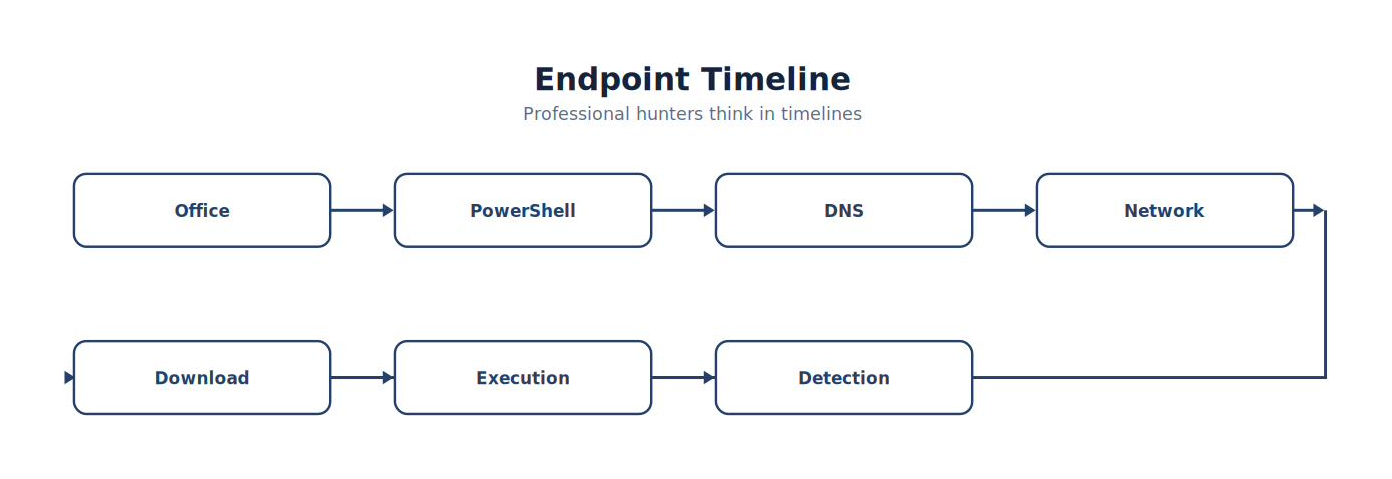
Note. The timeline places the events associated with endpoint Timeline in chronological order to support reconstruction, correlation, and defensible conclusions.
Professional hunters think in timelines.
Pivoting with Sysmon
A typical hunt might begin with:
PowerShell.
Next pivot:
Parent Process.
Next:
User.
Next:
DNS.
Next:
Network.
Next:
File.
Next:
Defender. Every answer generates another question.
Correlating with Wazuh
Sysmon becomes significantly more valuable when correlated.
Example:
| Technology | Evidence |
|---|---|
| Sysmon | Process Creation |
| Sysmon | DNS |
| Suricata | HTTP |
| Defender | Malware |
| Wazuh | Correlation |
Multiple sensors increase investigative confidence.
Common Student Mistake
Students frequently focus only on the executable name.
Example:
powershell.exe
Professional hunters investigate:
Parent process
Command line
User
Process GUID
Child processes
DNS
Network
Timeline
Context is more valuable than names.
Chapter Exercise 6.4 — Endpoint Threat Hunt
Objective
Reconstruct an attack sequence using only Sysmon telemetry collected from the Windows 11 laboratory workstation.
Scenario
Generate the following controlled activity:
Open Microsoft Word.
Launch PowerShell.
Perform an nslookup.
Download the EICAR test file using curl (EICAR, n.d.).
Allow Windows Defender to quarantine the file.
Student Tasks
Using only Sysmon events, determine:
Which application launched PowerShell?
Which user executed the commands?
What command-line arguments were used?
Which DNS query occurred?
Which network connection followed?
Which file was created?
Construct a complete timeline.
Do not use Wazuh alerts until after the Sysmon investigation is complete.
Endpoint Hunting Worksheet
| Investigation Step | Evidence |
|---|---|
| Initial Process | __________________ |
| Parent Process | __________________ |
| Command Line | __________________ |
| DNS Query | __________________ |
| Network Connection | __________________ |
| File Created | __________________ |
| Timeline Completed | □ |
| Wazuh Correlation Verified | □ |
Students should retain this worksheet as part of their threat hunting portfolio.
Building an Endpoint Hunt Playbook
By this point in the course, students should begin creating reusable playbooks for common investigations.
A sample playbook might include:
Identify the initiating process.
Examine the parent process.
Review the full command line.
Check for associated DNS queries.
Review outbound network connections.
Identify any files created or modified.
Correlate with Wazuh and Suricata.
Map the activity to MITRE ATT&CK.
Document findings and recommend detection improvements.
Over time, students will build a library of playbooks that can be reused across investigations.
Think Like a Threat Hunter
Suppose you discover that powershell.exe executed on a workstation. That fact alone tells you very little.
Now suppose you learn that:
WINWORD.EXE launched PowerShell.
The command line contained -EncodedCommand.
A DNS lookup immediately followed.
An outbound HTTP connection downloaded a file.
Windows Defender quarantined that file.
Wazuh correlated the sequence into a high-severity alert.
The investigation has shifted from observing an isolated process to reconstructing an attack chain. That ability—to reconstruct behavior from endpoint telemetry—is one of the defining skills of an experienced threat hunter.
Key Concepts
By the end of this section, you should understand that:
Sysmon provides rich endpoint telemetry that extends far beyond standard Windows event logging.
Parent-child process relationships often reveal attacker workflows.
Command-line arguments provide critical investigative context.
Sysmon DNS, network, and file creation events can be combined to reconstruct attack timelines.
Effective endpoint hunting relies on context, sequencing, and correlation rather than isolated events.
Sysmon becomes even more powerful when combined with Wazuh, Suricata, Windows Defender, and MITRE ATT&CK.
Looking Ahead
The next section, 6.5 Network Threat Hunting with Suricata and Packet Analysis, shifts the focus from the endpoint to the network. Students will learn how to hunt using Suricata alerts, packet captures, HTTP metadata, DNS activity, TLS information, and network flows. Rather than relying solely on endpoint evidence, they will investigate attacker behavior as it traverses the network, correlate packets with endpoint telemetry, and develop comprehensive investigations that combine host and network perspectives into a single, evidence-based narrative. This chapter reinforces one of the central themes of the textbook: the strongest investigations are built from multiple independent sources of telemetry.
6.5 Network Threat Hunting with Suricata and Packet Analysis
Learning Objectives
After completing this section, you should be able to:
Explain the role of network threat hunting.
Hunt using Suricata alerts and metadata.
Interpret network flows.
Investigate DNS activity.
Analyze HTTP communications.
Examine TLS metadata.
Correlate packet captures with Wazuh and Sysmon.
Reconstruct attacker communications.
Introduction
Suppose an attacker successfully compromises a workstation. Eventually, that attacker must communicate.
Perhaps to:
Download malware
Contact a Command-and-Control (C2) server
Exfiltrate data
Scan internal systems
Move laterally
Attackers can disguise many things. They cannot accomplish these objectives without generating network traffic. Network hunting focuses on discovering those communications.
Endpoint vs Network Hunting
Both perspectives are valuable.
| Endpoint | Network |
|---|---|
| Processes | Packets |
| Files | Connections |
| Registry | Flows |
| Users | Sessions |
| Command Lines | Protocols |
| Process Trees | Conversations |
Professional investigations combine both.
Figure 6-19
Dual Perspective Investigation
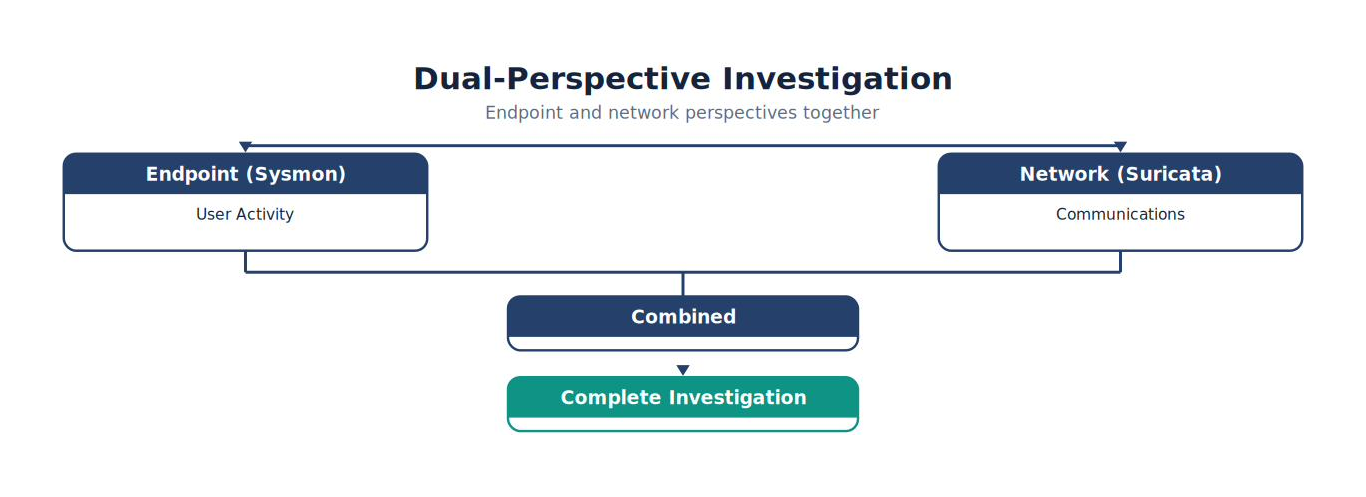
Note. The figure summarizes dual Perspective Investigation and highlights the relationships among its principal elements, evidence sources, and analytical outcomes.
Why Network Hunting Matters
Suppose malware deletes itself immediately after execution. Endpoint evidence may disappear. However, network evidence may still exist.
Examples include:
DNS requests
HTTP downloads
TLS sessions
Beaconing
Data transfers
Networks often preserve evidence after endpoints have changed.
Analyst Tradecraft Tip
Attackers frequently change:
Filenames
Hashes
Registry keys
Changing behavior is much harder. Changing network communication is harder still. This is one reason network hunting remains valuable even against sophisticated adversaries.
Suricata as a Hunting Sensor
Suricata provides more than alerts. It records valuable metadata about network communications.
Examples include:
Source IP
Destination IP
Ports
Protocols
DNS
HTTP
TLS
Flow information
File metadata
JA3/JA4 fingerprints (when configured)
Even when no signature fires, metadata can reveal unusual behavior.
Hunting DNS Activity
DNS often provides the earliest indication of malicious communication.
Questions include:
Which domains were queried?
Which process initiated the lookup?
Has this domain appeared before?
Which hosts queried the same domain?
Did HTTP communication immediately follow?
DNS frequently reveals attacker infrastructure.
Figure 6-20
DNS Hunt — Network Perspective (Suricata)
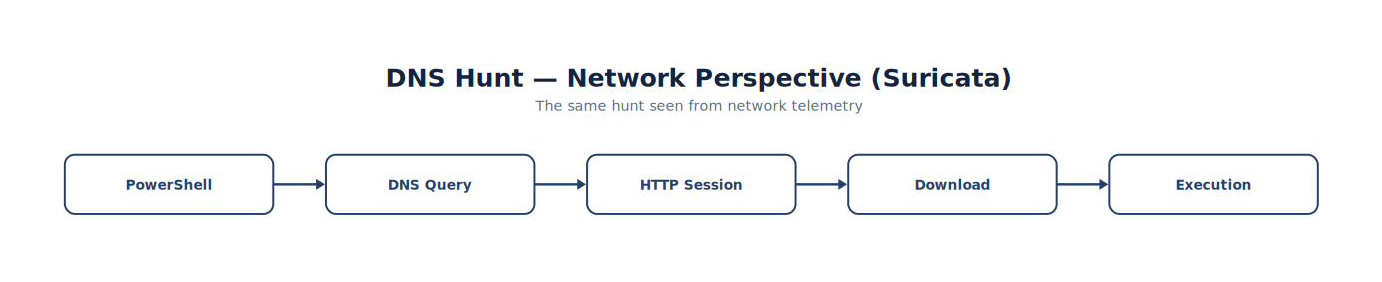
Note. The figure summarizes dNS Hunt — Network Perspective (Suricata) and highlights the relationships among its principal elements, evidence sources, and analytical outcomes.
Hunting HTTP Traffic
HTTP metadata provides valuable context.
Example questions:
Which URL was requested?
Which host initiated the request?
What User-Agent was used?
Was a file downloaded?
Did multiple systems access the same resource?
HTTP metadata often identifies malware delivery.
TLS Hunting
Encrypted traffic still provides useful metadata.
Questions include:
Which server was contacted?
Which certificate was presented?
Which Server Name Indication (SNI) was requested?
Was the JA3 fingerprint unusual?
Has this TLS fingerprint been observed previously?
Encryption protects content—not necessarily metadata.
Flow Analysis
Network flows summarize conversations.
Example:
| Source | Destination | Protocol | Duration |
|---|---|---|---|
| WIN11 | Web Server | HTTP | 4 sec |
| WIN11 | DNS | UDP | 20 ms |
| WIN11 | External IP | TLS | 35 sec |
Flows help identify unusual communication patterns.
Packet Hunting
Sometimes metadata is insufficient. Hunters may examine packet captures.
Packet analysis answers questions such as:
What commands were transmitted?
What files were downloaded?
Was authentication successful?
Which protocol fields appear unusual?
Packet captures provide the most detailed network evidence.
Detail is useful only when the collection point can observe the activity being investigated. A packet capture may miss traffic that followed another path, occurred before capture began, or remained opaque because of encryption. Hunters should therefore record the sensor location, capture interval, interface, filtering conditions, and time source before interpreting an apparent absence of traffic. Flow and protocol metadata can establish scope and recurrence, while selected packet data can answer narrower content-level questions. This layered approach reduces unnecessary packet inspection and makes the hunt easier to reproduce (Kent et al., 2006; Rich, 2026).
Figure 6-21
Network Investigation Pyramid
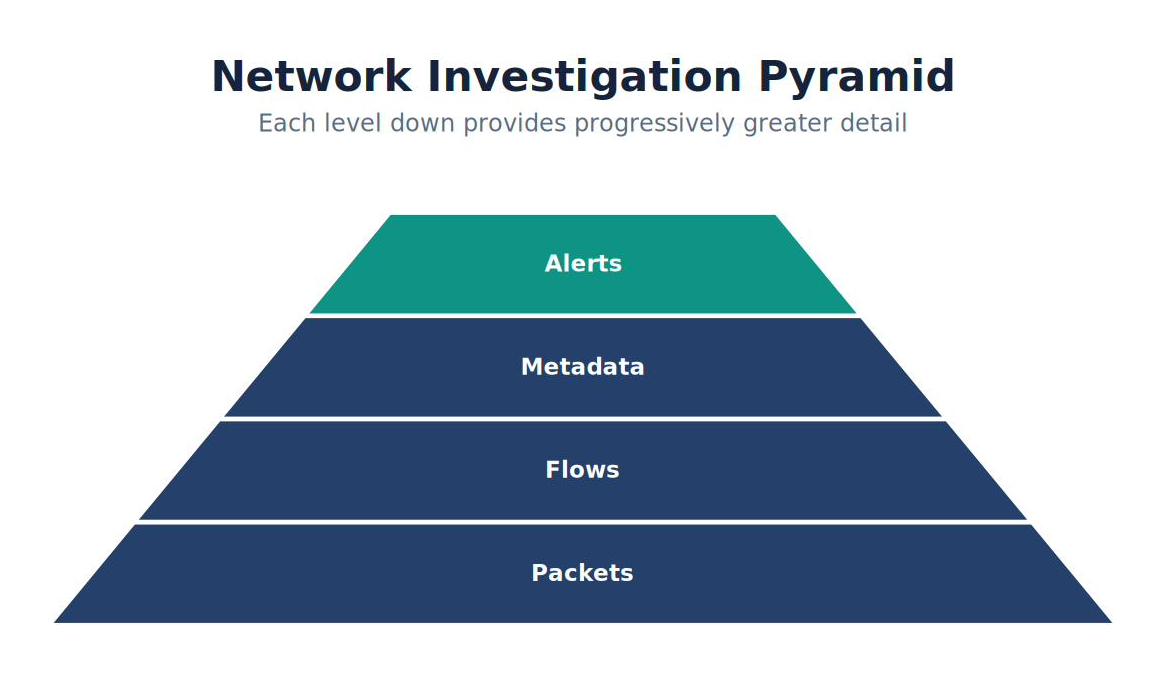
Note. The figure shows how network Investigation Pyramid narrows broad observations into prioritized evidence and increasingly confident analytical judgments.
Each level provides progressively greater detail.
Correlating with Sysmon
Suppose Sysmon reports:
PowerShell → Network Connection
Suricata reports:
HTTP Download
Packet Capture confirms:
Executable transferred
Together, the evidence is far stronger than any single source.
Building a Network Timeline
A typical hunt might produce:
| Time | Source | Event |
|---|---|---|
| 10:01 | Sysmon | PowerShell |
| 10:02 | Sysmon | DNS Query |
| 10:02 | Suricata | DNS Metadata |
| 10:03 | Suricata | HTTP Request |
| 10:03 | Packet Capture | Executable Download |
| 10:04 | Sysmon | File Created |
| 10:05 | Defender | Malware Detection |
Timelines combine endpoint and network evidence.
Hunting Rare Destinations
One valuable hunting strategy involves identifying uncommon communications.
Questions include:
Which external IP addresses were contacted for the first time?
Which domains are rarely observed?
Which hosts contacted only a single external destination?
Which systems generated the most outbound connections?
Rare events deserve attention.
Beaconing Detection
Many attackers periodically communicate with external infrastructure.
Example:
Figure 6-22
From Every 60 Seconds to Same Packet Size
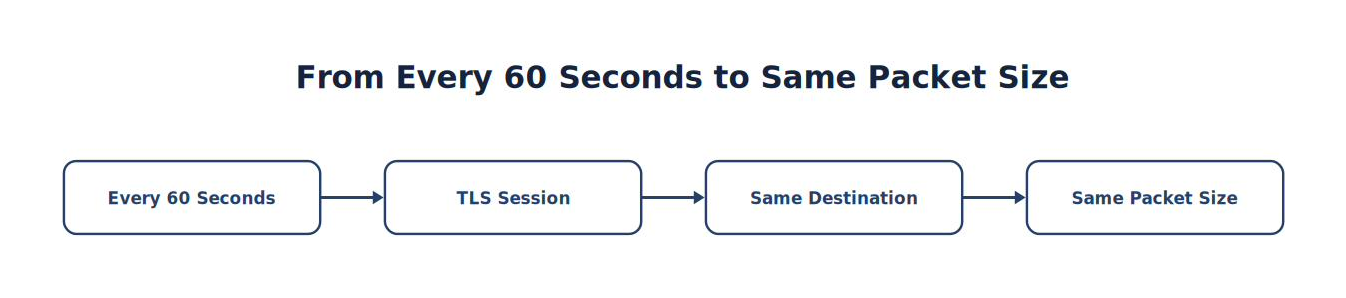
Note. The sequence traces how Every 60 Seconds progresses to Same Packet Size, emphasizing the intermediate evidence and processing steps.
Questions:
Is the timing regular?
Is the destination unusual?
Does the behavior occur across multiple hosts?
Consistent timing may indicate automated communication.
Data Exfiltration Hunting
Not all attacks download data. Some upload it.
Questions include:
Which hosts transmitted unusually large amounts of data?
Which protocols carried the traffic?
Did uploads occur outside normal business hours?
Were cloud storage services involved?
Exfiltration often differs from ordinary user behavior.
Common Student Mistake
Students frequently assume that every Suricata alert represents malicious activity.
Professional hunters recognize that:
Some alerts are informational.
Some indicate policy violations.
Some represent benign administrative activity.
Some are false positives.
Suricata provides evidence. Analysts determine significance.
Chapter Exercise 6.5 — Network Threat Hunt
Objective
Reconstruct an attack sequence using only network evidence.
Scenario
Generate:
DNS lookup.
HTTP download.
TLS connection.
Download the EICAR test file.
Observe Suricata detections.
Students may use Wazuh only after completing the network investigation.
Student Tasks
Determine:
Source host.
Destination host.
DNS query.
HTTP request.
Downloaded resource.
Timeline.
Correlated Sysmon evidence.
Network Hunting Worksheet
| Investigation Step | Evidence |
|---|---|
| Source Host | __________________ |
| Destination | __________________ |
| DNS | __________________ |
| HTTP | __________________ |
| TLS | __________________ |
| Packet Capture | □ |
| Timeline | □ |
| Wazuh Correlation | □ |
Combining Endpoint and Network Evidence
Professional investigations merge both perspectives.
Example:
Figure 6-23
From Word to Incident Confirmed
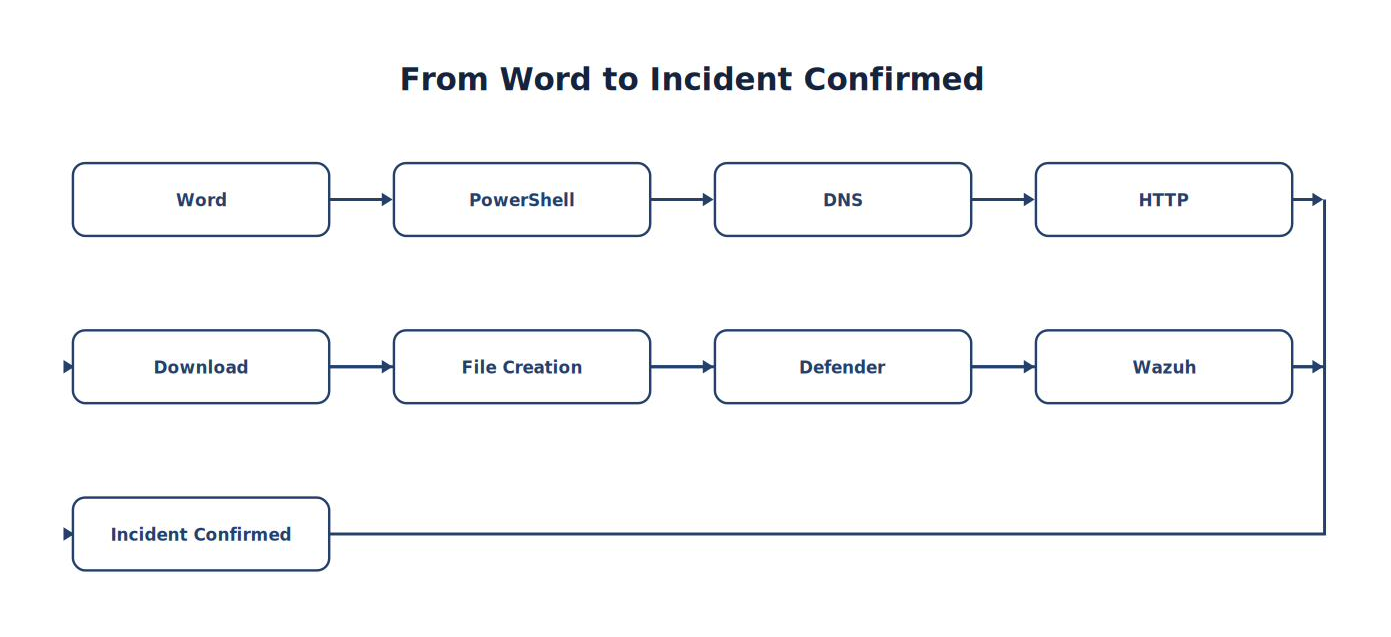
Note. The sequence traces how Word progresses to Incident Confirmed, emphasizing the intermediate evidence and processing steps.
This sequence tells a coherent story supported by multiple independent sensors.
Threat Hunter Tips
Successful network hunters:
✓ Hunt behaviors instead of signatures. ✓ Examine metadata before packet payloads. ✓ Correlate endpoint and network evidence. ✓ Build timelines. ✓ Investigate unusual communications. ✓ Validate assumptions with multiple sources. ✓ Document investigative reasoning.
Think Like a Threat Hunter
Imagine you discover a suspicious outbound TLS connection. A beginning analyst might stop after identifying the destination IP address.
A professional threat hunter asks:
Which process initiated the connection?
Which user launched that process?
Was there a DNS query immediately beforehand?
Was a file downloaded?
Did Sysmon record file creation?
Did Defender observe malware?
Did Wazuh correlate these events?
Does the behavior align with a known ATT&CK technique?
The investigation expands from a single connection into a complete attack narrative. That ability to connect endpoint and network evidence is what distinguishes experienced threat hunters from technicians who simply review alerts.
Key Concepts
By the end of this section, you should understand that:
Network hunting complements endpoint investigations by revealing communications between systems.
Suricata provides both signature-based alerts and valuable protocol metadata.
DNS, HTTP, TLS, flow records, and packet captures each provide different investigative perspectives.
Rare destinations, beaconing patterns, and unusual data transfers are valuable hunting opportunities.
The strongest investigations correlate Sysmon, Suricata, Windows Defender, packet captures, and Wazuh into a unified timeline.
Network telemetry answers how systems communicated, while endpoint telemetry explains what processes initiated those communications.
Looking Ahead
The next section, 6.6 Threat Hunting Using the MITRE ATT&CK Framework, teaches students how to organize hunts around adversary behaviors rather than individual technologies. Instead of asking, “What does Sysmon show?” or “What did Suricata detect?”, they will ask, “How would an attacker accomplish Discovery, Credential Access, Persistence, or Lateral Movement, and what evidence would those behaviors leave behind?” This ATT&CK-driven methodology provides a repeatable framework for enterprise threat hunting and becomes the organizing model for the remainder of Part V.
6.6 Threat Hunting with the MITRE ATT&CK Framework
Learning Objectives
After completing this section, you should be able to:
Explain why ATT&CK is an effective hunting framework.
Organize hunts using ATT&CK tactics.
Develop technique-specific hunting plans.
Correlate ATT&CK techniques across multiple telemetry sources.
Identify detection gaps using ATT&CK.
Document ATT&CK-driven hunts.
Recommend improvements to SOC visibility.
Introduction
Suppose your SOC manager asks:
“How well can we detect Credential Access?”
That question is different from asking:
“Can Sysmon detect Mimikatz?” One focuses on a specific tool. The other focuses on an attacker objective. Threat hunters organize investigations around attacker objectives because tools, malware families, and infrastructure change constantly. Adversary objectives change much more slowly.
Why ATT&CK Works for Hunting
MITRE ATT&CK organizes adversary behavior into logical stages (MITRE Corporation, n.d.-a).
Examples include:
Initial Access
Execution
Persistence
Privilege Escalation
Defense Evasion
Credential Access
Discovery
Lateral Movement
Collection
Exfiltration
Impact
Each tactic naturally becomes a hunting category.
Figure 6-24
ATT&CK-Driven Hunting
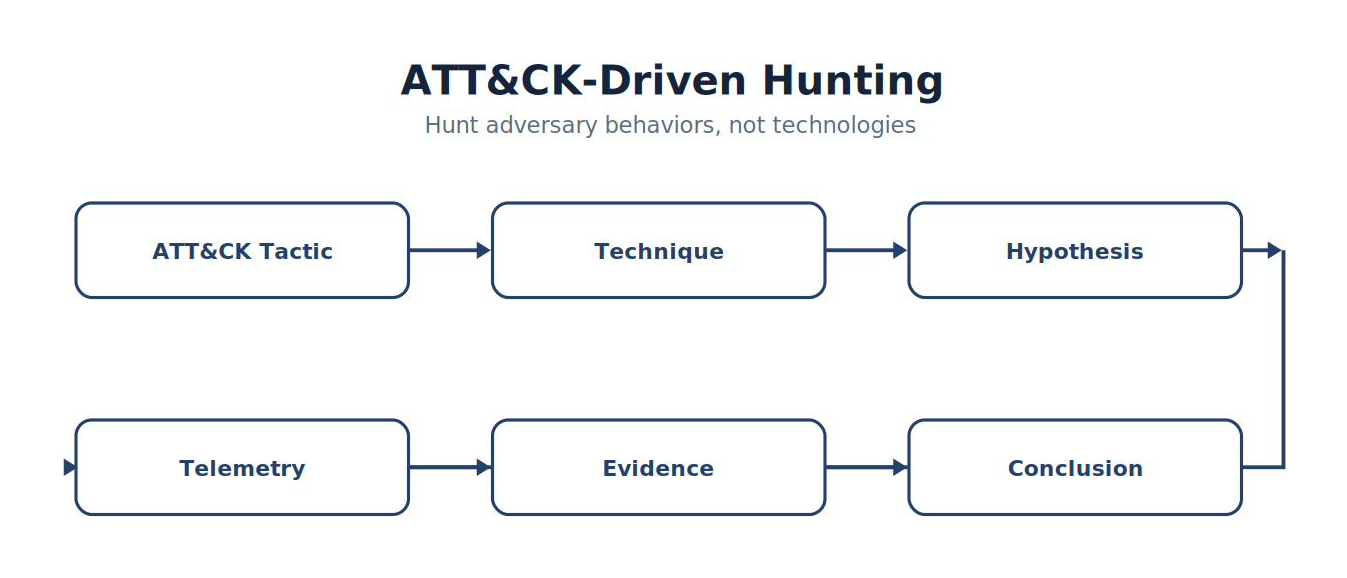
Note. The figure summarizes aTT&CK-Driven Hunting and highlights the relationships among its principal elements, evidence sources, and analytical outcomes.
Building Hunts Around Tactics
Suppose today’s objective is:
Discovery
Questions include:
Which systems executed network scanners?
Which users enumerated local accounts?
Which processes listed running services?
Which commands searched Active Directory?
Notice that every question describes behavior.
Execution Hunts
Example ATT&CK Technique:
PowerShell (T1059.001)
Possible hunting questions:
Which systems launched PowerShell?
Which parent processes initiated execution?
Which command lines contained encoded content?
Which executions immediately preceded network activity?
Telemetry:
Sysmon
Wazuh
Defender
Persistence Hunts
Possible techniques include:
Scheduled Tasks
Startup Folders
Registry Run Keys
Services
Hunting questions:
Which scheduled tasks were created this week?
Which startup locations changed?
Which services were recently installed?
Which persistence mechanisms appeared outside maintenance windows?
Persistence often survives reboots and provides valuable long-term evidence.
Credential Access Hunts
Example techniques:
LSASS memory access
Password dumping
Credential Manager abuse
Questions:
Which processes accessed LSASS?
Which users requested privileged credentials?
Which systems executed known credential utilities?
Did unusual privilege escalation precede credential access?
These hunts often require multiple telemetry sources.
Analyst Tradecraft Tip
Students often think:
“I’m hunting PowerShell.” You’re not. You’re hunting Execution. PowerShell is merely one possible implementation of that technique. Focus on attacker objectives—not individual tools.
Discovery Hunts
Discovery behavior often precedes lateral movement.
Questions include:
Which systems executed whoami?
Which hosts performed network scans?
Which processes queried Active Directory?
Which accounts enumerated group membership?
Individually these activities may appear normal. Combined, they may indicate reconnaissance.
Lateral Movement Hunts
Example behaviors:
Remote Desktop
SMB
PsExec
Windows Remote Management
Remote Service Creation
Questions:
Which systems communicated with many internal hosts?
Which accounts authenticated across multiple systems?
Which remote administration tools executed unexpectedly?
Lateral movement often connects isolated compromises.
Command and Control Hunts
ATT&CK provides excellent guidance.
Questions:
Which systems beacon periodically?
Which destinations are rare?
Which User-Agent strings appear unusual?
Which TLS sessions occur at fixed intervals?
Telemetry:
Suricata
Packet captures
Sysmon
Wazuh
Figure 6-25
ATT&CK Hunting Matrix
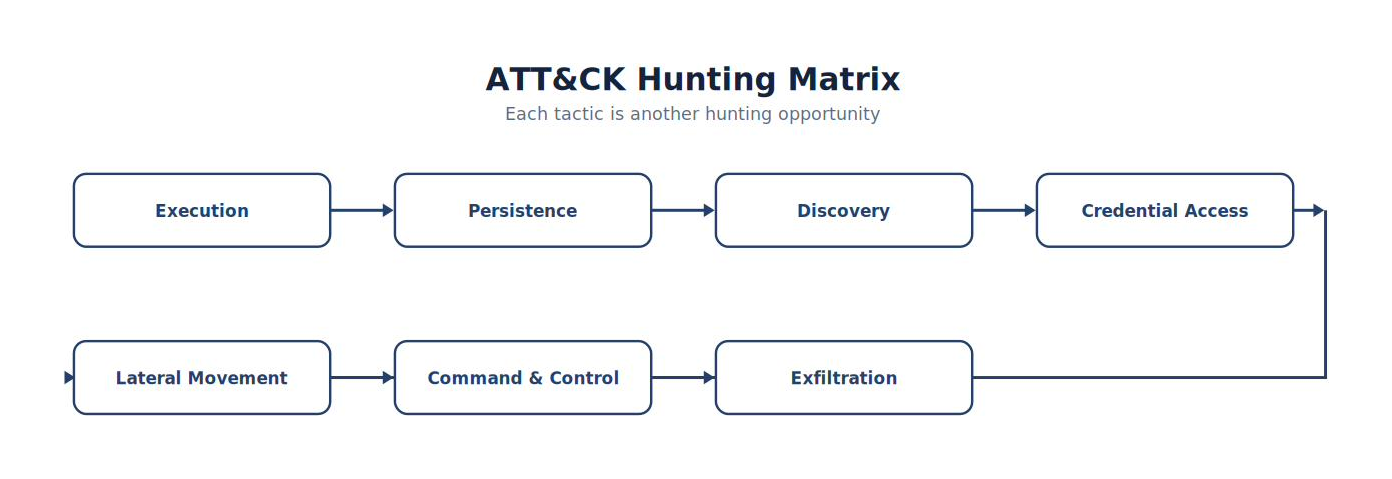
Note. The figure maps the principal dimensions of aTT&CK Hunting Matrix so analysts can compare relationships, identify gaps, and prioritize follow-up work.
Each tactic represents another hunting opportunity.
Mapping Telemetry to ATT&CK
| ATT&CK Tactic | Sysmon | Suricata | Defender | Wazuh |
|---|---|---|---|---|
| Execution | ✓ | ✓ | ||
| Discovery | ✓ | ✓ | ✓ | |
| Credential Access | ✓ | ✓ | ||
| Lateral Movement | ✓ | ✓ | ✓ | |
| Command & Control | ✓ | ✓ | ✓ | |
| Exfiltration | ✓ | ✓ |
No single sensor covers the entire ATT&CK matrix. Defense in depth requires multiple telemetry sources.
ATT&CK Coverage Review
Every hunt should ask:
Which ATT&CK techniques have:
Strong visibility?
Partial visibility?
No visibility?
Coverage gaps become future Detection Engineering projects. Threat hunting and Detection Engineering continuously improve one another.
ATT&CK Heat Maps
Hunters should periodically review organizational coverage.
Example:
| Tactic | Coverage |
|---|---|
| Execution | Strong |
| Persistence | Moderate |
| Discovery | Strong |
| Credential Access | Weak |
| Lateral Movement | Limited |
| Exfiltration | Moderate |
Visualization simplifies planning.
Hunting Example
Threat Intelligence reports:
Attackers increasingly abuse scheduled tasks.
ATT&CK Technique:
T1053
Hypothesis:
Unauthorized scheduled tasks may exist.
Telemetry:
Sysmon
Windows Event Logs
Wazuh
Evidence:
Task creation
Parent process
User
Command line
Conclusion:
Supported or unsupported.
ATT&CK Hunting Worksheet
| Item | Value |
|---|---|
| ATT&CK Tactic | __________________ |
| Technique | __________________ |
| Hypothesis | __________________ |
| Telemetry | __________________ |
| Searches | __________________ |
| Evidence | __________________ |
| Detection Gap | __________________ |
Students complete one worksheet for every hunt.
Common Student Mistake
Students often stop after mapping an event to ATT&CK.
Professional hunters ask:
What other techniques commonly accompany this one?
Which tactics usually precede it?
Which tactics usually follow it?
What telemetry should exist if the hypothesis is correct?
ATT&CK describes relationships—not isolated techniques (MITRE Corporation, n.d.-a).
Chapter Exercise 6.6 — ATT&CK-Based Threat Hunt
Objective
Conduct a complete threat hunt organized around one ATT&CK tactic.
Choose One:
Execution
Persistence
Discovery
Credential Access
Lateral Movement
Command and Control
Requirements
Develop a hypothesis.
Identify ATT&CK techniques.
Build searches.
Collect evidence from:
Sysmon
Suricata
Wazuh
Create a timeline.
Determine whether the hypothesis is supported.
Recommend one new detection.
Threat Hunting Report
Students submit:
Executive Summary
ATT&CK Tactic
ATT&CK Technique(s)
Hunting Hypothesis
Evidence Collected
Timeline
Detection Gaps
Detection Recommendations
Lessons Learned
Enterprise Hunting Playbooks
By the end of Part V, students should have developed reusable hunting playbooks for:
PowerShell abuse
Office macro execution
Scheduled task persistence
Network reconnaissance
Credential access
DNS beaconing
HTTP malware downloads
Suspicious parent-child process relationships
Lateral movement
Data exfiltration
These playbooks become a portfolio demonstrating practical threat hunting experience.
Think Like a Threat Hunter
Imagine two organizations.
Organization A
Conducts hunts based on whatever alert happened that morning.
Organization B
Conducts quarterly ATT&CK coverage reviews, prioritizes hunts based on current threat intelligence, documents every hypothesis, maps findings to ATT&CK, develops new detections from successful hunts, and measures coverage improvements over time. Both organizations perform threat hunting. Only one has developed a repeatable, intelligence-driven hunting program. That is the hallmark of a mature Security Operations Center.
Key Concepts
By the end of this section, you should understand that:
MITRE ATT&CK provides an effective organizational framework for threat hunting.
Hunts should be organized around attacker objectives rather than individual tools.
Each ATT&CK tactic naturally generates measurable hunting hypotheses.
Multiple telemetry sources are required to achieve meaningful ATT&CK coverage.
Successful hunts often identify opportunities to improve detections, close visibility gaps, and expand ATT&CK coverage.
Threat hunting and Detection Engineering are complementary disciplines that continuously strengthen one another.
Looking Ahead
The next section, 6.7 Threat Hunting Playbooks and Repeatable Methodologies, shifts from individual hunts to building an operational threat hunting program. Students will learn how to standardize hunt execution, create reusable playbooks, document investigative procedures, assign team roles, measure hunt outcomes, and continuously improve hunting methodologies. By the end of the chapter, they will understand that mature threat hunting is not a collection of one-time investigations—it is a structured, repeatable process that transforms intelligence into measurable improvements in organizational detection capability. This chapter serves as the bridge between classroom exercises and the operational practices used by enterprise SOCs, managed security service providers (MSSPs), and national cyber defense organizations.
6.7 Threat Hunting Playbooks and Repeatable Methodologies
Learning Objectives
After completing this section, you should be able to:
Explain the purpose of threat hunting playbooks.
Develop standardized hunting methodologies.
Build reusable hunting procedures.
Document hunting activities consistently.
Conduct peer reviews of threat hunts.
Measure the effectiveness of hunts.
Continuously improve hunting processes.
Introduction
Imagine a ransomware attack begins at 2:00 a.m. The senior threat hunter is on vacation. A new analyst receives the assignment.
Should the quality of the investigation depend on who happens to be working that night?
No. Professional SOCs reduce variability by developing standardized hunting playbooks. Playbooks ensure that every analyst follows a consistent methodology, regardless of experience level.
What Is a Threat Hunting Playbook?
A threat hunting playbook is a documented procedure that guides analysts through a repeatable investigation (Knerler et al., 2022).
Rather than improvising every hunt, analysts follow an established process that includes:
The hunting objective
The hypothesis
Required telemetry
Search strategy
Pivot points
Validation steps
Documentation requirements
Expected outcomes
A good playbook captures organizational knowledge and makes it reusable.
Figure 6-26
Threat Hunting Playbook Workflow
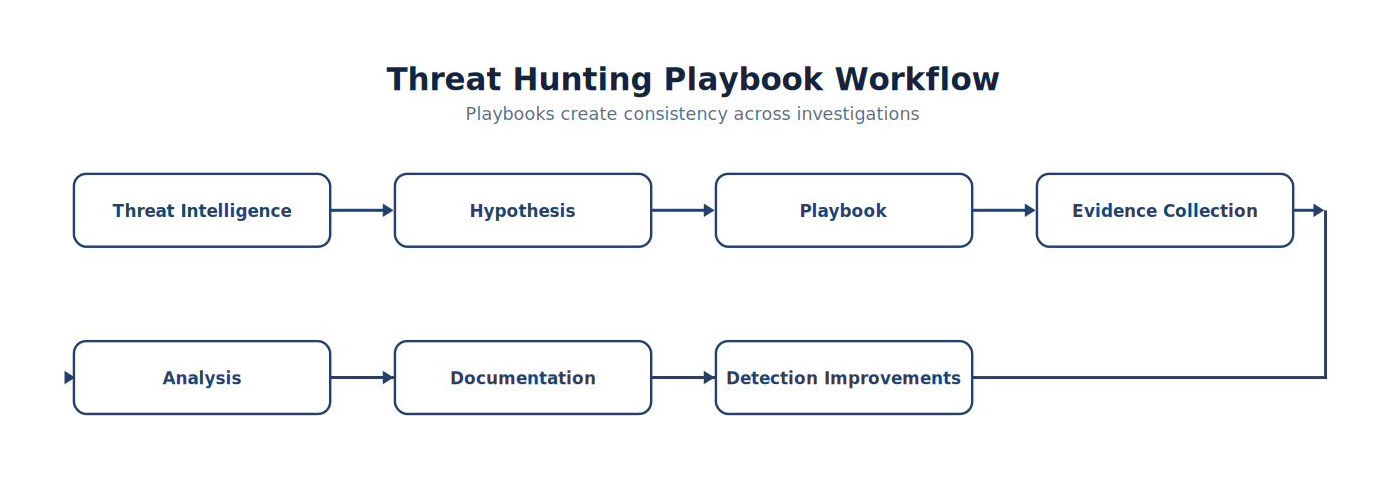
Note. The workflow presents the ordered stages of threat Hunting Playbook Workflow and highlights the validation and feedback steps that make the process repeatable.
Playbooks create consistency across investigations.
Why Standardization Matters
Without standardized procedures:
Hunts vary from analyst to analyst.
Important evidence may be overlooked.
Documentation becomes inconsistent.
Lessons learned are lost.
Standardization improves:
Quality
Repeatability
Collaboration
Training
Operational resilience
Analyst Tradecraft Tip
A mature SOC should be able to hand a hunting playbook to a new analyst and expect a reasonably consistent investigation. That is one of the strongest indicators of operational maturity.
Anatomy of a Hunting Playbook
Every playbook should contain the following sections.
| Section | Purpose |
|---|---|
| Objective | Why the hunt exists |
| Hypothesis | Behavior being investigated |
| Scope | Systems and users included |
| Telemetry | Required data sources |
| Searches | Queries to execute |
| Pivot Points | Follow-on investigations |
| ATT&CK Mapping | Related tactics and techniques |
| Validation | How to verify findings |
| Documentation | Required outputs |
| Lessons Learned | Future improvements |
Playbook Example
Title
Office Application Launching PowerShell
Objective
Detect potential malicious document execution.
Hypothesis
Microsoft Office applications should rarely launch PowerShell on standard user workstations.
Telemetry
Sysmon Event ID 1
Sysmon Event ID 22
Suricata HTTP metadata
Windows Defender
Wazuh alerts
Investigation Steps
Search for Office processes.
Identify child PowerShell processes.
Review command-line arguments.
Examine DNS activity.
Review outbound network traffic.
Construct a timeline.
Correlate with Defender.
Recommend new detections if appropriate.
Decision Points
Playbooks should include branching logic.
Example:
Figure 6-27
PowerShell Found? — Decision Flow
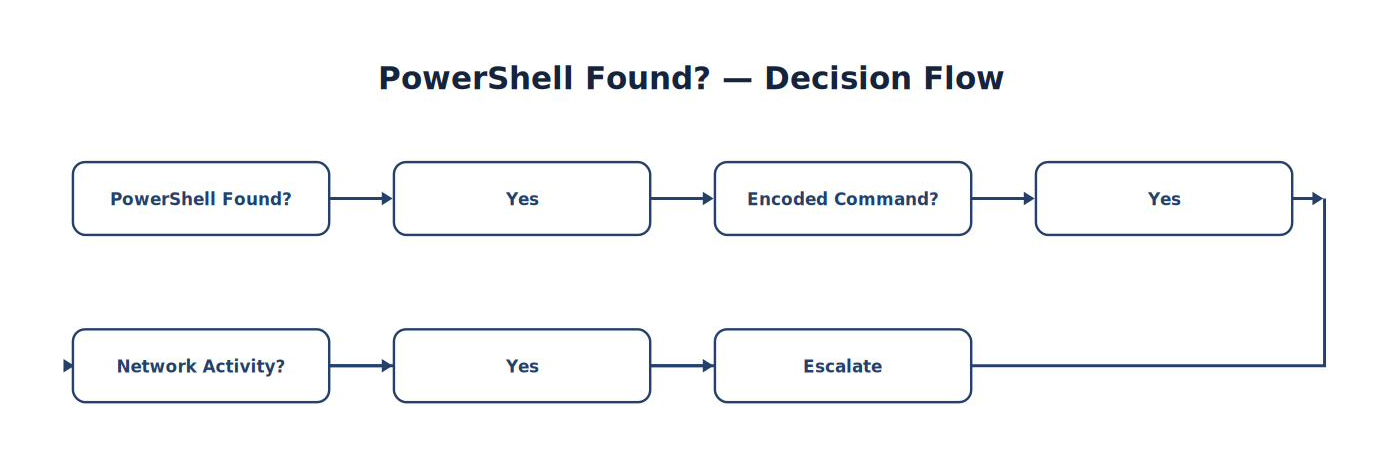
Note. The decision flow organizes the questions and validation checks used to evaluate powerShell Found? and select the appropriate next action.
──────────────
No → Continue Investigation
Decision trees help analysts make consistent choices.
Investigation Checklists
Checklists reduce mistakes.
Example:
| Task | Complete |
|---|---|
| Hypothesis documented | □ |
| Timeline created | □ |
| Parent process identified | □ |
| Command line reviewed | □ |
| DNS investigated | □ |
| Network traffic reviewed | □ |
| ATT&CK mapped | □ |
| Findings documented | □ |
Checklists should accompany every playbook.
Pivot Guidance
Every playbook should tell analysts where to investigate next.
Example:
If:
PowerShell → Investigate:
Parent process
User
Command line
DNS
HTTP
File creation
Defender
Wazuh
Playbooks should never end with a single event.
Documentation Standards
Every hunt should produce consistent documentation.
Suggested format:
Hunt Name
Date
Analyst
Hypothesis
Data Sources
Timeline
Evidence
Findings
ATT&CK Mapping
Detection Recommendations
Lessons Learned
Consistency simplifies peer review and knowledge sharing.
Peer Review
Professional hunting teams review one another’s work.
Reviewers should ask:
Was the hypothesis measurable?
Was sufficient telemetry examined?
Were all pivot opportunities explored?
Was the ATT&CK mapping appropriate?
Were conclusions supported by evidence?
Were recommendations actionable?
Peer review improves both the hunt and the hunter.
Figure 6-28
Hunt Review Cycle
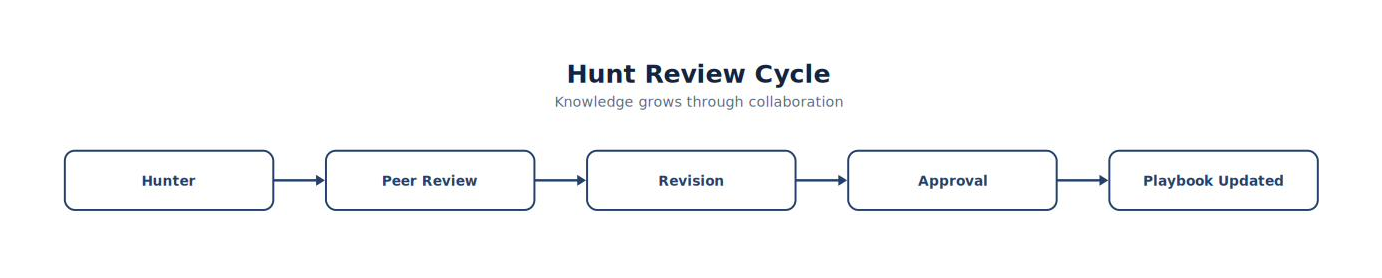
Note. The workflow presents the ordered stages of hunt Review Cycle and highlights the validation and feedback steps that make the process repeatable.
Knowledge grows through collaboration.
Measuring Hunt Effectiveness
Threat hunting programs should collect metrics.
Examples include:
| Metric | Purpose |
|---|---|
| Hunts completed | Activity |
| New detections created | Engineering improvement |
| Detection gaps identified | Visibility |
| Average hunt duration | Efficiency |
| Hunts leading to investigations | Operational value |
| False positives identified | Detection tuning |
| ATT&CK coverage expanded | Program maturity |
Metrics demonstrate the value of threat hunting.
Maintaining Playbooks
Playbooks should evolve.
Review them when:
New threats emerge.
ATT&CK is updated.
Detection rules change.
New telemetry becomes available.
Lessons are learned from incidents.
Hunt metrics identify weaknesses.
Playbooks are living documents.
Building a Playbook Library
Over time, organizations develop libraries of reusable playbooks.
Examples include:
| Playbook | ATT&CK Focus |
|---|---|
| Office → PowerShell | Execution |
| Encoded PowerShell | Execution |
| Scheduled Tasks | Persistence |
| LSASS Access | Credential Access |
| Internal Network Scan | Discovery |
| PsExec Activity | Lateral Movement |
| DNS Beaconing | Command and Control |
| Large Data Upload | Exfiltration |
A library accelerates future investigations.
Common Student Mistake
Students often document only successful hunts.
Professional hunters also document:
Unsuccessful hunts
Incorrect assumptions
Missing telemetry
Detection gaps
Lessons learned
Negative findings often improve future hunts more than successful ones.
Chapter Exercise 6.7 — Building a Threat Hunting Playbook
Objective
Develop a reusable hunting playbook suitable for inclusion in an enterprise SOC knowledge base.
Requirements
Select one ATT&CK technique.
Develop:
Hunt objective
Hypothesis
Investigation procedure
Required telemetry
Search strategy
Decision tree
Timeline template
Documentation template
Detection recommendations
Peer review checklist
Playbook Development Worksheet
| Section | Completed |
|---|---|
| Objective | □ |
| Hypothesis | □ |
| ATT&CK Mapping | □ |
| Telemetry | □ |
| Searches | □ |
| Pivot Guidance | □ |
| Decision Tree | □ |
| Documentation | □ |
| Peer Review | □ |
| Version Number | □ |
Students should version their playbooks just as they version detection rules.
Enterprise Knowledge Management
As organizations mature, hunting playbooks become part of a broader knowledge management strategy.
A centralized repository should include:
Detection engineering documentation
Threat hunting playbooks
Incident response procedures
Purple team scenarios
Lessons learned
ATT&CK mappings
Validation reports
Detection metrics
This repository becomes one of the SOC’s most valuable operational assets.
Think Like a Threat Hunter
Imagine two SOCs investigate the same suspicious PowerShell activity.
SOC A
Relies on the memory of its senior analyst. The investigation varies depending on who is on shift.
SOC B
Uses a documented playbook with standardized searches, pivot guidance, ATT&CK mappings, peer review, and version-controlled updates. The investigation is consistent, measurable, and repeatable. Both SOCs have talented analysts. Only one has built an operational threat hunting capability that can scale, survive staff turnover, and continuously improve. That is the hallmark of a mature Security Operations Center.
Key Concepts
By the end of this section, you should understand that:
Threat hunting playbooks transform individual expertise into organizational knowledge.
Standardized methodologies improve consistency, training, and investigation quality.
Playbooks should include objectives, hypotheses, searches, pivot guidance, documentation, and validation procedures.
Peer review and version control are as important for hunting playbooks as they are for detection rules.
Mature threat hunting programs continuously refine playbooks using lessons learned, metrics, and changing threat intelligence.
Looking Ahead
The next chapter, 6.8 Adversary Emulation with Atomic Red Team and Caldera, shifts from searching for unknown threats to deliberately generating known attacker behaviors in a controlled laboratory. Students will use adversary emulation to validate detections, test hunting playbooks, measure ATT&CK coverage, and identify visibility gaps before real attackers do. By combining detection engineering, threat hunting, and adversary emulation, students will complete the full Detect → Hunt → Validate → Improve cycle that defines modern enterprise Security Operations Centers. This chapter serves as the capstone of Part V and prepares students for advanced purple teaming and continuous security validation (MITRE Corporation, n.d.-b) (Red Canary, n.d.).
6.8 Adversary Emulation with Atomic Red Team and Caldera
Learning Objectives
After completing this chapter, you should be able to:
Explain the purpose of adversary emulation.
Differentiate adversary emulation from penetration testing.
Execute Atomic Red Team tests safely.
Execute Caldera operations.
Validate Wazuh detections.
Measure ATT&CK coverage.
Identify telemetry gaps.
Improve detection engineering using adversary emulation.
Introduction
Imagine two organizations.
Organization A says:
“We think our detections work.”
Organization B says:
“We tested every ATT&CK technique against our environment last week.”
Which organization has greater confidence?
The answer is obvious. Detection quality should never depend on assumptions. It should depend upon evidence. Adversary emulation provides that evidence.
What Is Adversary Emulation?
Adversary emulation recreates attacker behavior in a controlled laboratory. Unlike penetration testing, the objective is not to compromise systems.
Instead, the objective is to determine whether existing security controls:
Observe activity
Generate alerts
Support investigations
Detect attacker behaviors
Adversary emulation validates defenders rather than attackers.
Figure 6-29
Continuous Security Validation
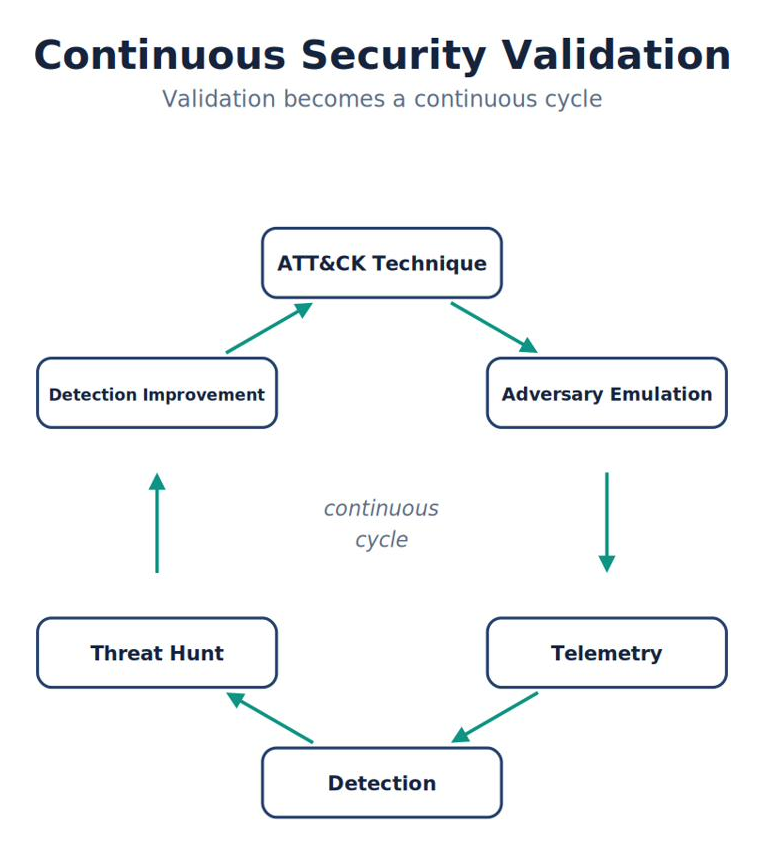
Note. The figure summarizes continuous Security Validation and highlights the relationships among its principal elements, evidence sources, and analytical outcomes.
This cycle becomes continuous.
Penetration Testing vs Adversary Emulation
Although related, these activities have different objectives.
| Penetration Testing | Adversary Emulation |
|---|---|
| Find vulnerabilities | Validate detections |
| Demonstrate exploitation | Demonstrate visibility |
| Offensive focus | Defensive focus |
| Success = Access | Success = Detection |
| Often one-time | Continuous |
Both are valuable. Their objectives differ.
Analyst Tradecraft Tip
Students often believe:
“If I exploit a vulnerability, my SOC is working.” Not necessarily. The exploit may succeed.
The important question is:
Did the SOC detect it?
Why Use Atomic Red Team?
Atomic Red Team provides small, repeatable ATT&CK simulations (Red Canary, n.d.).
Each Atomic Test focuses on:
One ATT&CK technique.
Example:
Figure 6-30
From Execution to Validate Detection
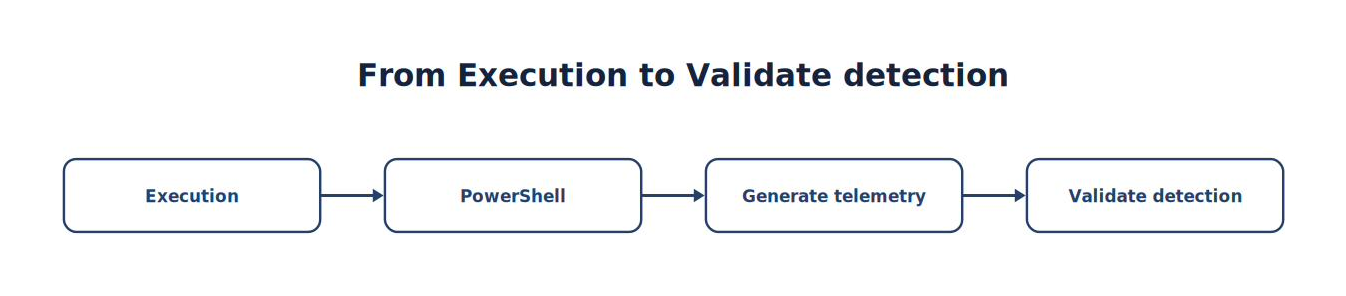
Note. The sequence traces how Execution progresses to Validate Detection, emphasizing the intermediate evidence and processing steps.
Students can safely test specific behaviors without deploying real malware.
Installing and Running Atomic Red Team
Atomic Red Team’s execution framework, Invoke-AtomicRedTeam, is a PowerShell module. On the Windows 11 endpoint, open an administrative PowerShell prompt and install it from the PowerShell Gallery:
Install-Module -Name invoke-atomicredteam,powershell-yaml -Scope CurrentUser
Then download the atomics folder — the library of test definitions, one per ATT&CK technique:
IEX (IWR 'https://raw.githubusercontent.com/redcanaryco/invoke-atomicredteam/master/install-atomicredteam.ps1' -UseBasicParsing)
Install-AtomicRedTeam -getAtomics -Force
To run a specific test, reference it by ATT&CK technique ID. For example, to test T1059.001 (PowerShell), the same technique referenced throughout this textbook:
WIN11 · PowerShell
Invoke-AtomicTest T1059.001 -TestNumbers 1Immediately after running the test, pivot to the Wazuh Dashboard and confirm that Sysmon and Wazuh captured the expected telemetry. Most atomic tests include a cleanup step; run it explicitly rather than leaving artifacts behind:
WIN11 · PowerShell
Invoke-AtomicTest T1059.001 -TestNumbers 1 -CleanupBest Practice
Never run Atomic Red Team against a system you cannot restore. Take a VMware snapshot of the Windows 11 endpoint before your first atomic test, and always run the -Cleanup step afterward. Executing an atomic test is a controlled, deliberate action — treat it with the same discipline you would treat any change to production infrastructure.
Why Use Caldera?
Unlike Atomic Red Team, Caldera simulates complete attacker campaigns.
Example:
Figure 6-31
From Initial Access to Exfiltration
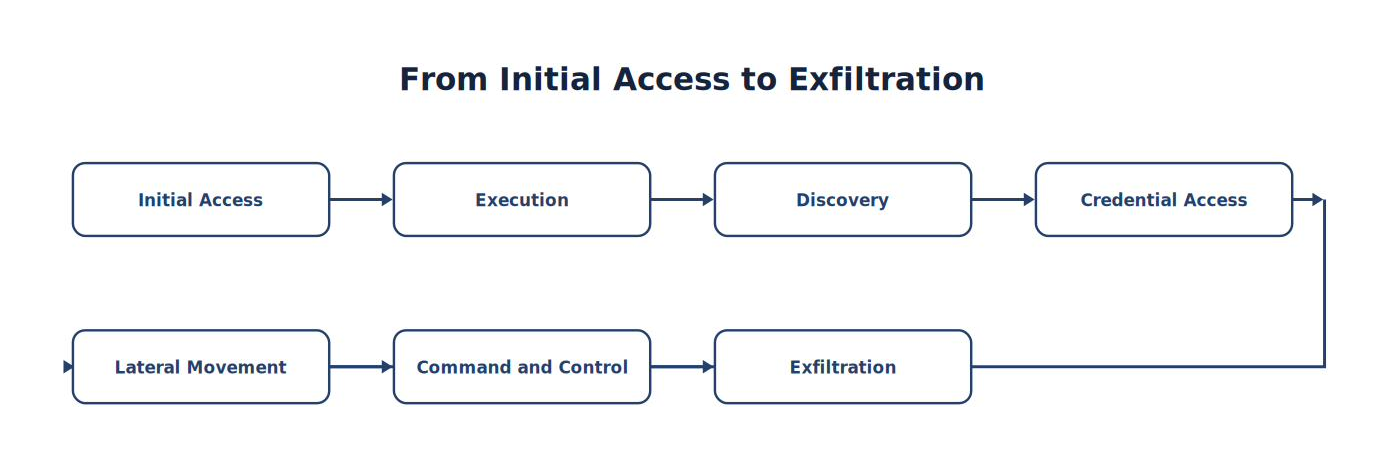
Note. The sequence traces how Initial Access progresses to Exfiltration, emphasizing the intermediate evidence and processing steps.
Caldera demonstrates attacker progression.
Installing and Running Caldera
Caldera runs as a standalone server, typically deployed on a dedicated Linux system (or the Ubuntu sensor, if resources allow) rather than directly on the Wazuh Server or the Windows endpoint being tested. In the isolated laboratory, clone the official repository recursively, enter its directory, create a Python virtual environment, and install its dependencies (MITRE Corporation, n.d.-b).
CALDERA SERVER · LINUX TERMINAL · STANDARD USER
git clone https://github.com/mitre/caldera.git --recursive
cd caldera
python3 -m venv .calderavenv
source .calderavenv/bin/activate
pip3 install -r requirements.txt
Start the server in the isolated lab. The --build flag is required on first launch and after UI or plugin changes; the official project warns that --insecure mode is not appropriate for production (MITRE Corporation, n.d.-b).
CALDERA SERVER · LINUX TERMINAL · ISOLATED LAB ONLY
python3 server.py --insecure --buildOnce the server reports that it is ready, replace the placeholder with the Caldera server's laboratory address and open the interface from a browser.
ANALYST WORKSTATION · WEB BROWSER
http://<CALDERA-SERVER-IP>:8888Default credentials are printed to the console on first launch (or found in conf/local.yml). Change them immediately in a shared lab environment. To emulate an adversary against the Windows 11 endpoint, deploy a Caldera agent (Sandcat, by default) on that endpoint, then build an Operation by selecting an adversary profile — a pre-built chain of ATT&CK techniques — and launching it against the connected agent. As with Atomic Red Team, immediately pivot to the Wazuh Dashboard after each operation to confirm the expected telemetry arrived.
Analyst Tradecraft Tip
MITRE Caldera’s project has moved between GitHub organizations over its history. Always confirm you are cloning from the current, actively maintained repository before running an installer script from the internet — this applies to every open-source security tool in this book, not just Caldera. Verifying the source of a script you are about to execute with administrative privileges is itself a professional habit worth building early.
Atomic Red Team and Caldera Compared
Figure 6-32
Atomic vs Caldera
Note. The comparison highlights the operational differences represented by atomic vs Caldera and shows why the distinction matters during analysis.
Both belong in mature SOC laboratories.
Safe Laboratory Practices
Before executing adversary simulations:
Verify:
Isolated network
Virtual machines
Snapshots
Administrative approval
Recovery procedures
Never execute offensive tooling on production systems without explicit authorization.
Example Validation Workflow
Suppose we wish to validate:
ATT&CK T1059.001
PowerShell
Procedure:
Figure 6-33
From Execute Atomic Test to Improve Detection
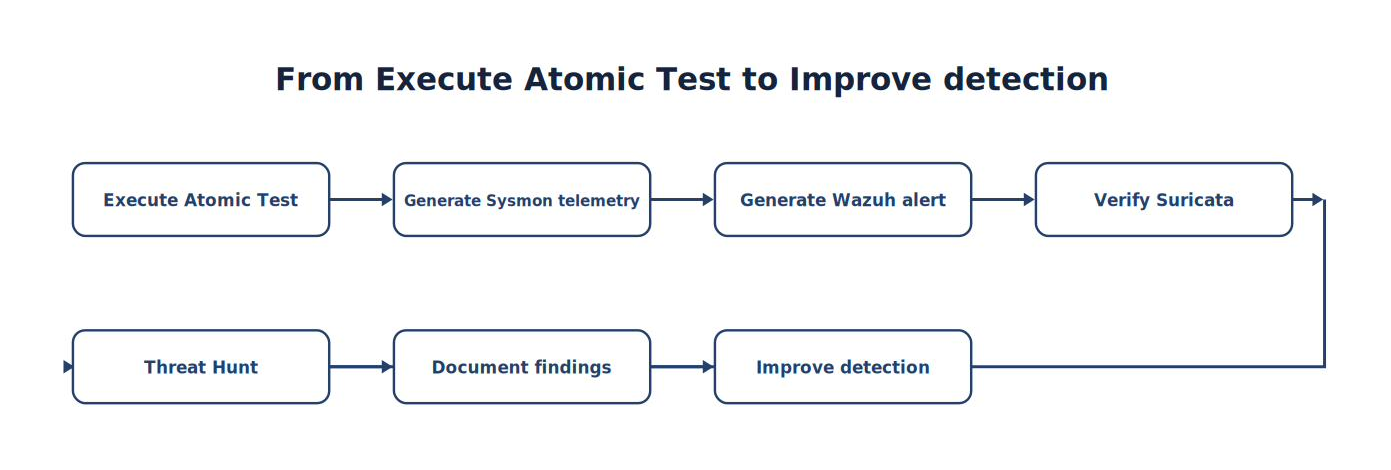
Note. The sequence traces how Execute Atomic Test progresses to Improve Detection, emphasizing the intermediate evidence and processing steps.
Every exercise should end with measurable conclusions.
Measuring Detection Coverage
Students should maintain an ATT&CK coverage matrix.
Example:
| Technique | Tested | Detected | Hunt Verified |
|---|---|---|---|
| T1059.001 | ✓ | ✓ | ✓ |
| T1105 | ✓ | ✓ | ✓ |
| T1046 | ✓ | ✓ | ✓ |
| T1053 | ✓ | Partial | ✓ |
| T1003 | ✓ | ✗ | Partial |
Coverage metrics identify engineering priorities.
Validating Wazuh
During every emulation exercise verify:
Was telemetry collected?
Was decoding successful?
Did rules execute?
Was alert severity appropriate?
Was ATT&CK mapping correct?
Could analysts investigate successfully?
Detection quality extends beyond alert generation.
Validating Sysmon
Students should verify:
Process Creation
DNS
Network Connections
File Creation
Parent Process
Command Line
Missing telemetry frequently indicates configuration issues rather than detection failures.
Validating Suricata
Verify:
Packet capture
Protocol identification
Signature match
eve.json generation
Wazuh ingestion
Network telemetry should support endpoint findings.
Figure 6-34
Detection Validation Pipeline

Note. The pipeline shows how information moves through detection Validation Pipeline, from its source through processing to the analyst-visible result.
Every stage should produce evidence.
Detection Gap Analysis
Suppose an Atomic Test executes successfully. No alerts appear.
Questions:
- Was telemetry missing?
- Was the rule absent?
- Did decoding fail?
- Was the event excluded?
Gap analysis transforms failures into engineering improvements.
Improving Detection Engineering
Every emulation should produce recommendations.
Examples:
Add new Wazuh rule.
Improve Suricata signature.
Expand Sysmon configuration.
Increase ATT&CK coverage.
Improve hunting playbook.
Reduce false positives.
Add correlation logic.
Adversary emulation drives continuous improvement.
Common Student Mistake
Students often celebrate:
“The Atomic Test executed successfully.” The real objective is not successful execution.
The objective is understanding:
What telemetry appeared?
What detections fired?
What investigations were possible?
What gaps remain?
The simulation exists to evaluate the defenders—not the attacker.
Chapter Exercise 6.8 — Validating Detections with Atomic Red Team
Objective
Execute controlled ATT&CK techniques and evaluate the effectiveness of your SOC.
Scenario
Select three ATT&CK techniques.
Examples:
PowerShell Execution
Network Discovery
Scheduled Task Creation
Student Tasks
For each technique:
Execute the Atomic Test.
Record Sysmon telemetry.
Record Suricata observations (if applicable).
Review Wazuh alerts.
Conduct a threat hunt.
Identify detection gaps.
Recommend engineering improvements.
Adversary Validation Worksheet
| Step | Completed |
|---|---|
| ATT&CK Technique Selected | □ |
| Atomic Test Executed | □ |
| Sysmon Evidence | □ |
| Suricata Evidence | □ |
| Wazuh Alert | □ |
| Threat Hunt | □ |
| Detection Gap Analysis | □ |
| Engineering Recommendation | □ |
Purple Team Reporting
Each exercise should conclude with a report.
Executive Summary
ATT&CK Technique
Objective
Telemetry Collected
Detections Generated
Hunting Results
Detection Gaps
Recommended Improvements
Validation Status
Pass / Partial / Fail
Building a Continuous Validation Program
Enterprise SOCs rarely perform one-time validation. Instead they establish recurring exercises.
Example schedule:
| Frequency | Activity |
|---|---|
| Weekly | Atomic Red Team tests |
| Monthly | ATT&CK coverage review |
| Quarterly | Caldera campaign |
| Semiannual | Purple Team exercise |
| Annual | Full detection engineering review |
Regular validation helps ensure that detections remain effective as environments, attacker techniques, and defensive tools evolve.
Think Like a Purple Team Engineer
Imagine two organizations.
Organization A
Writes detection rules and assumes they continue working indefinitely.
Organization B
Runs weekly Atomic Red Team tests, quarterly Caldera campaigns, tracks ATT&CK coverage, measures detection performance, updates playbooks, validates telemetry, and continuously improves Wazuh rules based on observed gaps. Both organizations own the same technology stack. Only one has established a continuous security validation program. That organization will almost certainly identify detection failures before an adversary does.
Key Concepts
By the end of this chapter, you should understand that:
Adversary emulation validates defensive capabilities rather than offensive success.
Atomic Red Team is well suited for testing individual ATT&CK techniques, while Caldera can emulate complete attack campaigns.
Every emulation exercise should generate telemetry, validate detections, support threat hunting, and identify engineering improvements.
Detection gaps should be documented, prioritized, and addressed through iterative updates to rules, telemetry collection, and hunting playbooks.
Continuous security validation is an ongoing operational process that strengthens Detection Engineering, Threat Hunting, and overall SOC maturity.
Looking Ahead
The final chapter of Part V, 6.9 Threat Hunting and Adversary Emulation Capstone, brings together every concept introduced in Chapters 5 and 6. Students will design and execute a complete purple team engagement: selecting ATT&CK techniques, running Atomic Red Team or Caldera exercises, validating Sysmon, Suricata, and Wazuh telemetry, conducting hypothesis-driven hunts, documenting evidence, measuring ATT&CK coverage, identifying detection gaps, and presenting engineering recommendations to SOC leadership. This capstone mirrors the workflow of enterprise Detection Engineering and Threat Hunting teams and serves as the culminating practical assessment for the first half of the textbook.
6.9 Threat Hunting and Adversary Emulation Capstone
Chapter Capstone
Purple Team Detection Validation Project
Scenario
You have recently joined the Purple Team at Falcon Manufacturing, an international organization with approximately 8,000 employees.
The Security Operations Center has recently implemented:
Wazuh SIEM
Sysmon
Suricata
Windows Defender
Atomic Red Team
MITRE ATT&CK
Management believes the environment is well protected. However, no formal validation has ever been performed.
Your team has been asked to determine:
“Can our SOC actually detect realistic attacker behavior?” Your responsibility is to design, execute, validate, document, and present a complete adversary emulation exercise.
Project Objectives
Students will:
Plan an adversary simulation.
Execute ATT&CK techniques.
Validate telemetry.
Perform threat hunting.
Measure ATT&CK coverage.
Improve detections.
Present engineering recommendations.
Phase 1 — Planning
Define:
Business objective
Threat scenario
ATT&CK tactics
Success criteria
Laboratory scope
Safety considerations
Deliverable
Threat Modeling Document
Phase 2 — Threat Intelligence
Research:
Recent attacker behavior.
Document:
Target industries
ATT&CK techniques
Initial Access methods
Execution methods
Persistence methods
Develop one realistic threat scenario.
Deliverable
Threat Intelligence Summary
Phase 3 — ATT&CK Mapping
Select:
Minimum:
Five ATT&CK techniques.
Example:
| Tactic | Technique |
|---|---|
| Execution | PowerShell |
| Discovery | Network Scan |
| Persistence | Scheduled Task |
| Command & Control | HTTP |
| Exfiltration | Data Upload |
Students justify every selection.
Deliverable
ATT&CK Coverage Matrix
Phase 4 — Adversary Emulation
Execute:
Atomic Red Team or
Caldera
Document:
Commands
Expected behavior
Expected telemetry
Safety precautions
Deliverable
Execution Log
Phase 5 — Telemetry Validation
Verify:
Sysmon
Suricata
Windows Defender
Wazuh
Questions:
- Did every event appear?
- Were timestamps correct?
- Were fields complete?
- Was telemetry missing?
Figure 6-35
Telemetry Validation

Note. The figure summarizes telemetry Validation and highlights the relationships among its principal elements, evidence sources, and analytical outcomes.
Phase 6 — Detection Validation
Students review:
Existing Wazuh detections.
Questions:
- Did alerts fire?
- Correct severity?
- Correct ATT&CK mapping?
- Useful descriptions?
- Appropriate context?
Deliverable
Detection Validation Report
Phase 7 — Threat Hunting
Now assume:
No alerts existed.
Conduct:
Hypothesis-driven hunt.
Collect:
Evidence. Timeline. ATT&CK mapping. Conclusion.
Deliverable
Threat Hunting Report
Phase 8 — Gap Analysis
Identify:
Missing telemetry. Missing detections. Missing ATT&CK coverage. Missing documentation. Weak hunting procedures. Every gap becomes an engineering recommendation.
Engineering Recommendations
Examples:
Improve:
Sysmon configuration
Wazuh rules
Suricata signatures
Correlation logic
ATT&CK mappings
Hunt playbooks
Every recommendation should be supported by evidence.
Phase 9 — Detection Engineering
Implement:
At least:
One new Wazuh rule
One Suricata signature
One hunting playbook improvement
One documentation improvement
Demonstrate measurable improvement.
Phase 10 — Executive Presentation
Students present findings to SOC leadership.
Presentation should answer:
- What was tested?
- What was detected?
- What was missed?
- Why?
- How can the SOC improve?
- How much ATT&CK coverage increased?
Management should understand the business value without needing to interpret raw technical data.
Required Deliverables
| Deliverable | Required |
|---|---|
| Threat Model | ✓ |
| ATT&CK Matrix | ✓ |
| Atomic/Caldera Plan | ✓ |
| Execution Log | ✓ |
| Telemetry Validation | ✓ |
| Detection Validation | ✓ |
| Threat Hunt | ✓ |
| Timeline | ✓ |
| Gap Analysis | ✓ |
| New Detection | ✓ |
| Updated Playbook | ✓ |
| Executive Presentation | ✓ |
Capstone Timeline
| Week | Activity |
|---|---|
| 1 | Planning |
| 2 | Threat Intelligence |
| 3 | ATT&CK Mapping |
| 4 | Adversary Emulation |
| 5 | Detection Validation |
| 6 | Threat Hunting |
| 7 | Engineering Improvements |
| 8 | Final Presentation |
Team Roles
Suggested roles:
| Role | Responsibility |
|---|---|
| Purple Team Lead | Project management |
| Threat Intelligence Analyst | ATT&CK research |
| Detection Engineer | Wazuh rules |
| Network Detection Engineer | Suricata |
| Threat Hunter | Evidence collection |
| SOC Analyst | Alert validation |
| Documentation Lead | Final report |
Individual students may perform multiple roles while documenting each responsibility.
Technical Validation Checklist
Students should verify:
✓ Sysmon Event ID 1
✓ Sysmon Event ID 3
✓ Sysmon Event ID 11
✓ Sysmon Event ID 22
✓ Suricata alerts
✓ Suricata eve.json
✓ Wazuh alerts
✓ ATT&CK mappings
✓ Timeline completeness
✓ Detection improvements
Documentation Requirements
Each engineering decision should answer:
- Why was this technique selected?
- Why was this rule created?
- Why was this telemetry required?
- Why was this severity assigned?
- Why was this hunt performed?
Engineering decisions should always be evidence-based.
Peer Review
Every project receives:
Technical review. Documentation review. Presentation review. Engineering review. Students revise the project based on peer feedback before final submission.
Grading Rubric
| Category | Points |
|---|---|
| Threat Intelligence | 10 |
| ATT&CK Mapping | 10 |
| Adversary Emulation | 10 |
| Telemetry Validation | 15 |
| Detection Validation | 10 |
| Threat Hunting | 15 |
| Engineering Improvements | 15 |
| Documentation | 5 |
| Executive Presentation | 10 |
| Professionalism | 10 |
| Total | 100 |
Reflection Questions
Each student submits a professional reflection addressing:
Which ATT&CK technique was the most difficult to validate, and why?
Which telemetry source (Sysmon, Suricata, Defender, or Wazuh) provided the most valuable evidence during your investigation?
What detection gaps did you discover, and how would you prioritize addressing them?
How did adversary emulation improve your confidence in the organization’s detection capabilities?
Which engineering improvement had the greatest impact on the quality of detections?
How did peer review influence your final design?
How would you expand this validation program if you were leading the SOC?
Part V Summary
By completing Part V, you have developed the foundational skills of a professional Threat Hunter and Purple Team Engineer.
You can now:
Develop intelligence-driven hunting hypotheses.
Conduct advanced investigations using Wazuh Discover.
Perform endpoint threat hunting with Sysmon.
Investigate network activity using Suricata and packet analysis.
Organize hunts using the MITRE ATT&CK framework.
Build repeatable hunting playbooks.
Execute controlled adversary emulation using Atomic Red Team and Caldera.
Validate detections across multiple telemetry sources.
Identify detection gaps and recommend engineering improvements.
Communicate findings through technical reports and executive presentations.
More importantly, you have learned that effective cybersecurity is not simply about deploying tools—it is about continuously validating, measuring, and improving how those tools work together to detect and respond to adversary behavior.
Part VI Preview — Digital Forensics and Incident Response (DFIR)
Part VI transitions from finding threats to responding to them. Students will learn how to preserve evidence, acquire forensic artifacts, analyze Windows, Linux, and network data, reconstruct attacker timelines, maintain chain of custody, and conduct structured incident response using industry-recognized frameworks. Throughout Part VI, Wazuh, Sysmon, Suricata, and the hunting methodologies developed earlier in the book become investigative tools for answering a new set of questions:
What happened?
When did it happen?
How did it happen?
What was affected?
How can we recover and prevent it from happening again?
This transition completes the evolution from SOC analyst, to Detection Engineer, to Threat Hunter, and finally to Digital Forensics and Incident Response (DFIR) practitioner—the four core disciplines that define modern enterprise cyber defense.
6.10 Chapter Summary
This chapter shifted your mindset from reactive alert response to proactive threat hunting. You learned that hunting begins with a hypothesis, not an alert, and that professional hunters organize their search around adversary behavior — using the MITRE ATT&CK framework as a common language — rather than around individual log sources. You practiced advanced searching with Wazuh Discover, correlated endpoint telemetry from Sysmon with network telemetry from Suricata, and built repeatable hunting playbooks that can be handed off to other analysts.
You also learned to validate your own detection capability directly, using Atomic Red Team to safely execute individual ATT&CK techniques and Caldera to emulate multi-stage adversary campaigns — always followed immediately by checking whether Wazuh actually captured the expected telemetry. This closes the loop introduced in Chapter 5: a detection is not proven until it has been tested against real, controlled adversary behavior.
Chapter 6 Key Terms
| Term | Definition |
|---|---|
| Adversary Emulation | Deliberately reproducing known attacker techniques in a controlled environment to validate detection and response capability. |
| Atomic Red Team | An open-source library of small, single-technique tests mapped to MITRE ATT&CK, executed via the Invoke-AtomicRedTeam PowerShell module. |
| Caldera | A MITRE-developed adversary emulation platform capable of running multi-stage, chained attack operations against connected agents. |
| Hunting Hypothesis | A specific, testable statement about possible adversary activity that guides a threat hunt. |
| Hunting Playbook | A documented, repeatable methodology for conducting a specific type of threat hunt. |
| Purple Team | A collaborative exercise combining red team (offensive) and blue team (defensive) roles to improve detection coverage. |
| Threat Hunting | Proactively searching for evidence of adversary activity that has not generated an automated alert. |
Knowledge Check
Select the best answer for each question.
1. What is the fundamental difference between monitoring and threat hunting?
A. Monitoring is faster
B. Threat hunting only applies to network telemetry
C. There is no meaningful difference
D. Monitoring reacts to alerts; hunting proactively searches for activity that did not generate one
2. What should every threat hunt begin with?
A. A confirmed incident
B. A testable hypothesis
C. A completed report
D. A Caldera operation
3. Why do professional threat hunters organize hunts around adversary behavior (ATT&CK) rather than individual log sources?
A. It reflects how attackers actually operate and allows hunts to generalize across tools and telemetry sources
B. It is required by Wazuh licensing
C. Log sources are unreliable
D. ATT&CK replaces the need for telemetry
4. What is the purpose of Atomic Red Team in this lab?
A. To permanently compromise the Windows endpoint
B. To replace Wazuh’s detection engine
C. To safely execute a single, well-documented ATT&CK technique and validate whether it was detected
D. To generate Suricata rules automatically
5. Why should you always run the -Cleanup step after an Atomic Red Team test?
A. It is optional and rarely necessary
B. To remove artifacts the test created and restore the endpoint to a known state
C. It improves Wazuh Indexer performance
D. It is required before Wazuh will generate any alerts
6. How does Caldera differ from Atomic Red Team in typical use?
A. Caldera only works on Linux
B. They are functionally identical
C. Caldera does not use the MITRE ATT&CK framework
D. Caldera emulates multi-stage adversary campaigns using connected agents, while Atomic Red Team executes individual, isolated techniques
7. After running any adversary emulation test, what should you do immediately?
A. Delete the test results
B. Restart the Wazuh Indexer
C. Check Wazuh to confirm whether the expected telemetry and alerts actually appeared
D. Disable Sysmon
8. Why is verifying the source of an installer script before running it a professional habit worth building?
A. Scripts run with administrative privileges can cause significant harm if sourced from an untrusted or outdated location
B. It has no real security value
C. It is only relevant for Caldera
D. Wazuh performs this verification automatically
Chapter Discussion Questions
Explain why “What if we didn’t detect it?” is a more powerful question for a mature SOC than “Did we detect it?”
Describe how you would develop a hunting hypothesis for detecting DNS tunneling in this lab environment.
Walk through how you would use Atomic Red Team to validate a custom Wazuh rule you wrote in Chapter 5.
Why is a multi-stage Caldera operation a more realistic test of SOC readiness than a single Atomic Red Team test?
What safety precautions should always precede running adversary emulation tools against a lab endpoint?
How does documenting a threat hunt as a reusable playbook benefit a SOC beyond the single hunt that produced it?
Further Resources
MITRE ATT&CK (https://attack.mitre.org) — The behavioral framework every hunt in this chapter is organized around.
MITRE Caldera (https://caldera.mitre.org) — Documentation for the adversary emulation platform used in the labs.
Atomic Red Team (https://github.com/redcanaryco/atomic-red-team) — Per-technique tests, arguments, and cleanup commands.
Rich, M. S. (2026). Advanced network forensics: A cyber-behavioral science approach. John Wiley & Sons. — Secondary reading on layered network evidence and behavior-informed hunting.
Threat Hunter Playbook (OTRF) (https://threathunterplaybook.com/) — Open, community-maintained hunting notebooks mapped to ATT&CK.