

Chapter Overview
Course Progression
This chapter prepares for and reinforces Progressive Labs PL-07 and PL-08, which operationalize intelligence and apply carefully validated automated response. Chapter Exercises are focused practice; Progressive Labs are cumulative investigations. See Course Progression and Progressive Lab Alignment in the front matter.
Imagine a Security Operations Center receiving:
60,000 events every minute
4,500 alerts every day
700 phishing reports every week
Hundreds of vulnerability findings
Thousands of authentication events
Can analysts investigate every alert manually?
No.
Modern SOCs rely upon automation to:
Reduce repetitive work
Collect evidence
Enrich alerts
Standardize investigations
Improve response speed
Allow analysts to focus on higher-value investigations
Automation has become one of the defining characteristics of mature Security Operations Centers.
Learning Objectives
After completing this chapter, you should be able to:
Explain security automation.
Differentiate automation from orchestration.
Identify automation opportunities.
Understand SOAR fundamentals.
Evaluate automation risks.
Explain human oversight.
Design simple automated workflows.
8.1 Security Operations Automation
Introduction
Imagine a phishing alert arrives.
Without automation:
An analyst must:
Read the email.
Extract URLs.
Check reputation.
Search Wazuh.
Search firewall logs.
Search Defender.
Search DNS.
Search Suricata.
Document findings.
Repeat hundreds of times every week. Now imagine automation performs the repetitive searches before the analyst even opens the case. The analyst begins with evidence instead of collecting it. Automation changes the analyst’s role.
Figure 8-1
Manual vs Automated Workflow
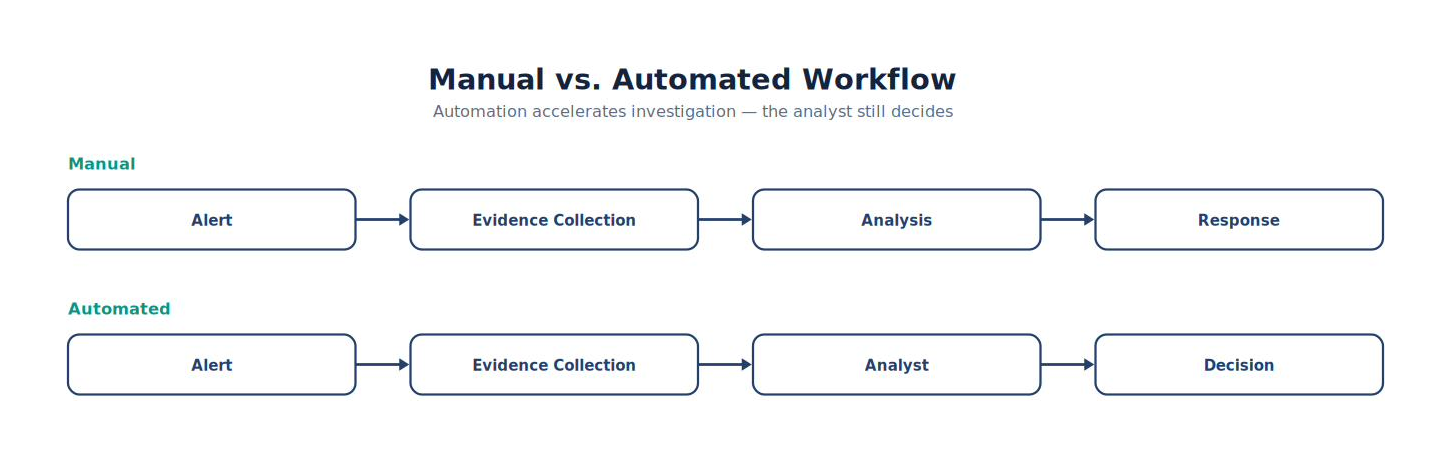
Note. The workflow presents the ordered stages of manual vs Automated Workflow and highlights the validation and feedback steps that make the process repeatable.
What Is Security Automation?
Security automation performs repetitive tasks without requiring manual execution each time.
Examples include:
Collecting logs
Enriching alerts
Running reputation lookups
Querying threat intelligence
Opening tickets
Sending notifications
Updating dashboards
Automation reduces repetitive effort.
What Automation Is Not
Automation does not replace:
Critical thinking
Risk assessment
Executive decisions
Legal review
Incident leadership
Forensic interpretation
Automation supports analysts. It does not replace them.
Analyst Tradecraft Tip
Students often ask:
“Will AI replace SOC analysts?”
A better question is:
“Which parts of an analyst’s job should be automated?”
The answer is almost always:
Repetitive tasks. Not investigative reasoning.
Why SOCs Need Automation
As organizations grow, security data grows faster.
Examples include:
| Environment | Approximate Daily Events |
|---|---|
| Small Business | Thousands |
| University | Millions |
| Enterprise | Hundreds of millions |
| Cloud Provider | Billions |
Humans cannot review every event. Automation becomes essential.
Good Automation Candidates
Tasks well suited for automation include:
IP reputation lookups
Hash reputation lookups
WHOIS queries
Alert enrichment
Ticket creation
Asset identification
Notification delivery
Log collection
Dashboard updates
These tasks follow predictable procedures.
Poor Automation Candidates
Some activities still require human judgment.
Examples include:
Incident severity determination
Executive communication
Attribution
Legal decisions
Root cause interpretation
Risk acceptance
Automation should inform—not replace—these decisions.
Figure 8-2
Human Decision Point
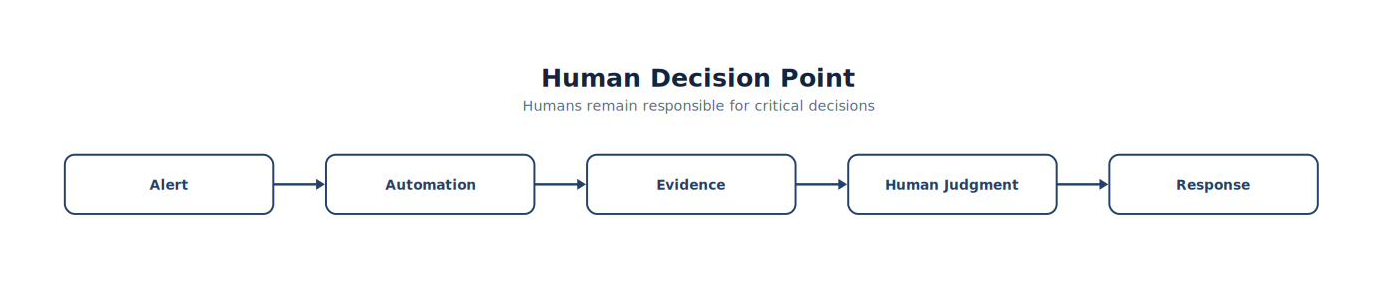
Note. The figure summarizes human Decision Point and highlights the relationships among its principal elements, evidence sources, and analytical outcomes.
Humans remain responsible for critical decisions.
Automation Benefits
Organizations frequently achieve:
Faster investigations
More consistent procedures
Reduced analyst workload
Improved documentation
Lower response times
Better evidence collection
Standardized workflows
Automation improves consistency.
Automation Risks
Automation introduces new challenges.
Examples include:
Incorrect assumptions
Excessive automation
Broken workflows
Missing context
Alert loops
Privilege misuse
Automation should always be tested before production deployment.
Automation Safety
Professional automation should include:
Logging
Approval checkpoints
Error handling
Rollback procedures
Version control
Documentation
Automation deserves the same engineering discipline as detection rules.
Automation Maturity
Organizations generally mature through several stages.
| Stage | Characteristics |
|---|---|
| Manual | Analyst performs every task |
| Assisted | Automation enriches alerts |
| Semi-Automated | Human approval required for selected actions |
| Orchestrated | Multiple systems coordinate workflows |
| Adaptive | Automation continuously improves through feedback |
Most organizations operate somewhere between assisted and orchestrated automation.
Building an Automation Workflow
Suppose Wazuh generates a malware alert.
Automation could:
Identify the affected asset.
Query asset inventory.
Retrieve recent Sysmon events.
Retrieve related Suricata alerts.
Query threat intelligence.
Attach evidence to the incident ticket.
Notify the assigned analyst.
The analyst begins with a nearly complete case file.
Figure 8-3
Automated Enrichment
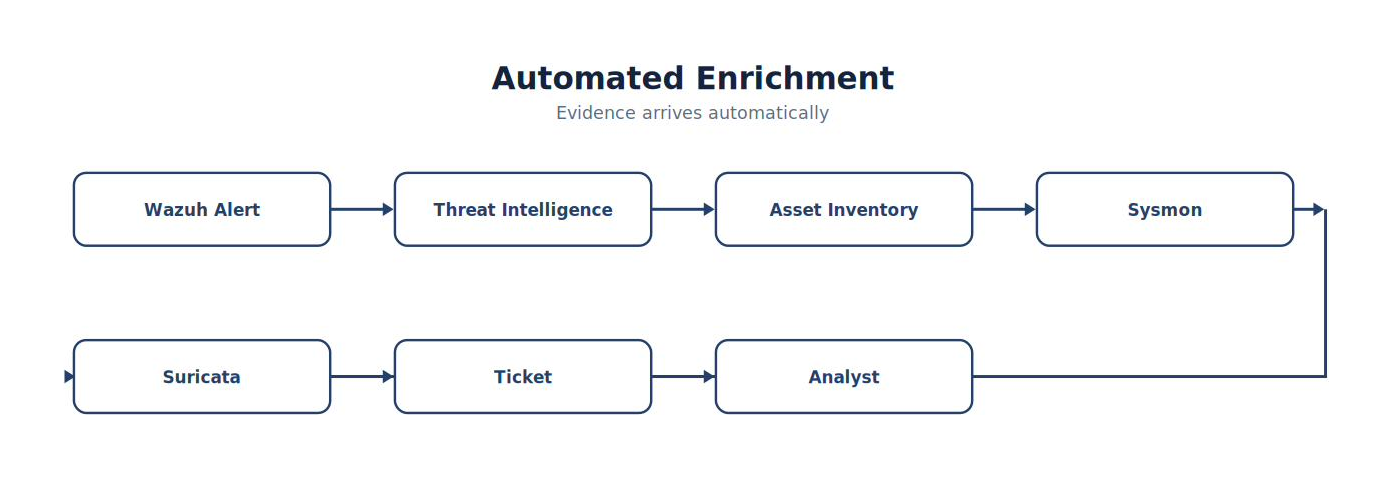
Note. The figure summarizes automated Enrichment and highlights the relationships among its principal elements, evidence sources, and analytical outcomes.
Automation Metrics
Organizations should measure automation.
Examples include:
| Metric | Purpose |
|---|---|
| Alerts Enriched | Coverage |
| Time Saved | Efficiency |
| False Automation | Quality |
| Manual Interventions | Reliability |
| Workflow Success Rate | Stability |
| Mean Enrichment Time | Performance |
Automation should produce measurable value.
Common Student Mistake
Students often assume:
“If automation is good, more automation must be better.”
Professional engineers understand that:
Poorly designed automation can amplify mistakes just as quickly as it accelerates good decisions. The objective is appropriate automation, not maximum automation.
Lab Exercise 8-1 — Designing an Automated SOC Workflow
Objective
Develop an automation workflow that reduces analyst workload without removing human oversight.
Scenario
A Wazuh alert indicates suspicious PowerShell execution.
Student Tasks
Design an automated workflow that:
Retrieves Sysmon events.
Searches Suricata logs.
Queries threat intelligence.
Identifies the affected asset.
Opens an incident ticket.
Notifies the assigned analyst.
Identify:
Which actions are fully automated?
Which actions require analyst approval?
Which actions should never be automated?
Automation Design Worksheet
| Workflow Step | Automated | Human Approval |
|---|---|---|
| Alert Enrichment | □ | □ |
| Threat Intelligence Lookup | □ | □ |
| Asset Identification | □ | □ |
| Ticket Creation | □ | □ |
| Host Isolation | □ | □ |
| Executive Notification | □ | □ |
Students should justify each design decision.
Think Like a SOC Architect
Imagine two SOCs.
SOC A
Every alert requires an analyst to manually gather logs, search multiple systems, copy evidence into a ticket, identify the asset owner, and notify the response team.
SOC B
When the alert arrives, automation immediately enriches it with endpoint telemetry, network metadata, threat intelligence, asset information, recent authentication activity, and historical detections. The analyst opens the ticket with most of the evidence already assembled and can focus on interpretation rather than collection. Both SOCs employ talented analysts. Only one allows those analysts to spend the majority of their time thinking instead of clicking. That is the objective of effective security automation.
Key Concepts
By the end of this chapter, you should understand that:
Security automation reduces repetitive operational tasks while preserving human decision-making.
Automation and orchestration improve consistency, efficiency, and response speed in modern SOCs.
The best automation targets predictable, repeatable workflows such as alert enrichment and evidence collection.
High-impact decisions—including incident severity, legal actions, and executive communication—continue to require human judgment.
Successful automation programs are engineered, tested, documented, measured, and continuously improved.
Looking Ahead
The next chapter, 8.2 Security Orchestration, Automation, and Response (SOAR), expands individual automation tasks into coordinated, end-to-end workflows. Students will learn how enterprise SOAR platforms integrate SIEMs, endpoint security tools, ticketing systems, threat intelligence feeds, and communication platforms into unified playbooks that coordinate investigations across multiple technologies. Rather than automating isolated tasks, they will learn how mature SOCs orchestrate complete investigative processes while maintaining appropriate human oversight, governance, and accountability (Gartner, n.d.-a).
A small SOC automates individual tasks. A mature SOC orchestrates entire investigations. One concept anchors this chapter:
Automation performs tasks. Orchestration coordinates systems. That single distinction explains why SOAR platforms have become a critical component of enterprise Security Operations Centers.
8.2 Security Orchestration, Automation, and Response (SOAR)
Chapter Overview
Modern Security Operations Centers rarely use only one security product.
A typical enterprise SOC may include:
Wazuh SIEM
Sysmon
Suricata
Microsoft Defender
Email Security Gateway
Threat Intelligence Platform
Vulnerability Scanner
Asset Inventory
Identity Management
Ticketing System
Chat Platform
Firewall
Endpoint Detection and Response (EDR)
Each product produces valuable information. The challenge is coordinating them. SOAR platforms orchestrate these technologies into repeatable investigative workflows.
Learning Objectives
After completing this chapter, you should be able to:
Explain SOAR.
Differentiate SIEM and SOAR.
Describe orchestration workflows.
Design automated playbooks.
Integrate multiple security technologies.
Identify appropriate human approval points.
Evaluate SOAR maturity.
Introduction
Imagine Wazuh generates a malware alert.
Without SOAR:
The analyst must manually:
Query Sysmon.
Search Suricata.
Search Defender.
Check VirusTotal.
Open ServiceNow.
Notify Incident Response.
Document findings.
With SOAR:
One workflow performs those tasks automatically. The analyst begins investigating immediately.
Figure 8-4
SIEM vs SOAR
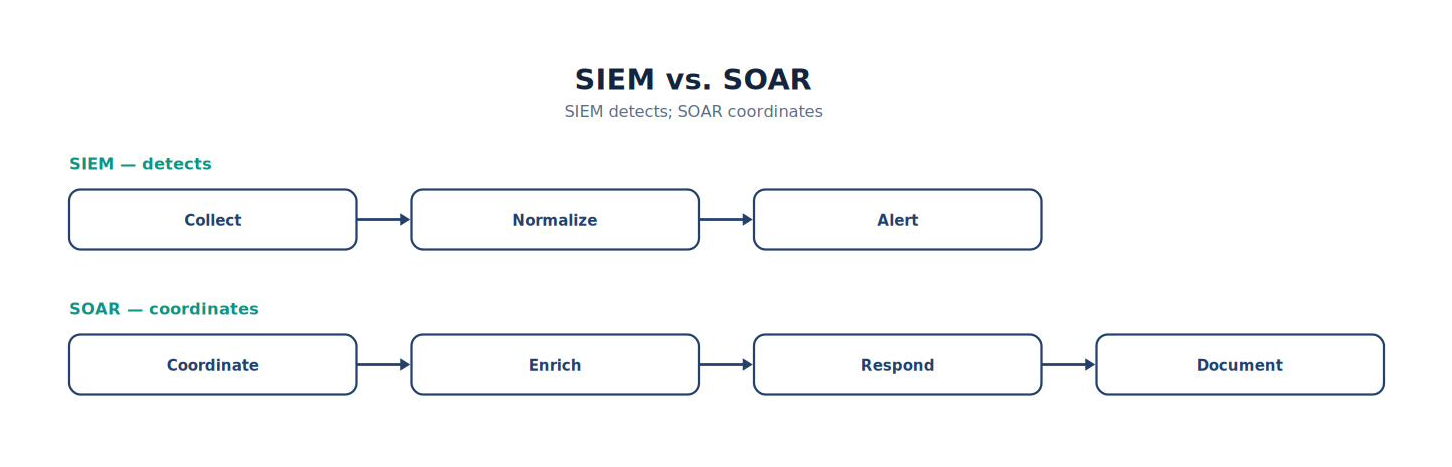
Note. The comparison highlights the operational differences represented by sIEM vs SOAR and shows why the distinction matters during analysis.
What Is SOAR?
Security Orchestration, Automation, and Response integrates multiple security technologies into coordinated workflows (Gartner, n.d.-a).
Typical functions include:
Alert enrichment
Workflow execution
Ticket creation
Threat intelligence
Asset lookups
Notification
Evidence collection
Response coordination
SOAR connects tools together.
SIEM vs SOAR
Students frequently confuse these technologies.
| SIEM | SOAR |
|---|---|
| Collects logs | Coordinates systems |
| Detects threats | Executes workflows |
| Generates alerts | Enriches investigations |
| Supports monitoring | Supports response |
| Provides dashboards | Automates playbooks |
Most mature SOCs use both.
Analyst Tradecraft Tip
A SIEM answers:
“What happened?”
A SOAR asks:
“Now what should happen next?” The technologies complement one another.
Components of a SOAR Platform
Most SOAR platforms include:
Workflow Engine
API Integrations
Case Management
Automation Engine
Playbook Library
Analyst Dashboard
Approval Mechanisms
Reporting
Each component supports incident response.
Common SOAR Integrations
Enterprise environments commonly integrate:
| Technology | Purpose |
|---|---|
| Wazuh | Alerts |
| Sysmon | Endpoint telemetry |
| Suricata | Network detection |
| Defender | Malware status |
| Active Directory | User information |
| ServiceNow/Jira | Case management |
| VirusTotal | Reputation lookups |
| Slack/Teams | Notifications |
| Firewall | Blocking actions |
| EDR | Endpoint isolation |
SOAR acts as the coordinator.
Figure 8-5
Enterprise SOAR Architecture
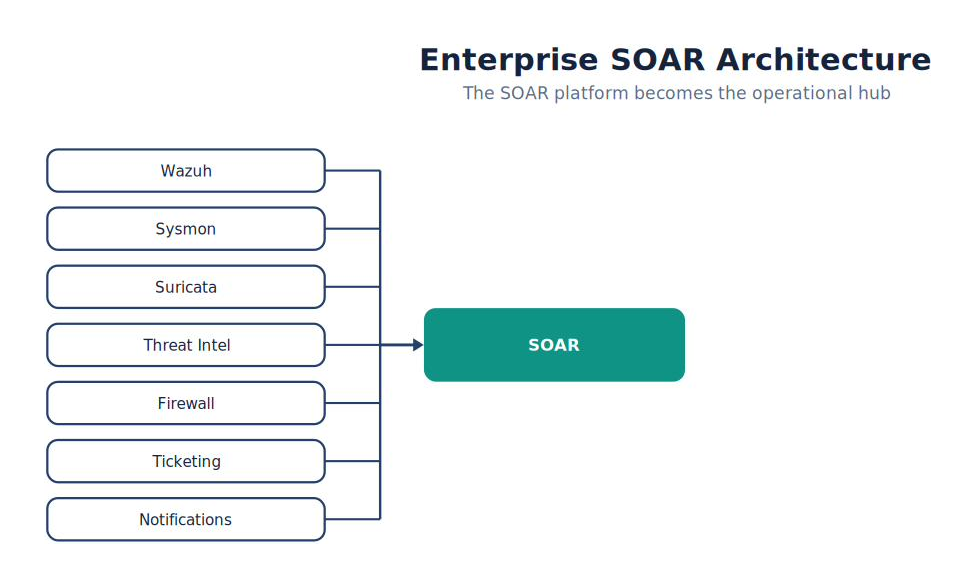
Note. The diagram identifies the primary components of enterprise SOAR Architecture and shows how they connect, exchange data, and support security operations.
The SOAR platform becomes the operational hub.
Playbooks
Playbooks define repeatable workflows.
Example:
Figure 8-6
From High-Severity Malware Alert to Isolate Endpoint
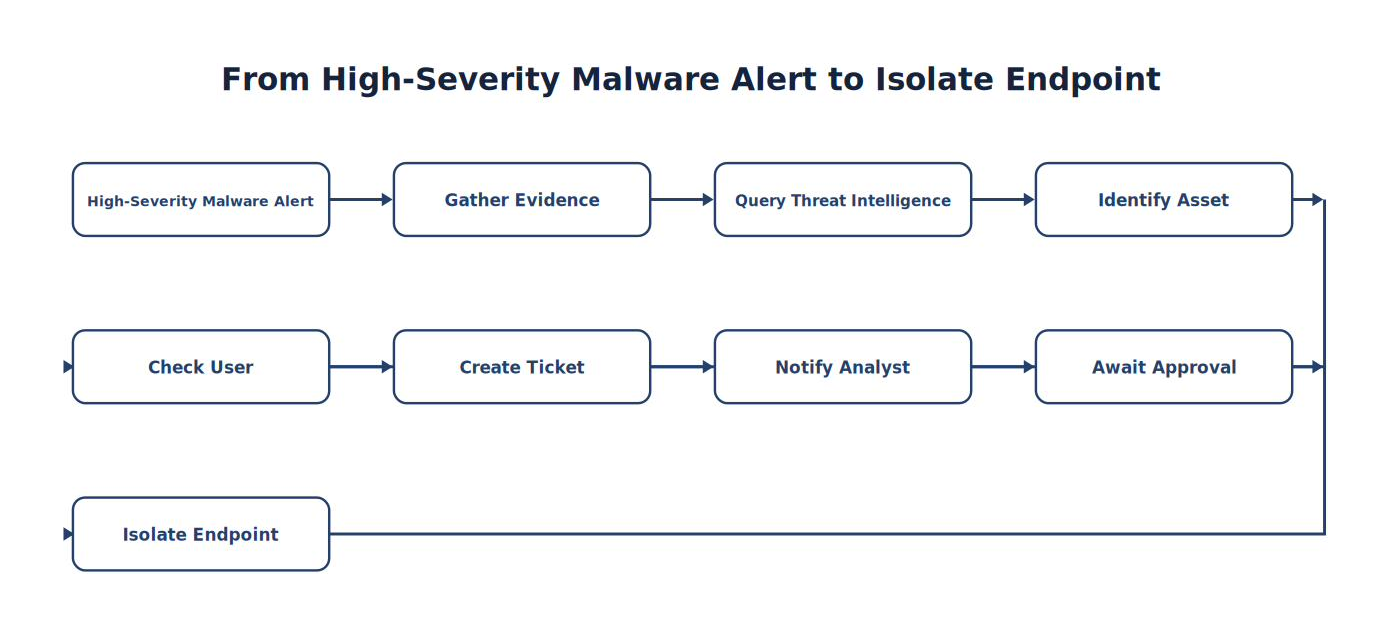
Note. The sequence traces how High-Severity Malware Alert progresses to Isolate Endpoint, emphasizing the intermediate evidence and processing steps.
Every step is documented.
Human Approval
Not every action should execute automatically.
Examples requiring approval may include:
Host isolation
Account disablement
Firewall changes
User notification
Production system shutdown
Automation should pause when human judgment is required. Approval points should identify the authorized decision maker, evidence presented, action scope, timeout behavior, audit record, and safe rollback or recovery path.
Example Workflow
A PowerShell alert arrives.
SOAR automatically:
Retrieves Sysmon events.
Retrieves Suricata metadata.
Checks Defender.
Queries VirusTotal.
Retrieves asset owner.
Opens an incident.
Assigns analyst.
Generates timeline.
The analyst reviews a complete case.
Figure 8-7
SOAR Playbook
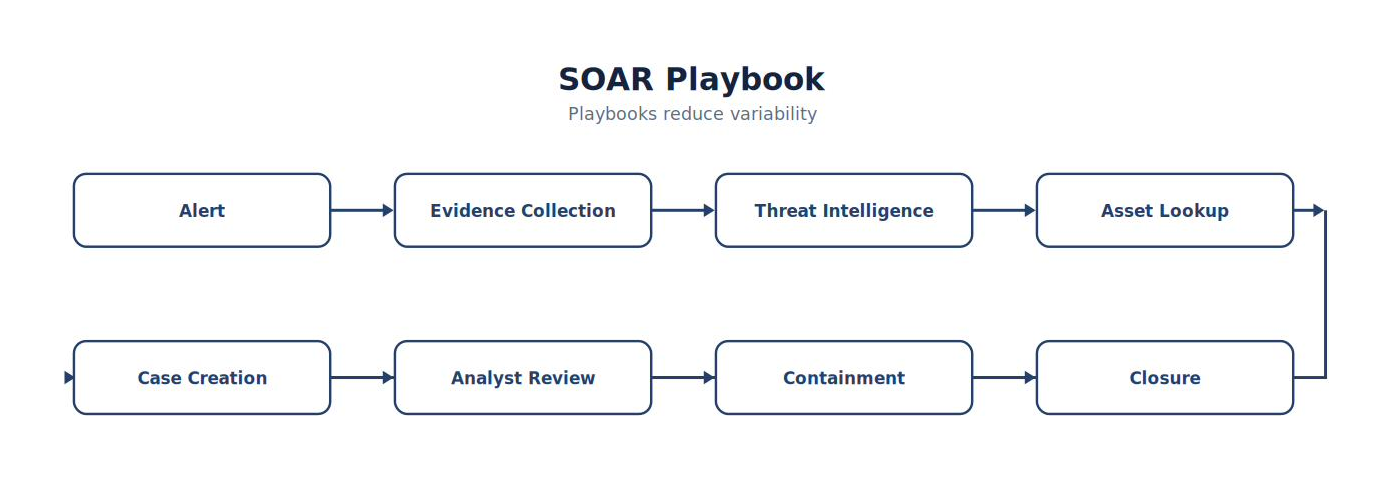
Note. The figure summarizes sOAR Playbook and highlights the relationships among its principal elements, evidence sources, and analytical outcomes.
Case Management
SOAR platforms frequently include case management.
Each case contains:
Timeline
Evidence
Assigned analyst
Status
Related alerts
Comments
Attachments
Metrics
Cases preserve investigative history.
Threat Intelligence Integration
When an IP address appears, SOAR can automatically:
Query reputation
Identify malware families
Search previous incidents
Check internal sightings
Record results
Analysts spend less time performing repetitive lookups.
Asset Context
Alerts become more valuable when enriched.
Example:
Instead of:
Host: WIN11
SOAR provides:
Owner
Department
Criticality
Operating System
Recent vulnerabilities
Previous incidents
Context improves prioritization.
Measuring SOAR Effectiveness
Organizations should evaluate:
| Metric | Purpose |
|---|---|
| Playbook Success Rate | Reliability |
| Average Investigation Time | Efficiency |
| Automation Coverage | Maturity |
| Analyst Time Saved | Productivity |
| Manual Steps Remaining | Improvement Opportunities |
| False Automation Events | Quality |
Metrics justify investment.
Governance
SOAR workflows should be managed like software.
Requirements include:
Version control
Testing
Documentation
Change management
Approval
Rollback procedures
Poorly managed automation creates operational risk.
Common Student Mistake
Students often design playbooks that automate every possible action.
Professional engineers ask:
Is this decision reversible?
Could business operations be affected?
Does policy require human approval?
What happens if the workflow fails?
Automation without governance is risk.
Lab Exercise 8-2 — Designing an Enterprise SOAR Playbook
Objective
Design a complete SOAR workflow for a high-severity malware incident.
Scenario
A Wazuh Level 12 alert indicates:
Encoded PowerShell
Suspicious DNS
HTTP download
Defender malware detection
Student Tasks
Design a playbook that:
Enriches the alert.
Retrieves Sysmon events.
Retrieves Suricata data.
Performs threat intelligence lookups.
Creates an incident.
Notifies responders.
Requests approval for endpoint isolation.
Documents every action.
SOAR Playbook Worksheet
| Workflow Component | Complete |
|---|---|
| Trigger Defined | □ |
| Evidence Collection | □ |
| Threat Intelligence | □ |
| Asset Context | □ |
| Ticket Creation | □ |
| Human Approval | □ |
| Containment | □ |
| Documentation | □ |
| Metrics | □ |
Students should justify each automation decision.
Enterprise SOAR Maturity Model
Organizations typically progress through several stages.
| Level | Characteristics |
|---|---|
| 1 – Manual | Analyst performs all tasks manually |
| 2 – Automated | Individual repetitive tasks are automated |
| 3 – Orchestrated | Multi-system playbooks coordinate investigations |
| 4 – Optimized | Playbooks are measured, versioned, and continuously improved |
| 5 – Adaptive | Automation dynamically adjusts using metrics and analyst feedback while maintaining human oversight |
This model helps organizations assess and improve their operational capabilities.
Think Like a SOC Architect
Imagine two enterprise SOCs.
SOC A
Uses Wazuh, Sysmon, Suricata, Defender, ServiceNow, Active Directory, and threat intelligence independently. Analysts manually move between six browser tabs for every investigation.
SOC B
Uses the same technologies. However, SOAR automatically coordinates evidence collection, enriches alerts, builds timelines, opens tickets, retrieves asset context, performs threat intelligence lookups, and presents analysts with a nearly complete investigation before they begin their review. Both organizations purchased the same security products. Only one integrated them into a cohesive operational system. That integration—not the number of tools—is what defines a mature Security Operations Center.
Key Concepts
By the end of this chapter, you should understand that:
SIEM and SOAR serve complementary roles within enterprise SOCs.
SOAR platforms orchestrate multiple security technologies into standardized investigative workflows.
Well-designed playbooks reduce repetitive work while preserving human oversight for high-impact decisions.
Governance, testing, documentation, and version control are essential for maintaining reliable automation.
Mature SOCs measure the effectiveness of playbooks and continuously refine them based on operational metrics and lessons learned.
Looking Ahead
The next chapter, 8.3 Artificial Intelligence in Security Operations Centers, examines one of the most rapidly evolving areas of cybersecurity. Rather than treating AI as a replacement for analysts, students will learn how modern SOCs responsibly use AI to summarize alerts, assist with detection engineering, accelerate threat hunting, generate investigation reports, and support incident response. The chapter emphasizes both the opportunities and the limitations of AI, highlighting the continuing importance of human validation, evidence-based decision-making, and governance in security operations.
Coverage of AI in security operations tends toward two extremes: overselling it (“AI will replace SOC analysts”) or ignoring it completely. Neither approach prepares students for today’s enterprise SOC. This chapter instead teaches a balanced principle that students will carry throughout their careers:
Artificial Intelligence accelerates analysis. Humans remain accountable for decisions. That philosophy aligns with how mature enterprise SOCs are actually adopting AI (Knerler et al., 2022).
8.3 Artificial Intelligence in Security Operations Centers
Chapter Overview
Artificial Intelligence (AI) has rapidly become part of modern Security Operations Centers.
Analysts now use AI to assist with:
Alert summarization
Threat intelligence research
Detection engineering
Threat hunting
Malware analysis
Report writing
Playbook development
Log interpretation
However, AI is not a replacement for experienced analysts. Instead, AI serves as an assistant that accelerates repetitive cognitive tasks while analysts remain responsible for validating conclusions and making operational decisions.
Learning Objectives
After completing this chapter, you should be able to:
Explain the role of AI in SOC operations.
Differentiate AI assistance from autonomous decision making.
Identify appropriate AI use cases.
Recognize AI limitations.
Validate AI-generated results.
Explain governance requirements.
Integrate AI responsibly into SOC workflows.
Introduction
Imagine a Level 3 SOC analyst begins investigating a new alert.
Without assistance, an analyst might manually review:
5,000 Sysmon events
400 Suricata alerts
12 Wazuh correlation rules
300 Windows Event Logs
Instead, the analyst asks an AI assistant:
“Summarize everything related to this incident.”
Within seconds, the AI provides:
Executive summary
Timeline
MITRE ATT&CK® techniques
Related alerts
Initial hypotheses
Has the investigation finished?
No. It has just begun.
Figure 8-8
AI-Assisted Investigation
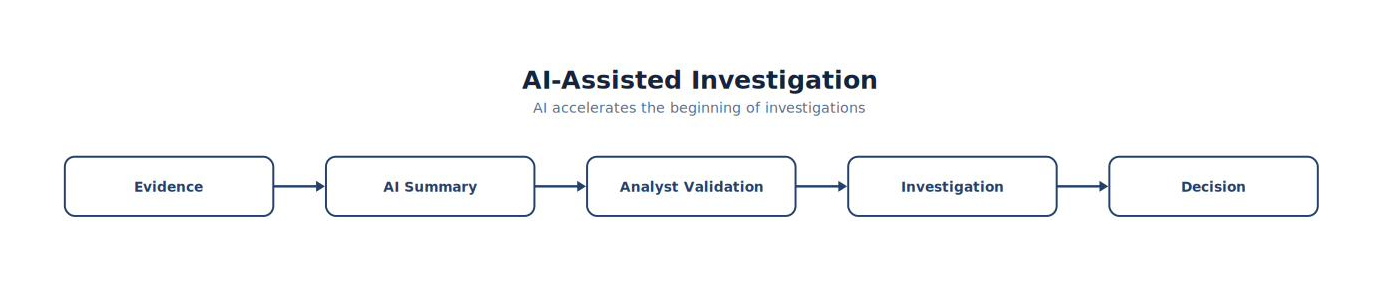
Note. The figure summarizes aI-Assisted Investigation and highlights the relationships among its principal elements, evidence sources, and analytical outcomes.
AI accelerates the beginning of investigations.
What Is Artificial Intelligence?
Within SOC operations, AI refers to systems capable of assisting analysts by:
Identifying patterns
Summarizing information
Answering questions
Generating documentation
Suggesting detections
Explaining technical findings
AI performs information processing. Analysts perform security decisions.
AI Is Not Magic
Artificial Intelligence does not:
Know the environment automatically
Verify evidence independently
Guarantee correctness
Replace incident responders
Replace legal review
Replace executive decision making
AI assists. Humans remain accountable.
Analyst Tradecraft Tip
Students often ask:
“Can ChatGPT replace SOC analysts?”
The better question is:
“Which analyst tasks benefit from AI assistance?”
The answer is usually:
Information-intensive, repetitive, time-consuming tasks. Not judgment.
Good AI Use Cases
Modern SOCs increasingly use AI for:
Alert summarization
IOC explanation
ATT&CK mapping assistance
Detection rule drafting
Sigma rule generation
Wazuh rule development
PowerShell explanation
Log interpretation
Threat hunting hypotheses
Executive summary drafting
Documentation
These activities accelerate analyst productivity.
Poor AI Use Cases
AI should not independently determine:
Incident severity
Legal conclusions
Regulatory reporting
Attribution
Evidence authenticity
Root cause confirmation
Production containment
These decisions require human review.
AI-Assisted Threat Hunting
Suppose analysts ask:
“Show me suspicious PowerShell behavior.”
AI may assist by:
Explaining common attacker techniques
Suggesting ATT&CK mappings
Identifying unusual command lines
Recommending hunting pivots
The analyst still validates every finding.
Figure 8-9
AI Hunting Workflow
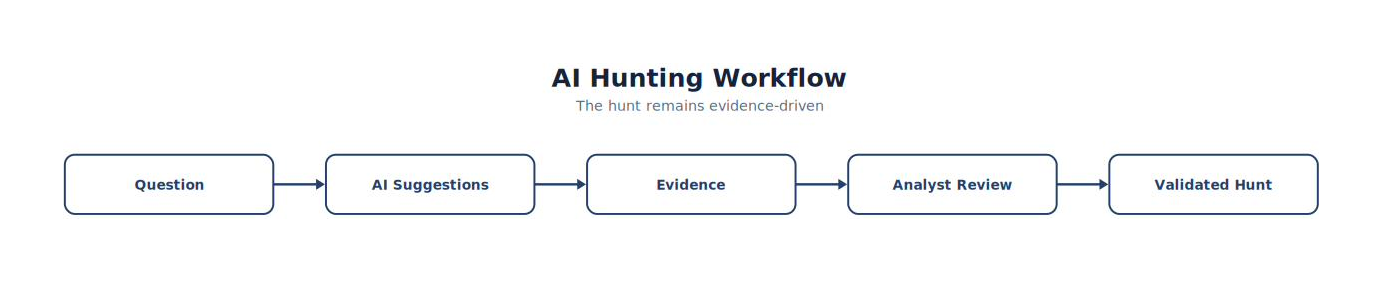
Note. The workflow presents the ordered stages of aI Hunting Workflow and highlights the validation and feedback steps that make the process repeatable.
The hunt remains evidence-driven.
AI-Assisted Detection Engineering
Detection Engineers increasingly use AI to:
Generate:
Sigma rules
YARA rules
Wazuh decoders
Wazuh rules
Suricata signatures
Regular expressions
AI accelerates development. Engineers validate correctness.
AI-Assisted DFIR
During investigations, AI may assist with:
Timeline summaries
IOC extraction
Report drafting
ATT&CK mapping
Evidence organization
Technical explanations
These tasks reduce documentation time.
AI-Assisted Malware Analysis
AI can help explain:
PowerShell commands
Bash scripts
Obfuscated code
Registry modifications
Network indicators
API usage
Analysts should still execute established malware analysis procedures and validate conclusions using appropriate tools and evidence.
AI and Threat Intelligence
Analysts may use AI to:
Summarize reports
Compare malware families
Explain attacker techniques
Identify trends
Generate executive briefings
AI helps transform lengthy reports into actionable information.
AI Hallucinations
Large language models sometimes generate incorrect or unsupported information. This is commonly referred to as a hallucination.
Examples include:
Invented ATT&CK techniques
Incorrect Event IDs
Nonexistent Wazuh rules
Unsupported malware capabilities
Incorrect protocol behavior
Professional analysts verify every AI-generated claim.
Validation must continue after deployment. Models and behavioral baselines can lose reliability as users, systems, applications, and adversary techniques change. Teams should monitor the input data, document material model or prompt changes, retain representative test cases, and compare automated recommendations with independently verified outcomes. When an AI-supported conclusion cannot be explained in terms of observable evidence, its confidence should be reduced and a human analyst should make the operational decision. NIST's AI Risk Management Framework treats validity, reliability, transparency, explainability, privacy, and accountability as related characteristics of trustworthy AI rather than one-time deployment checks (National Institute of Standards and Technology, 2023; Rich, 2026).
Figure 8-10
Human Validation
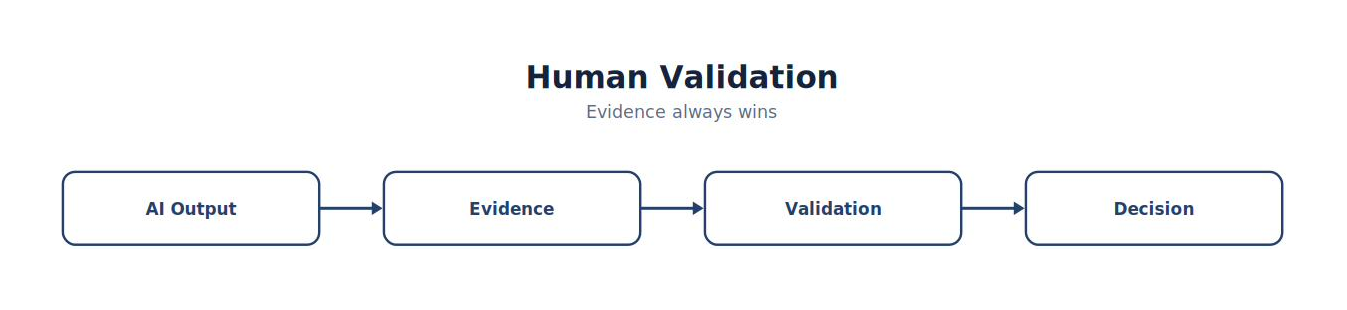
Note. The figure summarizes human Validation and highlights the relationships among its principal elements, evidence sources, and analytical outcomes.
AI Governance
Organizations should establish policies addressing:
Approved AI tools
Acceptable data types
Sensitive information handling
Human review requirements
Logging
Auditing
Model updates
Governance reduces organizational risk.
Privacy Considerations
Before using external AI services, organizations should consider:
Customer information
Confidential business data
Intellectual property
Regulatory obligations
Contractual restrictions
Students should understand that not every incident can be shared with every AI platform.
AI Metrics
Organizations should measure AI effectiveness.
Examples include:
| Metric | Purpose |
|---|---|
| Investigation Time Saved | Productivity |
| Report Draft Time | Documentation |
| Detection Draft Accuracy | Engineering |
| Analyst Acceptance Rate | Quality |
| Validation Corrections | Reliability |
| False Recommendations | Risk |
AI should provide measurable operational value.
AI Maturity
Enterprise adoption generally progresses through stages.
| Stage | Characteristics |
|---|---|
| Assisted | AI summarizes and explains |
| Augmented | AI supports engineering and hunting |
| Integrated | AI embedded within SOC workflows |
| Governed | Policies, auditing, and validation implemented |
| Optimized | Continuous measurement and responsible improvement |
Most organizations remain in the early stages of adoption.
Common Student Mistake
Students often assume:
“If AI generated it, it must be correct.”
Professional analysts ask:
What evidence supports this?
Can I verify it?
Does another source agree?
Would I defend this conclusion in court?
Would I sign my name to this report?
AI accelerates analysis. Evidence validates conclusions.
Chapter Exercise 8.1 — AI-Assisted SOC Investigation
Objective
Use an AI assistant responsibly during a simulated incident investigation.
Scenario
A Wazuh alert indicates:
PowerShell execution
DNS lookup
HTTP download
Defender malware detection
Student Tasks
Use AI to:
Summarize the incident.
Suggest ATT&CK mappings.
Draft an executive summary.
Recommend hunting pivots.
Propose detection improvements.
Then:
Validate every recommendation using:
Sysmon
Wazuh
Suricata
Windows Defender
Students should identify any AI outputs that required correction or refinement.
AI Validation Worksheet
| Task | AI Assisted | Human Validated |
|---|---|---|
| Timeline Summary | □ | □ |
| ATT&CK Mapping | □ | □ |
| IOC Identification | □ | □ |
| Executive Summary | □ | □ |
| Detection Recommendation | □ | □ |
| Final Report | □ | □ |
Validation should be documented for each AI-assisted task.
Responsible AI Checklist
Before incorporating AI-generated content into an investigation, verify:
✓ Every technical statement is supported by evidence. ✓ ATT&CK mappings are accurate. ✓ Event IDs and rule references exist. ✓ Recommendations are feasible within the organization’s environment. ✓ Sensitive information has been handled according to organizational policy. ✓ Final conclusions have been reviewed and approved by a qualified analyst.
Think Like a SOC Leader
Imagine two Security Operations Centers.
SOC A
Prohibits AI entirely. Analysts manually summarize alerts, draft reports, search documentation, explain scripts, map ATT&CK techniques, and create detection rules.
SOC B
Uses AI responsibly. Analysts leverage AI to summarize evidence, explain unfamiliar logs, draft documentation, suggest hunt hypotheses, and accelerate detection engineering. Every AI-generated recommendation is validated against endpoint telemetry, network evidence, and organizational policies before any operational decision is made. Both organizations employ skilled analysts. Only one enables those analysts to spend more time on critical thinking, investigation, and decision-making instead of repetitive documentation and information retrieval. That is the objective of responsible AI adoption in a modern Security Operations Center.
Key Concepts
By the end of this chapter, you should understand that:
Artificial intelligence is a productivity tool that augments, rather than replaces, SOC analysts.
AI is particularly valuable for summarization, documentation, detection engineering assistance, and threat hunting support.
Every AI-generated output must be validated using independent evidence before it influences operational decisions.
Governance, privacy, auditing, and human oversight are essential components of responsible AI adoption.
The most effective SOCs combine automation, orchestration, AI assistance, and experienced human judgment to improve both efficiency and security.
Looking Ahead
The next chapter, 8.4 AI-Assisted Detection Engineering and Threat Hunting, moves from using AI as a general assistant to applying it directly within Detection Engineering and Threat Hunting workflows. Students will learn how AI can accelerate Sigma rule creation, Wazuh rule development, Suricata signature refinement, hypothesis generation, ATT&CK coverage analysis, false-positive reduction, and hunt planning—while also learning where AI recommendations require careful validation. This chapter emphasizes the collaboration between AI and experienced defenders, demonstrating how responsible AI use can improve detection quality without compromising analytical rigor or evidentiary standards.
Learning how to write detection rules is only part of the discipline. The harder skill is learning how to use AI to become a better Detection Engineer while still validating every rule independently. That distinction is critical, and it leads to one important principle:
AI generates ideas. Detection Engineers generate trustworthy detections. AI can accelerate engineering. It cannot replace engineering.
8.4 AI-Assisted Detection Engineering and Threat Hunting
Chapter Overview
Modern Detection Engineers increasingly use AI to accelerate:
Detection development
Rule optimization
Threat hunting
ATT&CK mapping
IOC analysis
Detection coverage analysis
False-positive reduction
Documentation
Rather than replacing engineering expertise, AI acts as an intelligent assistant that helps analysts develop higher-quality detections more efficiently.
Learning Objectives
After completing this chapter, you should be able to:
Explain AI-assisted Detection Engineering.
Use AI to improve threat hunting.
Develop AI-assisted detection rules.
Validate AI-generated detections.
Improve ATT&CK coverage.
Reduce false positives.
Apply AI responsibly within enterprise SOC operations.
Introduction
Imagine an organization needs to develop detections for:
PowerShell
LOLBins
Credential dumping
Scheduled tasks
DNS tunneling
Beaconing
Without AI, an engineer manually researches every ATT&CK technique.
With AI, the engineer requests:
“Suggest Sigma rules covering ATT&CK T1059.001.”
Within seconds, AI generates:
Detection logic
ATT&CK mappings
References
Sigma examples
Investigation guidance
Has the work finished?
No. Engineering has just begun.
Figure 8-11
AI-Assisted Detection Development
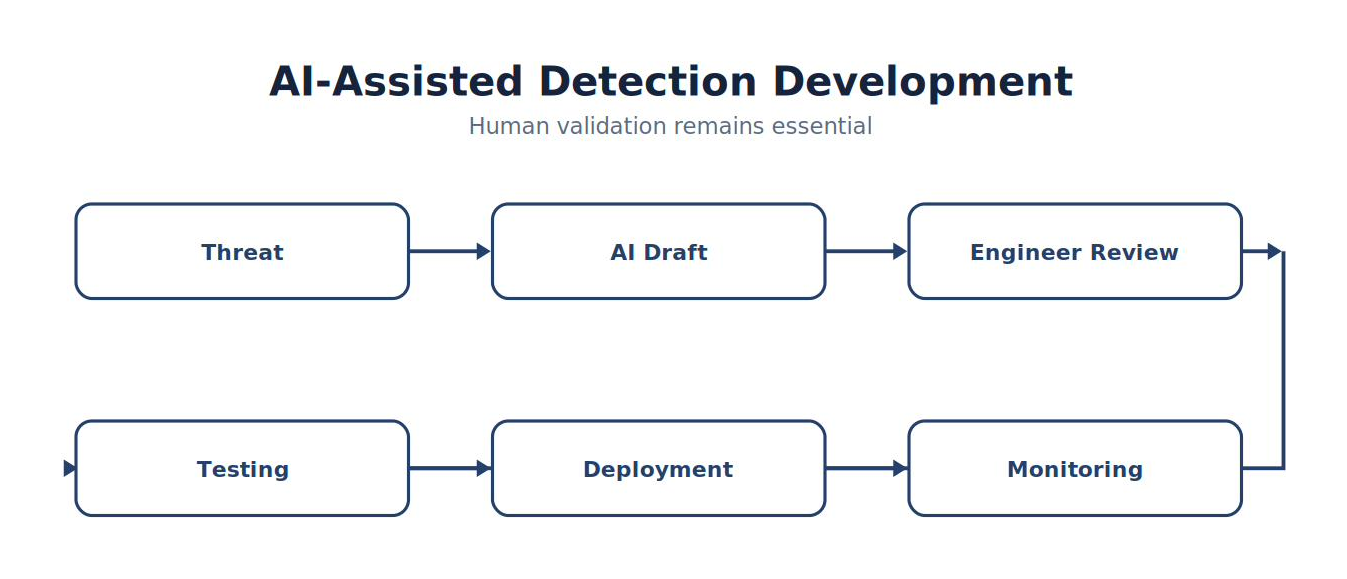
Note. The figure summarizes aI-Assisted Detection Development and highlights the relationships among its principal elements, evidence sources, and analytical outcomes.
Human validation remains essential.
AI-Assisted Detection Engineering
AI may assist engineers by:
Generating:
Sigma rules
Wazuh rules
Suricata signatures
Regular expressions
Decoder templates
ATT&CK mappings
Investigation notes
The engineer determines whether the output is technically correct and appropriate for the environment.
AI-Assisted Threat Hunting
Threat hunters often begin with questions.
Example:
“How might attackers abuse certutil?”
AI can suggest:
ATT&CK mappings
Hunting hypotheses
Expected telemetry
Common command lines
Investigation pivots
The hunter validates every recommendation.
Analyst Tradecraft Tip
Professional hunters never ask AI:
“Tell me what happened.”
Instead they ask:
“Help me think of additional questions.” That is a much more effective use of AI.
AI and Sigma Rules
Suppose an engineer requests:
Generate a Sigma rule for suspicious PowerShell execution.
AI may provide:
Detection logic
ATT&CK technique
Rule metadata
References
Engineers should verify:
Field names
Syntax
ATT&CK mapping
Environment compatibility
Expected false positives
Generated rules require testing before deployment.
AI and Wazuh Rules
AI may assist with:
Rule structure
Decoder logic
Rule grouping
ATT&CK tagging
Rule descriptions
Documentation
The engineer validates:
Rule IDs
Dependencies
XML syntax
Existing rule conflicts
Alert severity
AI and Suricata
Network Detection Engineers may use AI to:
Draft:
Signature ideas
Flow logic
Metadata
Rule comments
Validation includes:
Syntax
Performance
Detection quality
False positives
Figure 8-12
AI Detection Workflow
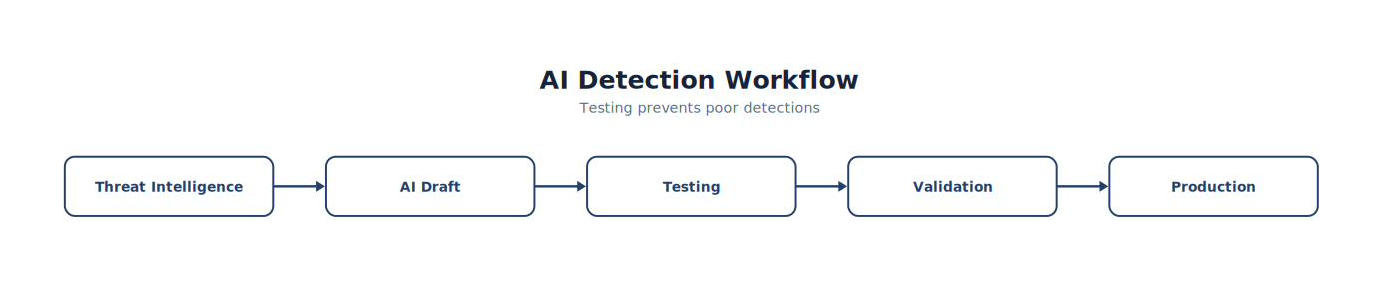
Note. The workflow presents the ordered stages of aI Detection Workflow and highlights the validation and feedback steps that make the process repeatable.
Testing prevents poor detections.
Improving ATT&CK Coverage
AI can analyze:
Figure 8-13
From Existing Detections to Engineering Priorities
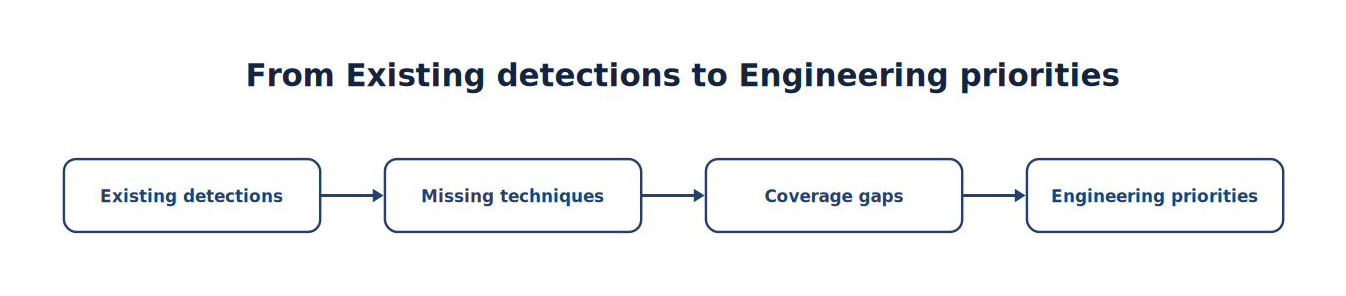
Note. The sequence traces how Existing Detections progresses to Engineering Priorities, emphasizing the intermediate evidence and processing steps.
Engineers decide:
Which gaps matter most.
False Positive Reduction
Suppose a PowerShell rule generates:
3,000 alerts every day.
AI may suggest:
Parent process filtering
User exclusions
Administrative allowlists
Command-line refinement
Engineers validate every recommendation before implementation.
AI-Assisted Hunt Planning
Threat hunters may ask:
“What telemetry supports ATT&CK T1046?”
AI may recommend:
Sysmon Event ID 3
Suricata flow records
Firewall logs
DNS logs
Wazuh searches
The hunter develops the final plan.
AI and Documentation
Detection Engineers spend significant time documenting:
Detection purpose
ATT&CK mapping
False positives
Investigation guidance
Testing procedures
References
AI accelerates documentation. Engineers verify accuracy.
AI-Assisted Coverage Reviews
Enterprise SOCs periodically review:
ATT&CK coverage
Detection overlap
Missing telemetry
Rule duplication
Obsolete detections
AI helps summarize findings and identify patterns that warrant further investigation.
AI Limitations
AI may:
Invent Event IDs
Mislabel ATT&CK techniques
Generate inefficient regex
Produce invalid XML
Recommend nonexistent fields
Everything requires validation.
Human Validation Checklist
Before deployment verify:
✓ Rule compiles. ✓ Syntax is valid. ✓ ATT&CK mapping is correct. ✓ Fields exist. ✓ Test data triggers appropriately. ✓ False positives remain acceptable. ✓ Documentation is complete.
Measuring AI Success
Organizations should measure:
| Metric | Purpose |
|---|---|
| Rules Generated | Productivity |
| Rules Accepted | Quality |
| False Positives | Reliability |
| ATT&CK Coverage | Maturity |
| Engineering Time Saved | Efficiency |
| Analyst Satisfaction | Operational value |
AI should improve engineering—not merely generate more rules.
Common Student Mistake
Students sometimes assume:
“If AI wrote the detection, it must be better than mine.”
Professional Detection Engineers ask:
Does it work?
Can I explain every condition?
Would I deploy it in production?
Can I troubleshoot it later?
Can another engineer maintain it?
Maintainability matters as much as functionality.
Chapter Exercise 8.2 — AI-Assisted Detection Engineering
Objective
Use AI to accelerate the creation of enterprise detection content.
Scenario
Your organization wants improved detection coverage for:
PowerShell abuse
LOLBins
Scheduled Tasks
DNS tunneling
Student Tasks
Use AI to:
Draft a Sigma rule.
Draft a Wazuh rule.
Suggest a Suricata signature.
Recommend ATT&CK mappings.
Identify expected false positives.
Propose investigation guidance.
Then:
Validate every recommendation before approving deployment.
Detection Engineering Worksheet
| Item | AI Draft | Human Validated |
|---|---|---|
| Sigma Rule | □ | □ |
| Wazuh Rule | □ | □ |
| Suricata Signature | □ | □ |
| ATT&CK Mapping | □ | □ |
| Investigation Guide | □ | □ |
| Production Approval | □ | □ |
Students should record any corrections made to AI-generated content and explain why those changes were necessary.
AI Prompt Engineering for Detection Engineers
Experienced engineers learn that the quality of AI output depends heavily on the quality of the prompt.
Weak Prompt
“Write a detection rule.”
Better Prompt
“Generate a Sigma rule that detects suspicious PowerShell execution associated with ATT&CK T1059.001. Include expected false positives, required log sources, investigation guidance, and references. Do not invent field names.” Students should learn to write precise prompts that produce useful engineering artifacts while reducing ambiguity.
Think Like a Detection Engineering Lead
Imagine two Detection Engineering teams.
Team A
Researches every ATT&CK technique manually, drafts every Sigma rule from scratch, writes all documentation manually, and spends days preparing ATT&CK coverage reports.
Team B
Uses AI to draft detection content, summarize threat intelligence, recommend hunt hypotheses, generate initial documentation, identify coverage gaps, and accelerate engineering work. Every output is reviewed, tested, validated, version-controlled, and approved before deployment. Both teams produce reliable detections. Only one delivers them faster, allowing the organization to respond more quickly to evolving threats while maintaining engineering quality. That is the goal of AI-assisted Detection Engineering.
Key Concepts
By the end of this chapter, you should understand that:
AI can significantly accelerate Detection Engineering and Threat Hunting without replacing the expertise of experienced analysts.
AI-generated rules, mappings, and documentation must always be validated before production use.
Prompt quality directly influences the usefulness and accuracy of AI-generated engineering content.
Effective Detection Engineers use AI to reduce repetitive work while maintaining responsibility for testing, validation, and operational decisions.
Responsible AI adoption improves engineering velocity while preserving reliability, maintainability, and evidence-based security practices.
Looking Ahead
The next chapter, 8.5 Enterprise Security Operations: Architecture, Evolution, and the Future, concludes the textbook by examining how modern Security Operations Centers continue to evolve. Students will explore cloud-native security monitoring, Extended Detection and Response (XDR), zero trust architectures, attack surface management, continuous validation, threat intelligence integration, and the future role of AI in cyber defense (Gartner, n.d.-c). The chapter emphasizes that while technologies will continue to change, the foundational skills developed throughout this textbook—critical thinking, evidence-based investigation, structured detection engineering, and disciplined incident response—will remain the core competencies of successful cybersecurity professionals.
This final chapter turns to the future of the Security Operations Center and, more importantly, the future of the cybersecurity professional. The goal is for students to finish this book understanding something larger than Wazuh, Suricata, Sysmon, or AI: although tools evolve continuously, the principles of good security operations remain remarkably stable. That is the closing message of the book:
Technology changes. Professional thinking endures.
8.5 Enterprise Security Operations: Architecture, Evolution, and the Future
Chapter Overview
The Security Operations Center has changed dramatically over the past twenty years.
Traditional SOCs primarily monitored:
Firewalls
Antivirus
Windows Event Logs
Today’s enterprise SOCs monitor:
Cloud environments
Hybrid networks
Identity systems
Containers
Kubernetes
SaaS platforms
Endpoint telemetry
Network metadata
Threat intelligence
AI-assisted investigations
Tomorrow’s SOCs will monitor technologies that have not yet been invented. The tools will change. The investigative mindset will not.
Learning Objectives
After completing this chapter, you should be able to:
Explain the evolution of enterprise SOCs.
Describe modern SOC architectures.
Understand cloud-native security operations.
Explain Zero Trust principles.
Describe XDR.
Explain Continuous Security Validation.
Identify future trends in cyber defense.
Develop a professional growth plan.
Introduction
Suppose you graduate today.
Your first employer uses:
Wazuh
Sysmon
Suricata
Three years later, your next employer uses:
Microsoft Sentinel
Defender XDR
CrowdStrike
Palo Alto Cortex XSIAM
Five years later, another organization adopts entirely different technologies.
Were your previous skills wasted?
Absolutely not. The tools changed. The investigative principles remained the same.
Figure 8-14
Evolution of the SOC
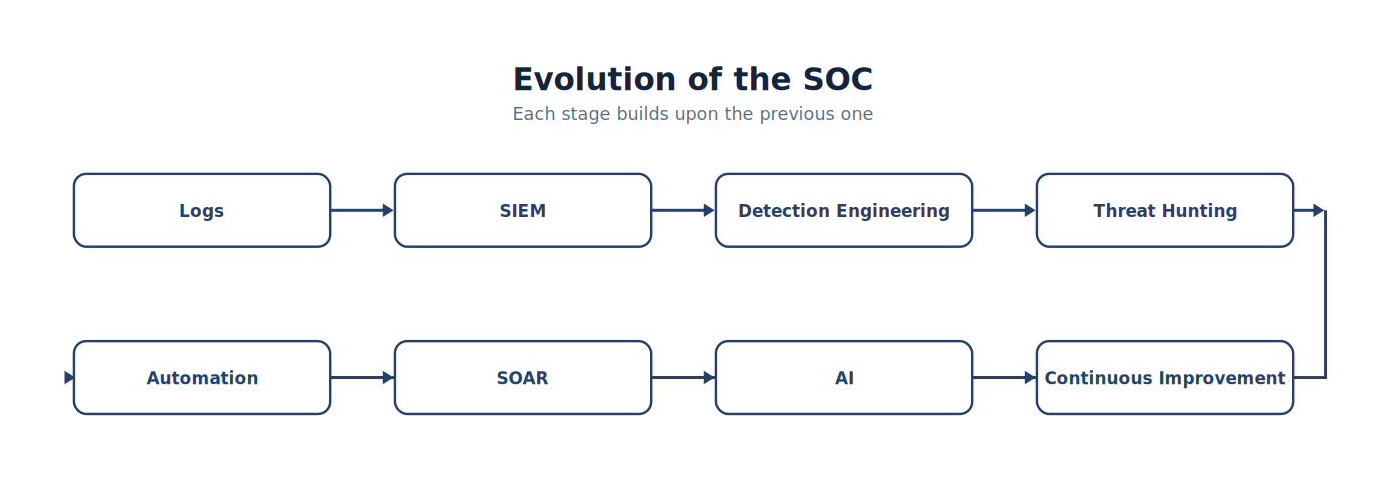
Note. The figure traces the progression represented by evolution of the SOC, showing how capabilities become more integrated, repeatable, and evidence driven.
Each stage builds upon the previous one.
Enterprise SOC Architecture
Modern SOCs integrate many technologies.
Typical architecture includes:
Endpoint Detection
Network Detection
Identity Monitoring
Cloud Security
SIEM
SOAR
Threat Intelligence
Vulnerability Management
Digital Forensics
AI Assistance
Security has become an ecosystem.
Cloud Security Operations
Organizations increasingly operate within:
Public cloud
Private cloud
Hybrid cloud
Multi-cloud
Cloud environments generate new telemetry sources including:
Identity events
Cloud audit logs
API activity
Object storage access
Container events
SOC analysts increasingly investigate cloud-native incidents.
Identity as the New Perimeter
Traditional security emphasized:
Network boundaries.
Modern security increasingly emphasizes:
Identity.
Questions include:
Who authenticated?
From where?
Using which device?
Was MFA used?
Was the behavior expected?
Identity telemetry has become one of the highest-value evidence sources.
Analyst Tradecraft Tip
Students often ask:
“Where is the perimeter?”
In many organizations, the answer is:
The user’s identity. That shift fundamentally changed enterprise security architecture.
Zero Trust
Zero Trust is based upon several guiding principles. Never assume trust based solely on network location.
Instead:
Continuously verify:
Identity
Device
Risk
Context
Authorization
Trust becomes dynamic rather than permanent.
Extended Detection and Response (XDR)
Traditional security products often worked independently.
XDR integrates:
Endpoint telemetry
Network telemetry
Identity events
Email security
Cloud activity
The goal is improved visibility through cross-domain correlation.
Figure 8-15
XDR
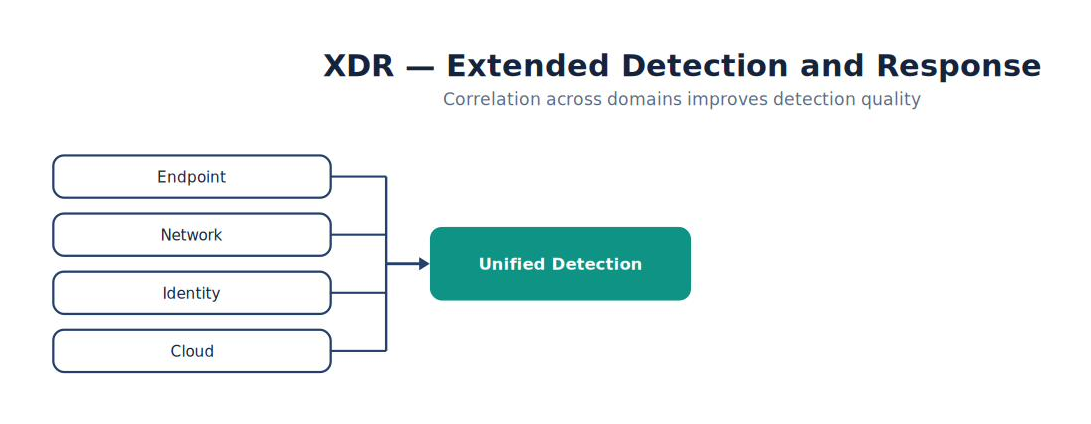
Note. The figure summarizes xDR and highlights the relationships among its principal elements, evidence sources, and analytical outcomes.
Correlation improves detection quality.
Continuous Security Validation
Organizations increasingly validate security continuously.
Examples include:
Atomic Red Team
Caldera
Purple Team Exercises
Automated ATT&CK testing
Detection validation
The objective is ensuring that detections remain effective as environments evolve.
Threat Intelligence Integration
Modern SOCs routinely consume:
Vendor intelligence
Open-source intelligence
Industry sharing communities
Government advisories
Internal intelligence
Threat intelligence guides:
Detection Engineering
Threat Hunting
Incident Response
AI in the Future SOC
AI will likely continue improving:
Alert prioritization
Detection engineering
Threat hunting assistance
Report generation
Automation
Knowledge retrieval
However, AI will not eliminate the need for:
Judgment
Ethics
Evidence validation
Leadership
Communication
These remain fundamentally human responsibilities.
Continuous Learning
Cybersecurity changes constantly.
Professionals should regularly:
Read threat reports.
Practice in laboratories.
Review ATT&CK updates.
Learn new technologies.
Refine scripting skills.
Participate in Capture-the-Flag events.
Contribute to the security community.
Learning becomes a career-long responsibility.
Professional Ethics
Technical ability creates responsibility.
Security professionals should:
Protect privacy.
Respect legal boundaries.
Preserve evidence honestly.
Report findings objectively.
Avoid conflicts of interest.
Use offensive knowledge responsibly.
Trust is one of a security professional’s greatest assets.
Career Development
The skills learned throughout this textbook support many career paths.
Examples include:
| Role | Primary Responsibilities |
|---|---|
| SOC Analyst | Monitor, triage, investigate alerts |
| Detection Engineer | Build and tune detections |
| Threat Hunter | Proactively search for adversaries |
| DFIR Analyst | Investigate and respond to incidents |
| Purple Team Engineer | Validate defensive capabilities |
| Security Engineer | Design and implement security controls |
| Security Architect | Develop enterprise security strategy |
| Cloud Security Engineer | Secure cloud environments |
| Security Consultant | Advise organizations on security improvements |
| Security Manager | Lead security operations and teams |
Most professionals move between several of these roles during their careers.
Building a Professional Portfolio
Students should graduate with evidence of their abilities.
Suggested portfolio items include:
Wazuh detection rules
Sigma rules
Suricata signatures
Threat hunting reports
DFIR investigation reports
ATT&CK coverage assessments
SOC dashboards
Automation workflows
Purple Team exercises
GitHub projects
Technical presentations
Employers frequently value demonstrated skills alongside certifications and degrees.
Enterprise SOC Maturity
Organizations continually mature.
| Level | Characteristics |
|---|---|
| Reactive | Responds after incidents |
| Managed | Standardized monitoring |
| Proactive | Threat hunting and Detection Engineering |
| Integrated | SOAR, AI, and cross-platform visibility |
| Adaptive | Continuous validation, metrics, and ongoing improvement |
Maturity is a journey rather than a destination.
Common Student Mistake
Students often focus on mastering one specific tool.
Professional defenders focus on mastering:
Investigation
Analysis
Evidence
Detection
Communication
Continuous learning
Tools change. Professional thinking transfers.
Capstone Exercise — Designing the Security Operations Center of 2035
Objective
Apply everything learned throughout the textbook to design a future-ready Security Operations Center.
Scenario
A multinational organization is building a new SOC that must support:
Hybrid cloud
Remote workforce
Industrial systems
Artificial Intelligence
Continuous Security Validation
Regulatory compliance
Global operations
Student Tasks
Design:
SOC architecture.
Technology stack.
Detection strategy.
Threat hunting program.
DFIR capability.
Automation strategy.
AI governance model.
Metrics program.
Staffing plan.
Continuous improvement roadmap.
Students should justify every architectural decision.
Final Reflection
Consider the following questions:
Which role introduced in this textbook interests you most, and why?
Which technical skill do you plan to develop next?
How has your understanding of evidence-based investigation changed?
Which concepts from Detection Engineering and Threat Hunting will remain valuable even as technologies evolve?
How will you continue learning after completing this course?
The Cybersecurity Professional
Throughout this textbook, you have learned:
How to monitor. How to detect. How to investigate. How to hunt. How to preserve evidence. How to respond. How to automate. How to use AI responsibly. Those are important technical skills. But the most valuable skill is something broader.
Professional cybersecurity practitioners are trusted to protect organizations, customers, and critical infrastructure. They make decisions using evidence, communicate honestly, document carefully, continue learning, and act ethically even when under pressure. Technology will continue to evolve. Your integrity, curiosity, and disciplined thinking will determine the quality of your career.
Final Key Concepts
By the end of this textbook, you should understand that:
Security operations are built upon evidence, disciplined processes, and continuous improvement rather than any single technology.
Detection Engineering, Threat Hunting, Digital Forensics, Incident Response, Automation, SOAR, and AI are complementary capabilities within a mature enterprise SOC.
Effective cybersecurity professionals combine technical expertise with communication, documentation, ethics, and sound judgment.
Lifelong learning is an essential requirement for success in cybersecurity.
The ability to adapt to new technologies while applying enduring investigative principles is the defining characteristic of a successful security professional.
8.6 Chapter Summary
This final chapter looked at how enterprise SOCs operate at scale, and where the discipline is heading. You learned the distinction between automation (executing a defined task automatically) and orchestration (coordinating an entire multi-step workflow across tools), and why SOAR platforms exist to reduce analyst workload on repetitive, well-understood investigations. You examined how AI is being responsibly integrated into modern SOC workflows — accelerating alert summarization, detection engineering, and threat hunting — while remaining firmly a tool that assists analysts rather than one that replaces their judgment or accountability. Finally, you considered how enterprise SOC architecture continues to evolve, and why the underlying principles taught throughout this textbook — validate telemetry, correlate evidence, form and test hypotheses, document your reasoning — will outlast any single tool or platform.
Chapter 8 Key Terms
| Term | Definition |
|---|---|
| Automation | Executing a single, well-defined task automatically without human intervention. |
| Governance | The policies and oversight structures that determine how and where AI or automation may be used in security operations. |
| Orchestration | Coordinating multiple tools and steps into a single automated workflow, typically spanning an entire investigation or response process. |
| SOAR | Security Orchestration, Automation, and Response — a platform category for building and executing automated security workflows. |
Knowledge Check
Select the best answer for each question.
1. What is the key difference between automation and orchestration?
A. They are the same thing
B. Automation executes a single task; orchestration coordinates multiple tools and steps into a complete workflow
C. Orchestration only applies to AI
D. Automation requires more human oversight than orchestration
2. Which of the following is an appropriate use of AI in a SOC, according to this chapter?
A. Independently determining incident severity
B. Making final legal or regulatory conclusions
C. Confirming evidence authenticity without analyst review
D. Summarizing telemetry to accelerate the start of an investigation
3. Why does this chapter caution against AI making autonomous security decisions?
A. Analysts remain accountable for validating conclusions and making operational decisions
B. AI is never useful in a SOC
C. AI cannot process security telemetry at all
D. Governance policies prohibit any AI use
4. What is the primary purpose of a SOAR platform?
A. To replace the Wazuh Manager
B. To generate Suricata signatures automatically
C. To reduce analyst workload by automating and orchestrating repetitive, well-understood investigative workflows
D. To eliminate the need for detection engineering
5. Why does this textbook emphasize principles (validate telemetry, correlate evidence, document reasoning) over specific tools?
A. Principles are easier to test on exams
B. Tools are unimportant in modern SOC operations
C. Principles replace the need to learn any software
D. Specific tools and platforms change over time, but the underlying investigative methodology remains valuable across a career
Chapter Discussion Questions
Explain the difference between automation and orchestration using an example from this textbook’s lab environment.
Describe a SOC task that is a good candidate for AI assistance, and one that is not — and explain why.
Why does human accountability remain essential even as SOCs adopt more automation and AI?
How might the specific tools used in this textbook (Wazuh, Suricata, Sysmon) change over your career, and what will likely stay the same?
What governance considerations should an organization put in place before allowing AI to assist with security investigations?
Final Thoughts
Cybersecurity is often described as a race between attackers and defenders. In practice, it is something more meaningful. Every correctly configured detection rule, every well-executed threat hunt, every carefully preserved piece of evidence, every thoughtfully designed playbook, and every accurately communicated incident report contributes to protecting people, organizations, and critical infrastructure. The technologies discussed throughout this book will evolve. Some will disappear. Others have not yet been invented. The principles you have practiced—critical thinking, evidence-based reasoning, disciplined engineering, ethical conduct, and continuous improvement—will remain valuable throughout your career. Those principles are the foundation of every successful Security Operations Center and every successful cybersecurity professional. Welcome to the profession.
Further Resources
Wazuh — API Reference (https://documentation.wazuh.com/current/user-manual/api/index.html) — The interface behind every automation described in this chapter.
VirusTotal Documentation (https://docs.virustotal.com/) — Reputation-enrichment service referenced in the enrichment workflow.
MITRE Caldera (https://caldera.mitre.org) — Automated adversary emulation for continuous validation.
NIST AI Risk Management Framework (https://www.nist.gov/itl/ai-risk-management-framework) — Governance guidance for responsible AI use in operations.
National Institute of Standards and Technology. (2023). Artificial intelligence risk management framework (AI RMF 1.0) (NIST AI 100-1). https://doi.org/10.6028/NIST.AI.100-1
Rich, M. S. (2026). Advanced network forensics: A cyber-behavioral science approach. John Wiley & Sons. — Secondary reading on behavioral analytics, explainable AI, and human validation.